Async Await in JavaScript: Sequential, Parallel and Error Examples
Learn what async and await actually do through runnable JavaScript. Trace dependent and parallel tasks, handle rejections, fix async loop mistakes, and test yourself.
KnowledgeGate Team
Exam prep & CS education
Updated 3 Sep 20266 min read
await lets asynchronous code read top to bottom, but does not make timers or requests synchronous or block the runtime. Predicting output order requires tracking where an async function suspends, whether work depends on earlier results, and where a rejection is caught. If functions and promises are unfamiliar, start with the complete JavaScript course.
What async and await mean in JavaScript
async makes every function call return a promise. await pauses the surrounding async function until a value fulfils or rejects, while other runnable JavaScript continues. Async/await is promise syntax, not a threading system or a replacement for promise states.
async function answer() { return 42; }
const pending = answer();
console.log(pending instanceof Promise);
pending.then(value => console.log(value));
Output:
true
42
Returning 42 fulfils the promise with that value. JavaScript controls promises and async functions; browsers or Node.js provide timers, network, and files. See Web Technologies for Teaching Exams: HTML and HTTP for host context, and Coding & Skills for the wider path.
Your first await: trace the output
function delay(ms, value) {
  return new Promise(resolve => setTimeout(() => resolve(value), ms));
}

async function buildResult() {
  console.log("1: request started");
  const score = await delay(80, 42);
  console.log(`3: score ${score}`);
  return `4: final ${score + 8}`;
}

const pendingResult = buildResult();
console.log("2: script continues");
pendingResult.then(console.log);
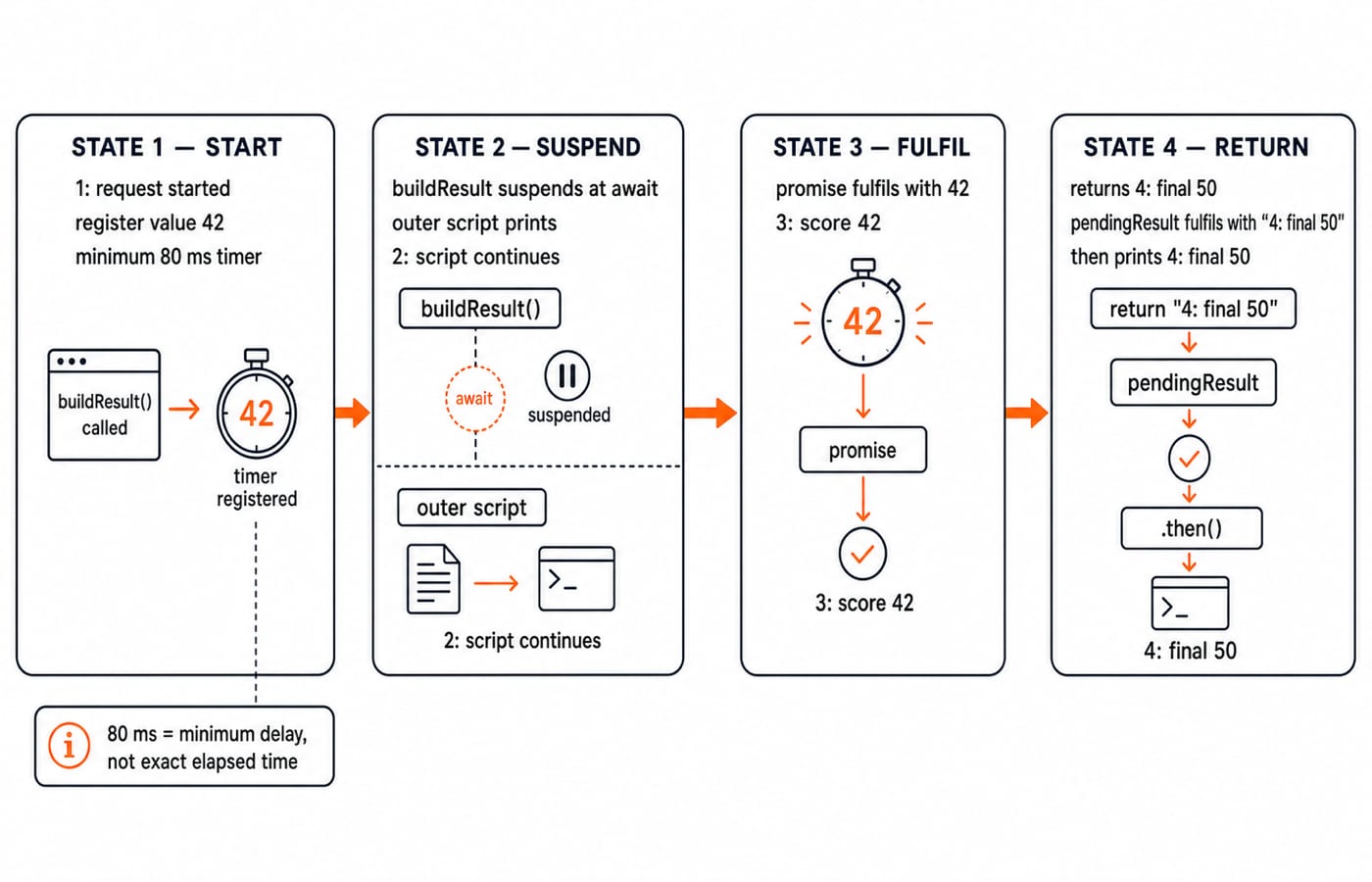
The exact output order is:
1: request started
2: script continues
3: score 42
4: final 50
buildResult() prints line 1 before delay(80, 42) returns a pending promise. await suspends only that function, letting the outer script print line 2. Fulfilment with 42 resumes lines 3 and 4. The 80 ms is a minimum request, not guaranteed elapsed time.
Worked example: build one learner report
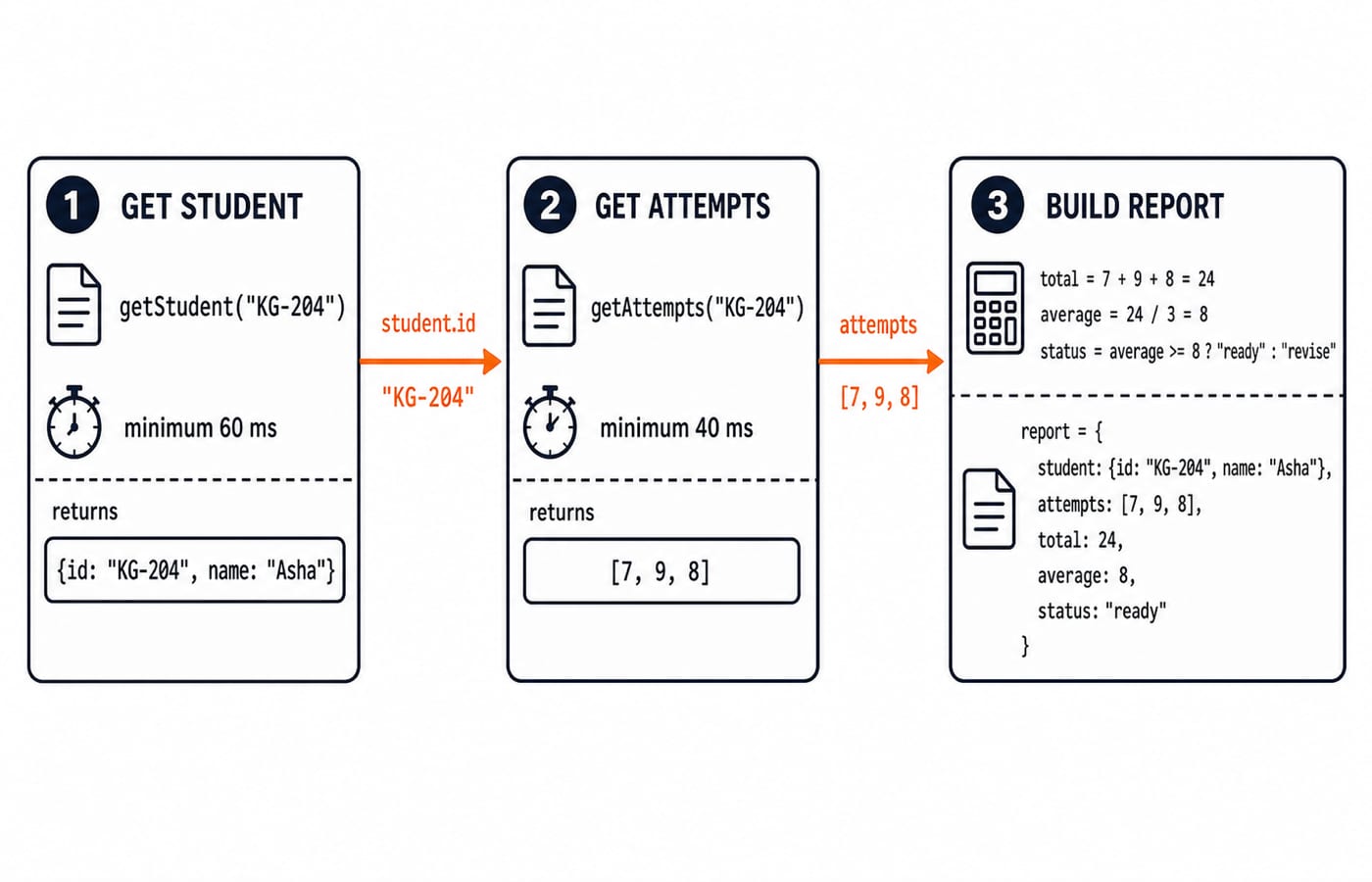
Here the attempt lookup depends on the student returned by the first lookup, so sequence is deliberate.
function delay(ms, value) {
  return new Promise(resolve => setTimeout(() => resolve(value), ms));
}

const students = new Map([["KG-204", { id: "KG-204", name: "Asha" }]]);
const attempts = new Map([["KG-204", [7, 9, 8]]]);

function getStudent(id) {
  return delay(60, students.get(id));
}

function getAttempts(id) {
  return delay(40, attempts.get(id));
}

async function buildReport(id) {
  const student = await getStudent(id);
  const scores = await getAttempts(student.id);
  const total = scores.reduce((sum, score) => sum + score, 0);
  const average = total / scores.length;
  return {
    id: student.id, name: student.name, scores, total, average,
    status: average >= 8 ? "ready" : "revise"
  };
}

buildReport("KG-204").then(report => {
  console.log(`${report.id} | ${report.name} | ${report.scores} | total ${report.total} | average ${report.average} | ${report.status}`);
});
This is simulated data, not a live API. Calculate 7 + 9 + 8 = 24, then 24 / 3 = 8. Since 8 >= 8, the exact output is KG-204 | Asha | 7,9,8 | total 24 | average 8 | ready.
Sequential versus parallel await with Promise.all
These requests are independent. Separate awaits make their minimum waits occur in sequence, 120 + 80 = 200 ms before overhead.
async function slowDashboard() {
  const lessons = await delay(120, { completed: 6, total: 8 });
  const quiz = await delay(80, { correct: 9, total: 12 });
  return { lessons, quiz };
}

async function dashboard() {
  const [lessons, quiz] = await Promise.all([
    delay(120, { completed: 6, total: 8 }),
    delay(80, { correct: 9, total: 12 })
  ]);
  return { lessonProgress: `${lessons.completed}/${lessons.total}`,
    quizScore: `${quiz.correct}/${quiz.total}` };
}

dashboard().then(data =>
  console.log(`Lessons ${data.lessonProgress} | Quiz ${data.quizScore}`)
);
Both timers start before the await. The second may fulfil first, but input order produces Lessons 6/8 | Quiz 9/12. Sequence work when B needs A; use Promise.all when independent tasks must all succeed. One rejection rejects the combination. Partial success needs separate catches or Promise.allSettled. Apply this dashboard pattern in the MERN Stack course.
Handle rejection with try, catch and finally
function getResult(id) {
  return new Promise((resolve, reject) => setTimeout(() => {
    if (id === "KG-204") resolve({ id: "KG-204", score: 8 });
    else reject(new Error(`No result for ${id}`));
  }, 50));
}

async function showResult(id) {
  console.log(`Looking up ${id}`);
  try {
    const result = await getResult(id);
    console.log(`Score: ${result.score}`);
  } catch (error) {
    console.log(`Failed: ${error.message}`);
  } finally {
    console.log("Lookup finished");
  }
}

showResult("KG-999");
The lookup settles after at least 50 ms. Exact output:
Looking up KG-999
Failed: No result for KG-999
Lookup finished
Score: never runs. A throw inside an async function becomes a rejection. Handle it with try/catch around an await or .catch. Do not hide reasons with catch {} or replace every failure with null. finally changes no success value unless it returns or throws.
Async loops: order, parallel work, and forEach
const jobs = [{ id: "A", ms: 70 }, { id: "B", ms: 30 }, { id: "C", ms: 50 }];
async function runJob(job) { return delay(job.ms, job.id); }

const ordered = [];
for (const job of jobs) ordered.push(await runJob(job));
console.log(ordered.join(","));

const completed = await Promise.all(jobs.map(runJob));
console.log(completed.join(","));
The loop starts jobs in sequence and collects A,B,C; minimum waits total 70 + 30 + 50 = 150 ms before overhead. The parallel form also prints A,B,C because input order determines result positions.
This version is a trap:
jobs.forEach(async job => {
  await runJob(job);
  console.log(job.id);
});
console.log("finished");
forEach does not await its async callback, so finished can appear first. Use for...of for sequence or await Promise.all(jobs.map(runJob)) for parallel work. Large workloads may need bounded concurrency.
Common errors, interview traces, and exercises
Missing await:
const report = buildReport("KG-204"); console.log(report.average);printsundefinedbecausereportis a promise. Await it.Misplaced await: outside an async function in a classic non-module script, it is a syntax error. Move it inside an async function. Top-level await is a module-specific exception.
Unnecessary sequence: separate dashboard awaits request at least 200 ms. Start both with
Promise.all.Swallowed rejection:
catch {}discards the reason. Handle, contextualise, or rethrow it.
Assessments commonly ask you to predict logs, distinguish values from promises, repair an await, choose sequential or parallel work, and trace rejection. Practise with Coding Round Strategy for Placements.
Three checks: async function f() { return 5; } makes f() instanceof Promise print true. The trace console.log("A"); async function run() { console.log("B"); await Promise.resolve(); console.log("D"); } run(); console.log("C"); prints A, B, C, D. await Promise.all([delay(40, "x"), delay(10, "y")]) produces ["x", "y"] because results follow input positions.
Exercise 1: Rewrite delay(30, 11).then(score => delay(20, score + 4)).then(final => console.log(`Final: ${final}`)) with two awaits and one try/catch.
async function finalScore() {
  try {
    const score = await delay(30, 11);
    const final = await delay(20, score + 4);
    console.log(`Final: ${final}`);
  } catch (error) {
    console.log(`Failed: ${error.message}`);
  }
}
finalScore(); // Final: 15
Exercise 2: Repair async function read() { return { score: 9 }; } const value = read(); console.log(value.score);.
async function showScore() {
  const value = await read();
  console.log(value.score);
}
showScore(); // 9
Async await in JavaScript: short version and next step
An async function returns a promise. await pauses that function, not the runtime. Keep dependencies sequential; start independent work with Promise.all. Handle rejections intentionally. In the report, [7, 9, 8] totals 24, averages 8, and produces ready.
Retype buildReport. Change the scores to [6, 8, 10]; predict total 24, average 8, and ready. Then use [5, 7, 9]; predict total 21, average 7, and revise. Change dashboard delays from 120/80 to 90/140 and explain why lessons still precede quiz in the result.
Use Complete JavaScript for the language sequence, then MERN Stack for browser and server projects. Retype, predict, run, and explain each trace.
Keep learning
Functions and Arrow Functions in JavaScript: Syntax, Scope and Runnable Examples
Build function declarations, expressions and arrows in JavaScript, then trace parameters, closures, lexical this and array callbacks through exact outputs.
Updated 19 Oct 20266 min readWeb Development

Modules in JavaScript: Import, Export, and Runnable Examples
Build JavaScript modules from scratch with a shopping-cart project that runs in Node.js and the browser. Learn live bindings, re-exports, lazy loading, and practical fixes.
Updated 15 Oct 20265 min readWeb Development

LocalStorage and Cookies in JavaScript: Store, Read and Delete Data
Run one lesson-progress object and one preference cookie through their complete life cycles, then learn which browser store fits a feature and which security traps to avoid.
Updated 11 Oct 20266 min readWeb Development
JavaScript Event Delegation: Bubbling, target and currentTarget with Runnable Examples
Learn how browser events travel through the DOM, then build one delegated listener that handles nested controls and rows added later.
Updated 6 Oct 20265 min readWeb Development