RGB, CMY, HSV and HLS Color Models: Conversions, Geometry and Worked Examples
Follow RGB (64,128,192) through ideal CMY, HSV and HLS, then reverse both cylindrical models. Includes formulas, boundary cases and exam traps.
KnowledgeGate Team
Exam prep & CS education
Updated 3 Sep 20266 min read

RGB, CMY, HSV and HLS can describe a related colour, but their coordinates do not mean the same thing. Memorised formulas usually break at two points: choosing the hue branch that matches the maximum channel, and using the saturation equation that belongs to the model you are in. The exact 8-bit colour RGB = (64,128,192) converts to normalised RGB, ideal CMY, HSV and HLS, and both cylindrical models reverse to the original tuple. Keeping at least four significant digits in each rounded decimal makes every check auditable.
Color models as coordinate systems for the same colour
A color model is a mathematical coordinate scheme. RGB alone is not a fully specified colour space. A real RGB space also identifies primaries, a white point and a transfer function. The conversions below take the given channel numbers and normalise them to [0,1] with no gamma correction applied, which is the usual textbook convention.
Model | Coordinates | Basic interpretation | Typical textbook geometry | Range |
|---|---|---|---|---|
RGB |
| Additive channels | Cube | Each channel |
CMY |
| Ideal subtractive complements | Cube | Each channel |
HSV |
| Hue angle, saturation radius, value height | Cylinder or hexcone |
|
HLS |
| Hue angle, lightness height, saturation scaled around mid-lightness | Double cone or cylinder |
|
Examiners lean on exactly this distinction. The word saturation names one number in HSV and a different number in HLS for the very same pixel: 0.66667 against 0.50394 for the colour worked out below. Computer Graphics belongs to the UGC NET Computer Science subject area, beside transforms and raster algorithms, so separating the two saturations early pays back across the paper.
RGB and CMY: additive channels and ideal subtractive complements
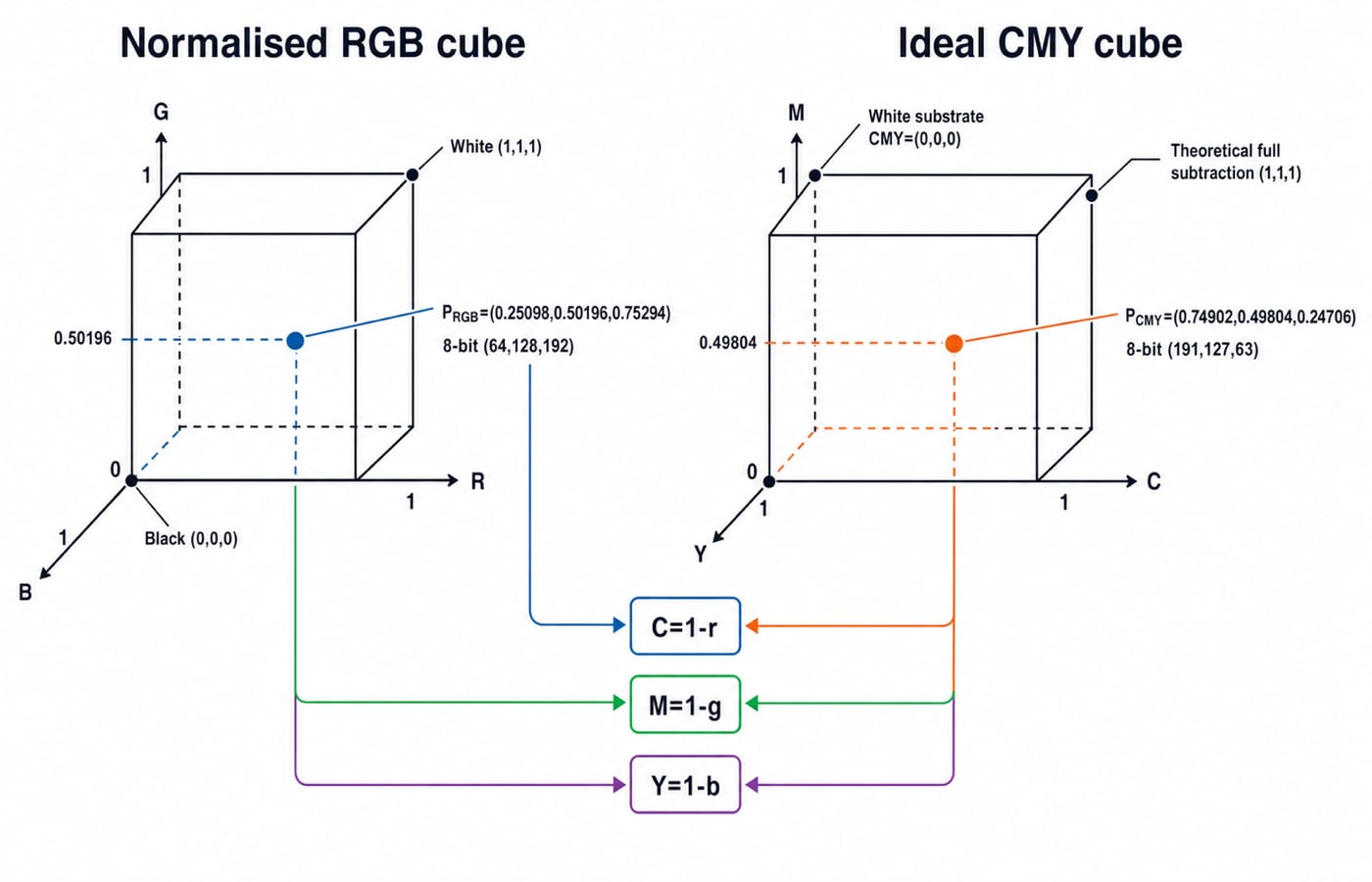
On the normalised RGB cube, black is (0,0,0), white (1,1,1), and the red, green and blue vertices are (1,0,0), (0,1,0) and (0,0,1). An 8-bit channel runs from 0 to 255, so divide by 255, not 256.
For the running colour:
r = 64/255 = 0.25098g = 128/255 = 0.50196b = 192/255 = 0.75294
The ideal complements are C=1-r, M=1-g and Y=1-b. Therefore, normalised CMY=(0.74902,0.49804,0.24706). On a matched 8-bit scale, this is (255-64,255-128,255-192)=(191,127,63). These 8-bit values and base conversion ideas use the same positional-number discipline.
Increasing RGB adds emitted light. Increasing ideal CMY removes reflected components from white light. Real printing commonly adds black ink and uses device profiles, so this complement calculation does not promise that an uncalibrated printer will match a screen.
HSV and HLS: hue, saturation, value and lightness
Let M=max(r,g,b), m=min(r,g,b) and chroma Delta=M-m. Hue locates the dominant sector: red is 0 degrees, yellow 60, green 120, cyan 180, blue 240 and magenta 300. If Delta=0, hue is undefined. Software may store zero by convention, but that does not make grey intrinsically red.
For HSV, V=M. Saturation is S_V=0 when M=0; otherwise, S_V=Delta/M. For HLS, L=(M+m)/2. Its saturation is S_L=0 when Delta=0; otherwise, S_L=Delta/(1-|2L-1|). HLS and HSL name the same coordinates in a different written order. Neither is HSI.
Choose hue only after finding the maximum channel:
Red maximum:
H=60[((g-b)/Delta) mod 6]Green maximum:
H=60[((b-r)/Delta)+2]Blue maximum:
H=60[((r-g)/Delta)+4]
Hue is in degrees. Wrap a negative result into [0,360).
Worked conversion: RGB (64,128,192) to HSV and HLS
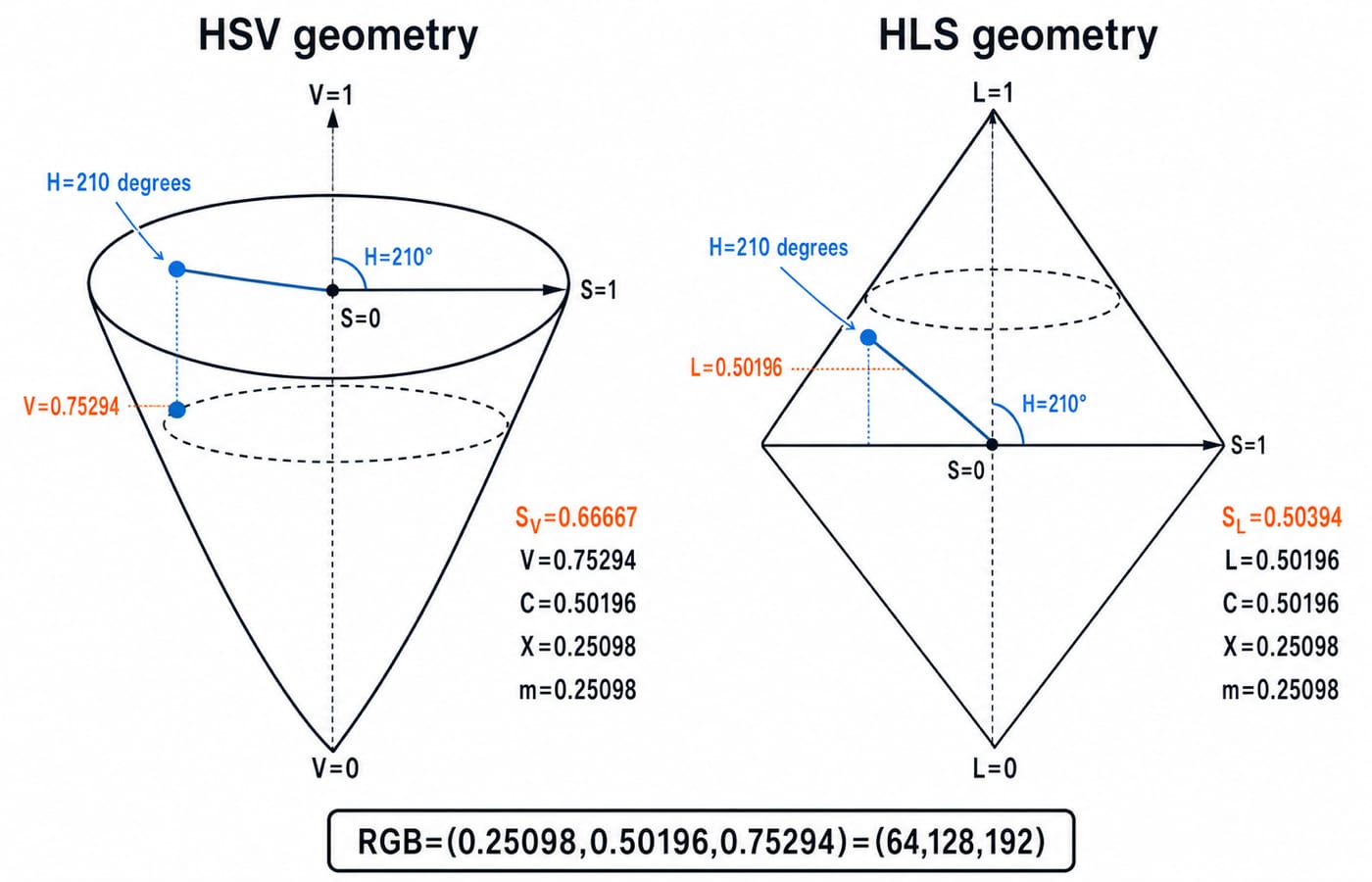
Reuse r=0.25098, g=0.50196 and b=0.75294. Then M=b=192/255=0.75294, m=r=64/255=0.25098 and Delta=128/255=0.50196. Blue is maximum, so only the blue branch applies:
(r-g)/Delta=((64-128)/255)/(128/255)=-64/128=-0.5
Thus H=60(-0.5+4)=60(3.5)=210 degrees. It lies between cyan at 180 degrees and blue at 240 degrees, which fits a blue-dominant colour containing more green than red.
For HSV, V=192/255=0.75294 and S_V=(128/255)/(192/255)=128/192=2/3=0.66667. So HSV=(210 degrees,0.66667,0.75294).
For HLS, L=((192+64)/255)/2=128/255=0.50196. Its separate saturation is S_L=(128/255)/(1-|256/255-1|)=(128/255)/(254/255)=128/254=64/127=0.50394. So HLS=(210 degrees,0.50196,0.50394).
Reverse check: HSV and HLS both return (64,128,192)
From HSV, C=V*S_V=(192/255)(2/3)=128/255. Also, H'=H/60=3.5, so X=C(1-|((H' mod 2)-1)|)=(128/255)(1-0.5)=64/255. The offset is m_0=V-C=64/255. For 180 <= H < 240, the pre-offset channels are (0,X,C). Adding m_0 gives (64/255,128/255,192/255), then multiplying by 255 gives (64,128,192).
Independently from HLS, C=(1-|2L-1|)S_L=(254/255)(64/127)=128/255, X=64/255, and m_0=L-C/2=128/255-64/255=64/255. The same sector tuple (0,X,C)+m_0 again returns (64,128,192)/255.
Checkpoint | Exact or 8-bit result | Rounded normalised result |
|---|---|---|
RGB source |
|
|
CMY |
|
|
HSV |
|
|
HLS |
|
|
HSV back to RGB |
|
|
HLS back to RGB |
|
|
Other inputs can differ by one 8-bit unit after conversion and rounding. This colour cannot: 64, 128 and 192 keep every intermediate value an exact fraction of 255, so any drift here is an arithmetic mistake.
Choosing a model and handling boundary colours
Three boundary checks expose most formula mistakes:
Grey
(128,128,128)hasDelta=0, both saturations0, undefined hue,V=128/255=0.50196andL=0.50196.Red
(255,0,0)hasH=0 degrees, both saturations1,V=1andL=0.5.White
(255,255,255)hasDelta=0, HSV(undefined,0,1)and HLS(undefined,1,0)in(H,L,S)order.
Those three cases all avoid the green branch, so check it once on RGB=(32,200,96). Here M=200/255, m=32/255 and Delta=168/255, giving H=60[(64/168)+2]=142.86 degrees, S_V=168/200=0.84, V=0.78431, L=232/510=0.45490 and S_L=168/232=0.72414. The hue lands between green at 120 degrees and cyan at 180 degrees, which is where a green-dominant colour holding more blue than red belongs.
Model | Useful textbook choice |
|---|---|
RGB | Display-channel data and pixel storage |
Ideal CMY | Reasoning about subtractive complements |
HSV | Holding a brightness-like value while changing hue or saturation |
HLS | Placing a lightness midpoint between black and white |
Neither HSV nor HLS is perceptually uniform. Normalised channels are mathematical fractions, while machine storage may use floating-point representation, which introduces a separate representation issue.
How exams test RGB, CMY, HSV and HLS conversions
Questions can ask you to identify additive and subtractive models, locate black and white, compute CMY, find M, m and Delta, select a hue branch, distinguish the two saturations, handle Delta=0, or reverse a hue sector.
Trap | Fix |
|---|---|
Divide an 8-bit channel by | Divide by |
Calculate hue before finding the maximum | Find |
Forget | Write the selected branch before substituting |
Reuse | Calculate |
Give grey an intrinsic | State that hue is undefined when |
Confuse | Label tuple order every time |
Treat ideal CMY as calibrated CMYK printing | State the ideal complement boundary |
For a 40-second check, take RGB=(0,255,255). Normalised (0,1,1) gives M=1, m=0, Delta=1 and cyan hue 180 degrees. Therefore HSV is (180 degrees,1,1), HLS is (180 degrees,0.5,1), and ideal CMY is (1,0,0). Equal HSV and HLS saturation can occur at this boundary, but it cannot be assumed for the running colour.
Colour-model questions rarely arrive alone. They sit next to 2D transforms, raster scan conversion and clipping in the same Computer Graphics unit, which the NTA-UGC-NET Paper - 2 course teaches as one sequence rather than as isolated formulas.
The short version and next step
Normalise RGB by
255.Calculate
M,mandDelta.Take ideal CMY complements.
Choose the hue branch from the maximum channel.
Compute HSV and HLS saturation with their own denominators.
Reverse-convert to catch arithmetic drift.
The checksum is (64,128,192) -> CMY (191,127,63), HSV (210 degrees,0.66667,0.75294), HLS (210 degrees,0.50196,0.50394) -> RGB (64,128,192).
Now swap red and blue to get RGB=(192,128,64). Predict that hue moves into the orange sector, calculate it, then verify it by reverse conversion. For the full Computer Graphics sequence, continue with the ZERO TO HERO Complete CS Course.
Keep learning

Function Keys F1-F12 Explained: Uses, Worked Shortcut Map and Exam Traps
Learn what F1 through F12 do in named Windows and Microsoft application contexts, then solve a nine-command classification and avoid common modifier traps.
Updated 20 Oct 20266 min readUGC NET Computer Science

E-Waste Management Explained: Lifecycle, Worked Recovery Example and Exam Traps
Learn how e-waste moves from use to reuse, recycling and controlled residue. A hypothetical 600 kg batch shows how to close the mass balance and avoid denominator traps.
Updated 16 Oct 20266 min readUGC NET Computer Science

Data Protection, IPR and Open Source Explained: Two Worked Cases and Exam Traps
Separate privacy from security, match IP rights to software assets, and solve two numerical cases on data minimisation and mixed-licence releases.
Updated 12 Oct 20266 min readUGC NET Computer Science

Common Software & Tools MCQs: 12 Solved ICT Questions Explained
Attempt 12 previous-year ICT MCQs before reading concise explanations that separate applications, hardware, web tools, abbreviations, malware and operating systems.
8 Oct 20267 min readUGC NET Computer Science