Society, Law and Ethics in ICT: Concepts, Worked Example and Exam Traps
Learn a three-lens method for separating social impact, legal requirements and ethical judgment in ICT, then apply it to an exact hypothetical AI-proctoring audit.
KnowledgeGate Team
Exam prep & CS education
Updated 24 Oct 20265 min read
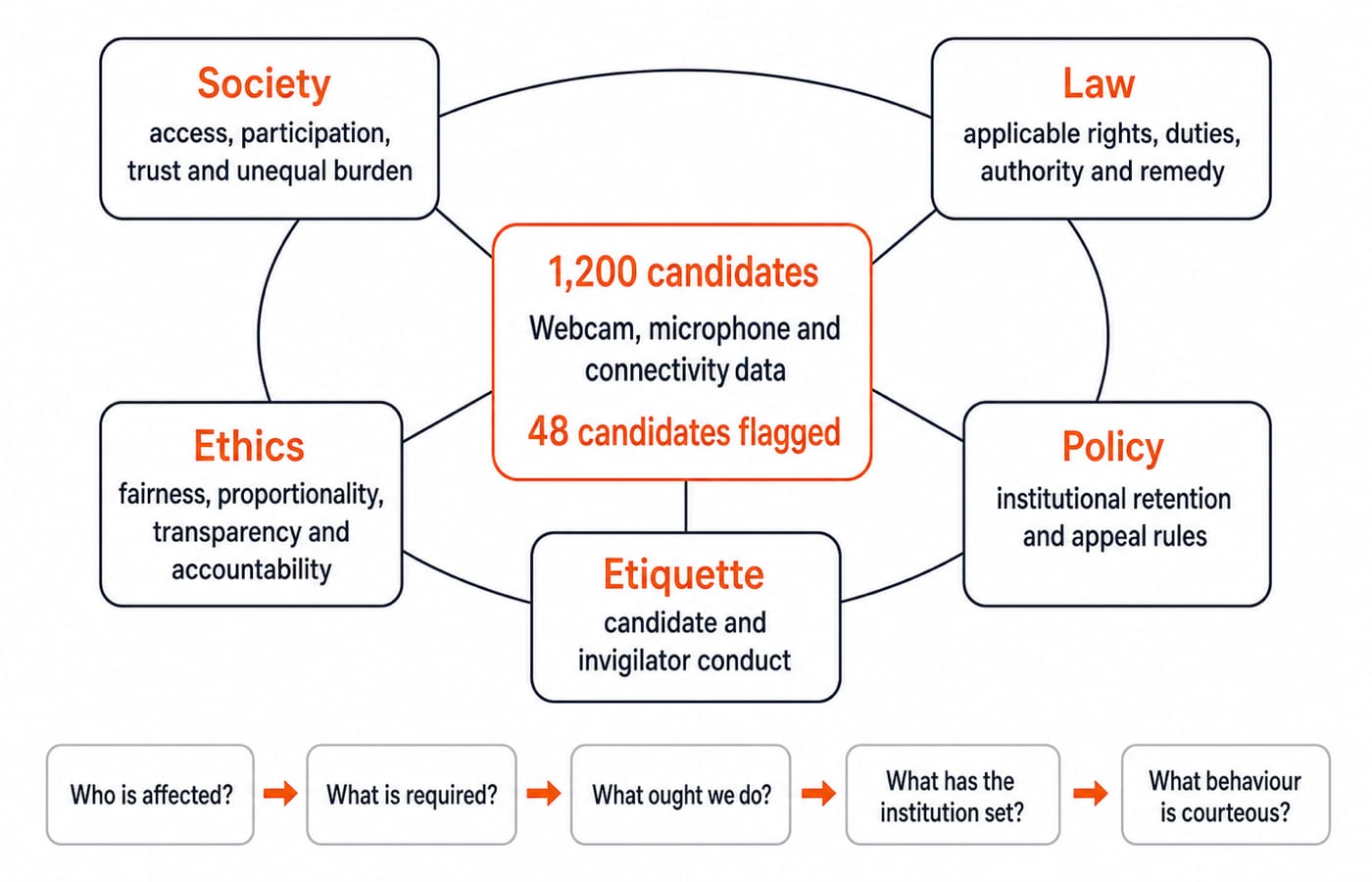
Law, ethics, morality, policy and social norms may align without being synonyms. Use three lenses: social effects, applicable law and ethical justification. A working system can still raise social, legal and ethical questions.
Society, law and ethics ask different questions about the same ICT system
Society covers technology-affected people, groups, institutions, relationships and norms. Ask who gains, who carries the burden, and how participation, power, behaviour or trust changes.
Law covers authority-recognised, enforced rules creating rights, duties, procedures or remedies. Ask what applicable rules permit, require or prohibit. Conclusions need jurisdiction, current text and facts.
Ethics is reasoned judgment about what ought to be done. Even if an action is possible and legal, is it fair, proportionate, transparent and respectful? For context, read ICT for Teaching Exams: Fundamentals Explained.
Separate law, ethics, morality, policy and etiquette
Idea | Source | How enforced | ICT example | Exam trap |
|---|---|---|---|---|
Law | Recognised authority | Formal procedures and remedies | Rules governing data or conduct | Assuming one rule applies everywhere |
Ethics | Defensible principles or professional duties | Reasoned review and accountability | Meaningful appeal before an automated penalty | Treating legal permission as ethical proof |
Morality | Personal or community beliefs | Conscience and social approval | Belief about acceptable online speech | Calling every belief a law |
Policy | Organisation's internal rule | Institutional process | University requires a strong password | Treating policy as a statute |
Etiquette | Convention for respectful behaviour | Social correction | Mute the microphone when not speaking | Confusing courtesy with a legal duty |
Meaningful appeal is an ethical safeguard and may be legally relevant, not a universal rule. Copying data or code raises legal and ethical questions that depend on authority, permission, facts and current law. The circles overlap without becoming identical. Conduct can be legal yet unfair, ethical intent cannot excuse a prohibition, and policy cannot replace law.
Use the society lens: stakeholders, access, power and second-order effects
Stakeholder | Possible benefit | Possible burden | Decision power |
|---|---|---|---|
Candidates | Remote access | Monitoring or false alerts | Explain and appeal |
Candidates with disabilities | Less travel | Inaccessible interface | Request accommodation |
Low-bandwidth users | Remote access | Connection flags | Report problems |
Invigilators | Prioritised review | Automation bias | Clear or confirm |
Teachers | Consistent records | Lost context | Set safeguards |
Institution | Scale | Handling harms | Set rules and remedies |
Software vendor | Product feedback | Defect accountability | Design and update |
Background bystanders | None necessarily | Incidental capture | Little consent power |
The digital divide spans hardware, connectivity, cost, skill, accessible design, language, help and appeal. Equal rules can have unequal effects from unequal starting points. Monitoring changes behaviour, unexplained flags weaken trust, inaccessible processes exclude learners, and automation shifts authority towards vendors. Teaching Aptitude for CS Recruitment Exams connects these choices to learner diversity and teacher responsibility.
Use the law and ethics lenses without collapsing one into the other
Use this jurisdiction-neutral checklist:
Who acts, under what authority?
What data or conduct and current rule are involved?
Is there notice, permission or other lawful authority?
How are purpose, access, retention and sharing controlled?
What review, complaint or remedy exists?
Apply five ethical tests. Autonomy: was there meaningful explanation and choice where possible? Beneficence and non-maleficence: do benefits justify foreseeable harms? Justice: are burdens and errors distributed fairly? Transparency: can an affected person understand the decision? Accountability: can a human review and correct it?
Consent does not cure unnecessary collection or unfair process. Accuracy alone does not establish fairness. Policy may fail an ethical test, while an ethical safeguard does not prove legal compliance.
Worked example: audit an AI-proctoring decision with exact rates
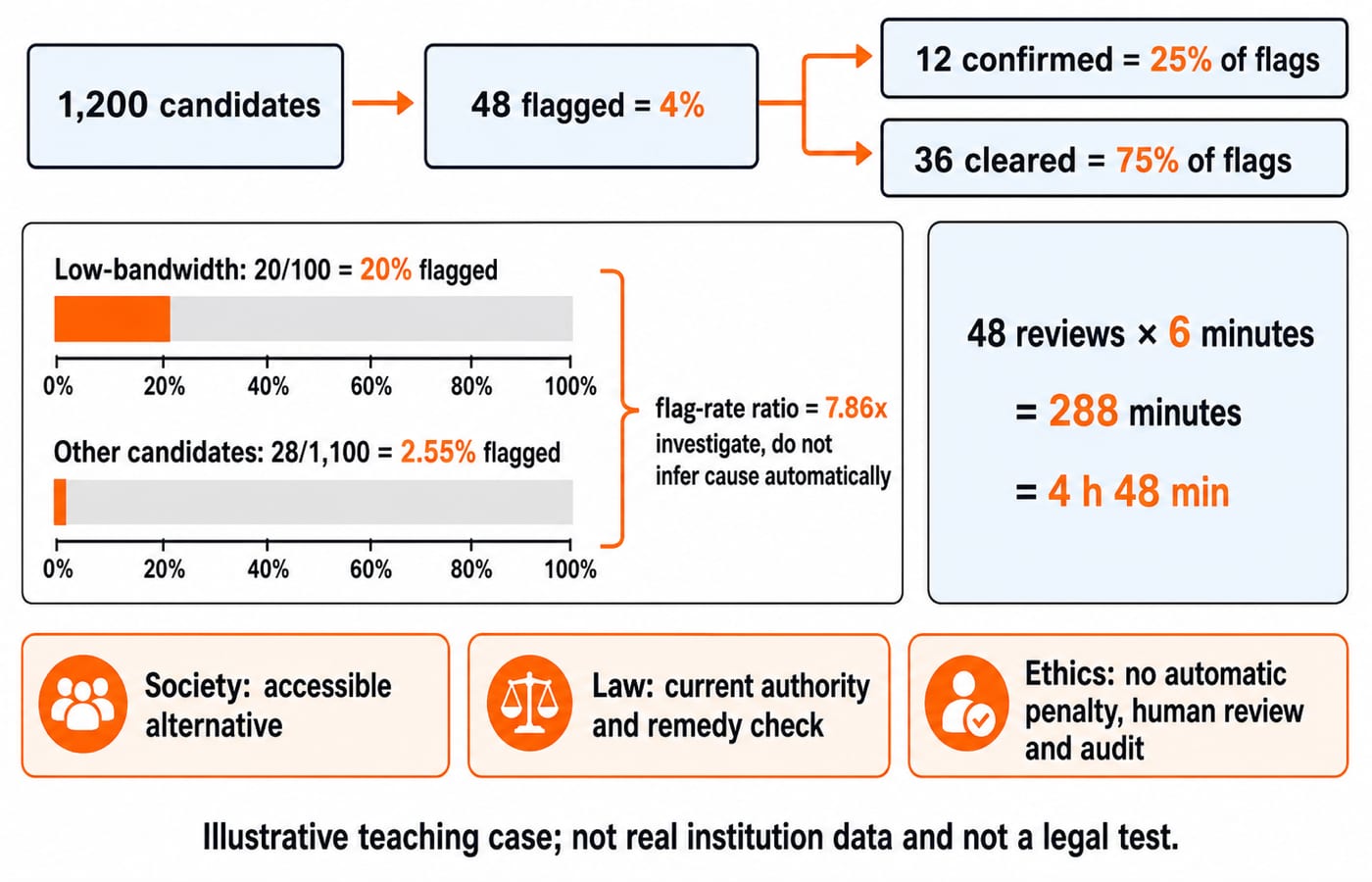
A hypothetical university uses AI proctoring for 1,200 candidates. It flags 48; reviewers confirm 12 violations and clear 36. Among 100 low-bandwidth candidates, 20 are flagged; among the other 1,100, 28 are flagged. Each review takes 6 minutes.
Overall flag rate =
48 / 1,200 x 100 = 4%.Confirmed precision =
12 / 48 x 100 = 25%.Cleared share among flags =
36 / 48 x 100 = 75%.
The third result is the false-alert share among flagged cases, not the statistical false-positive rate. That rate needs a missing denominator: all actual non-violations.
Low-bandwidth flag rate =
20 / 100 x 100 = 20%.Other-candidate flag rate =
28 / 1,100 x 100 = 2.545...%, rounded to 2.55%.Flag-rate ratio =
20 / 2.545... = 7.857..., rounded to 7.86 times.
The disparity warrants investigation of connectivity effects. It does not prove intent, illegality or causation.
Review workload = 48 x 6 = 288 minutes = 4 hours 48 minutes. Automatic penalties save time but risk penalising 36 cleared cases. Human review prevents that here.
Society: offer an accessible low-bandwidth route and examine unequal burdens. Law: have a qualified reviewer check current authority, notice, use, retention, vendor sharing and appeals. Ethics: ban automatic punishment, explain decisions, minimise collection, audit subgroups and document retention.
Apply one repeatable decision method to any ICT case
Make each step produce an answer:
State the system and purpose: AI proctoring supports exam integrity.
List stakeholders: include the 100 low-bandwidth candidates.
Map data and decisions: record what is captured, flagged and reviewed.
Quantify benefits and harms: note the 20% versus 2.55% warning.
Check applicable current law: identify authority, duties and remedies.
Apply ethical principles: test autonomy, harm, justice, transparency and accountability.
Choose safeguards: require human review and an accessible alternative.
Re-measure outcomes: compare group flag rates after the change.
Run legal and ethical checks before deployment, then repeat when evidence appears. Initial approval is not permanent justification.
How objective exams turn these distinctions into questions
Typical forms include a definition item separating law, ethics and policy; a match item linking digital divide with unequal participation, transparency with understandable decisions, accountability with an answerable human, and etiquette with courteous convention; or a statement pair where “legal compliance and ethical justification are identical” is false.
A sequence item can order purpose, stakeholders, harms, law, ethics, safeguards and re-measurement. A caselet can test 4%, 25%, 75% or 7.86 times. Reject 36/48 as a false-positive rate because its denominator is missing.
Other traps call every norm law, treat consent as proof of fairness, infer causation from disparity, confuse equal treatment with equitable access, or let aggregate accuracy hide subgroup unfairness.
Short version, traps and the next practice step
Society asks who is affected.
Law asks what the applicable authority requires.
Ethics asks what ought to be done.
Policy states the institution's rule.
Etiquette guides courteous conduct.
Legality is a minimum compliance question, not an ethical verdict. Recalculate 4%, 25%, 75%, 2.55%, 7.86 times and 4 hours 48 minutes without looking. Classify each safeguard under society, law or ethics, allowing overlap.
Use the NTA UGC NET Paper 1 Course for teaching and the UGC NET Paper 1 Test Series for timed practice. Then test the method on fresh ICT case questions by classifying each fact before calculating anything.
Keep learning
Function Keys F1-F12 Explained: Uses, Worked Shortcut Map and Exam Traps
Learn what F1 through F12 do in named Windows and Microsoft application contexts, then solve a nine-command classification and avoid common modifier traps.
Updated 20 Oct 20266 min readUGC NET Computer Science
E-Waste Management Explained: Lifecycle, Worked Recovery Example and Exam Traps
Learn how e-waste moves from use to reuse, recycling and controlled residue. A hypothetical 600 kg batch shows how to close the mass balance and avoid denominator traps.
Updated 16 Oct 20266 min readUGC NET Computer Science
Data Protection, IPR and Open Source Explained: Two Worked Cases and Exam Traps
Separate privacy from security, match IP rights to software assets, and solve two numerical cases on data minimisation and mixed-licence releases.
Updated 12 Oct 20266 min readUGC NET Computer Science
Common Software & Tools MCQs: 12 Solved ICT Questions Explained
Attempt 12 previous-year ICT MCQs before reading concise explanations that separate applications, hardware, web tools, abbreviations, malware and operating systems.
8 Oct 20267 min readUGC NET Computer Science