Regular Expressions in JavaScript: Match, Extract, Replace, and Validate
Learn JavaScript regex by tracing what each token consumes. Build a validator and a named-group log parser, then practise extraction, replacement, flags, and common traps.
KnowledgeGate Team
Exam prep & CS education
Updated 23 Oct 20265 min read
You can use includes() when one literal string is enough. The problem starts when valid input can take several forms. A JavaScript regular expression is a compact pattern plus flags, and the useful skill is tracing exactly what each token can consume. Regular expressions in JavaScript can match, extract, replace, validate, parse named groups, and expose the stateful g-flag trap.
Start with a pattern, flags, and the right JavaScript method
In /cat/gi, cat is the pattern, g asks for all matches, and i ignores letter case.
Array.from("Cat, catalog, concatenate".matchAll(/cat/gi), m => ({
  text: m[0],
  index: m.index
}));
// [{text:"Cat", index:0}, {text:"cat", index:5}, {text:"cat", index:17}]
Choose the API by the output you need:
API | Purpose |
|---|---|
| Answer yes or no |
| Return matches |
| Preserve all matches, groups, and indices; requires |
| Transform text |
| Return one detailed match at a time |
Build a pattern dynamically only when part of it comes from data:
const word = "cat";
const dynamic = new RegExp(word, "gi");
Escape regex metacharacters before inserting arbitrary or untrusted text. JavaScript's practical RegExp API is also different from the formal-language reasoning used in Regular Expressions and the Pumping Lemma.
Read regex syntax as a left-to-right contract
Read a pattern as instructions: literals such as KG-; classes such as [A-Z]; shorthands \d, \w, and \s; quantifiers ?, +, *, and {m,n}; anchors ^ and $; alternation A|B; groups (...); and escaped literals such as \.. Remember that \w includes digits and underscore, so it does not mean letters only.
Consider this whole-string validator:
const idPattern = /^KG-[A-Z]{2}\d{4}$/;
idPattern.test("KG-JS2026"); // true
idPattern.test("kg-JS26");   // false
Trace the first input from left to right. ^ fixes the start, KG- consumes the first three characters, [A-Z]{2} consumes JS, \d{4} consumes 2026, and $ confirms the end. The second input fails both the uppercase literal and the four-digit requirement.
Both anchors matter during validation:
/KG-[A-Z]{2}\d{4}/.test("xKG-JS2026y");   // true
/^KG-[A-Z]{2}\d{4}$/.test("xKG-JS2026y"); // false![Token-by-token trace of /^KG-[A-Z]{2}\d{4}$/ over KG-JS2026, with KG-JS2026 true and kg-JS26 false.](https://cdn.knowledgegate.ai/blog-assets/blog_asset_1784601760329_ro3z30.jpg)
Capture values with groups, alternatives, and named groups
Grouping and capturing are separate choices. (?:DEV|QA) groups alternatives without creating a captured field. Named groups make important output fields clear:
const ticket = /^(?<team>DEV|QA)-(?<id>\d{3})-(?<priority>P[1-3])$/;
ticket.exec("DEV-204-P2").groups;
// {team:"DEV", id:"204", priority:"P2"}
Captured values are strings. Converting id to the number 204 is an application step. "OPS-204-P2" fails the team alternative, "QA-31-P1" fails the three-digit rule, and "QA-031-P4" fails the priority rule. The regex checks format, not whether a team or ticket exists in a database.
Fully worked example: parse three log lines without guessing
Use one anchored parser for the complete line:
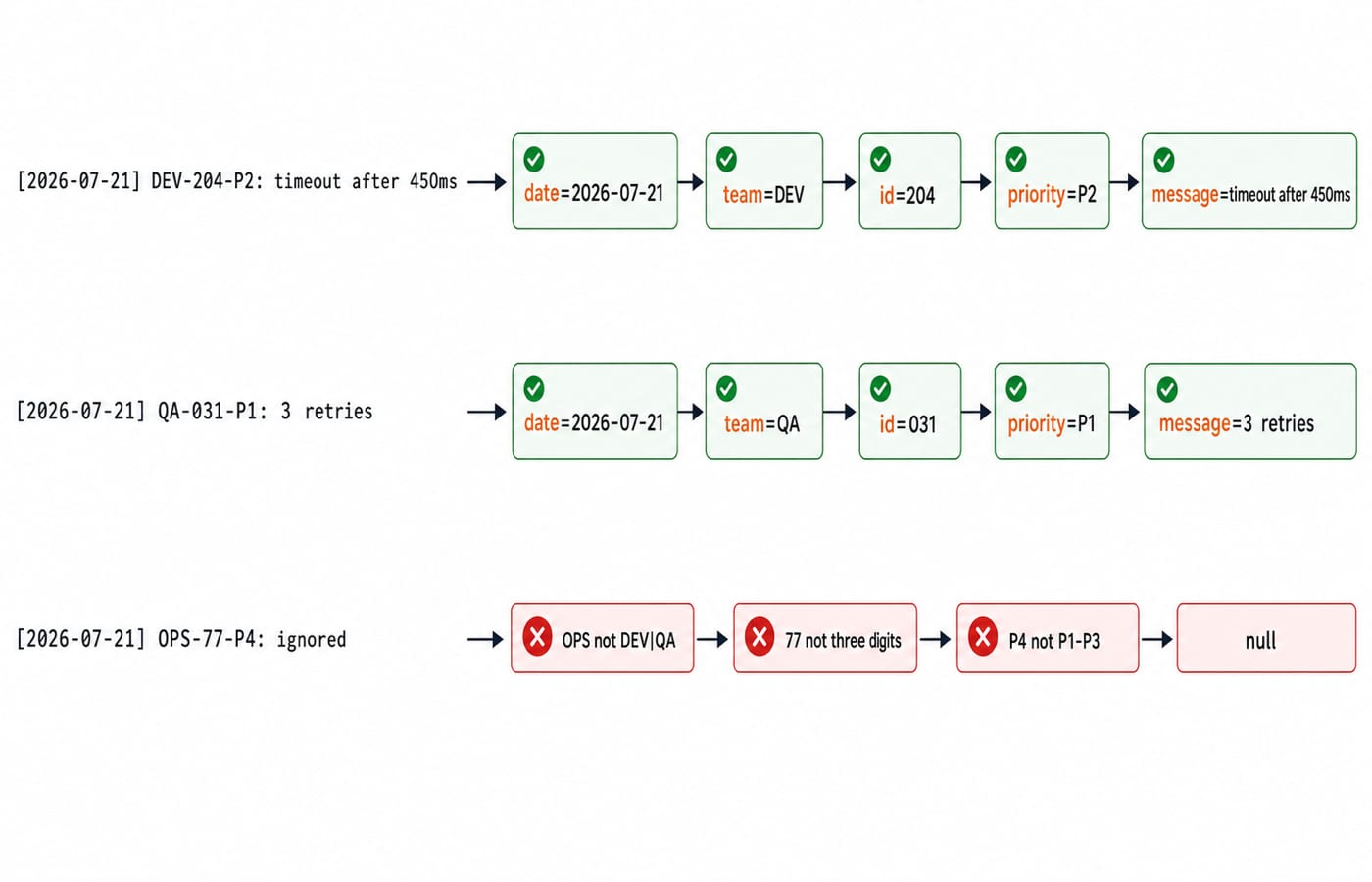
const pattern = /^\[(?<date>\d{4}-\d{2}-\d{2})\] (?<team>DEV|QA)-(?<id>\d{3})-(?<priority>P[1-3]): (?<message>.+)$/;
const lines = [
  "[2026-07-21] DEV-204-P2: timeout after 450ms",
  "[2026-07-21] QA-031-P1: 3 retries",
  "[2026-07-21] OPS-77-P4: ignored"
];
lines.map(line => line.match(pattern)?.groups ?? null);
For line 1, \[ and \] consume literal brackets. The groups take date="2026-07-21", team="DEV", id="204", and priority="P2". The literal colon and space follow, message takes "timeout after 450ms", and $ confirms that nothing remains. The object is exactly:
{date:"2026-07-21", team:"DEV", id:"204", priority:"P2", message:"timeout after 450ms"}Line 2 produces {date:"2026-07-21", team:"QA", id:"031", priority:"P1", message:"3 retries"}. Line 3 produces null: OPS is not allowed, 77 is not three digits, and P4 is outside P1 to P3. The date pattern checks shape only. Calendar-aware code must still reject an impossible date.
Extract, replace, and split real strings
Extract every complete ticket reference with a global pattern. The word boundaries stop a match from beginning or ending inside a longer word-like token.
"DEV-204-P2 fixed; QA-031-P1 pending; DEV-118-P3 reviewed"
  .match(/\b(?:DEV|QA)-\d{3}-P[1-3]\b/g);
// ["DEV-204-P2", "QA-031-P1", "DEV-118-P3"]
Named replacement fields can rearrange a known format:
"2026-07-21".replace(
  /^(?<year>\d{4})-(?<month>\d{2})-(?<day>\d{2})$/,
  "$<day>/$<month>/$<year>"
); // "21/07/2026"
This still does not validate the calendar. Patterns can also describe delimiters: "JS, regex; matchAll replace".split(/[,;\s]+/) returns ["JS", "regex", "matchAll", "replace"].
Understand flags, greediness, and the stateful lastIndex trap
Use i for case-insensitive matching, g for repeated matches, m to make ^ and $ line-oriented, s so dot matches line terminators, and u for Unicode-aware pattern semantics.
A global regex stores progress in lastIndex:
const digits = /\d+/g;
digits.test("2 items"); // true
digits.lastIndex;       // 1
digits.test("2 items"); // false
digits.lastIndex;       // 0
The second call starts at index 1, finds no later digits, and resets the index. For repeated yes-or-no validation, use a non-global regex, reset lastIndex deliberately, or choose a suitable string method.
Greediness changes how far a quantified token goes:
const text = "<b>JS</b><i>Regex</i>";
text.match(/<.+>/)[0];  // "<b>JS</b><i>Regex</i>"
text.match(/<.+?>/g);   // ["<b>", "</b>", "<i>", "</i>"]
+? is lazy, but even the lazy form is not a safe parser for nested or malformed HTML.
Avoid common regex mistakes and solve questions by tracing
Dynamic patterns have two escape layers. Write new RegExp("\\d{4}"), not new RegExp("\d{4}"), because the JavaScript string consumes one layer. Escape a literal dot as \., anchor a whole-field validator, and leave semantic checks outside regex.
const accountId = /^(?=.{6,12}$)(?=.*[A-Z])(?=.*\d)[A-Za-z\d]+$/;
accountId.test("Regex7");  // true
accountId.test("regex7");  // false: no uppercase letter
accountId.test("Regex_7"); // false: underscore is excluded
A regex can confirm the shape of DEV-204-P2. Request validation should still return a useful field error, while persistence rules decide whether ticket 204 exists. Mongoose Schemas and Models: Validation and Population covers that next layer. For nested HTML, use the DOM or an HTML parser, not tag-matching tricks.
In an objective question or technical screen, you may need to predict a match, identify captured groups, write a whole-string validator, explain greedy versus lazy matching, select test, matchAll, or replace, or diagnose lastIndex. Use one routine: mark anchors, expand each quantified token, trace the actual characters, then inspect the flags and method semantics.
Regular expressions in JavaScript: the short version and next step
Define the input contract.
Anchor the pattern when validating the whole string.
Group alternatives deliberately.
Capture only values the program needs.
Choose the method by the desired output.
Test valid, invalid, and boundary inputs.
Keep semantic and structured-data validation outside regex.
Now extend the log parser with an optional -R2 suffix. Keep [2026-07-21] DEV-204-P2: timeout after 450ms valid, also accept [2026-07-21] DEV-204-P2-R2: timeout after 450ms, and keep OPS-77-P4 invalid. Print the named groups and explain each failure before checking a solution.
For a focused next step in language fundamentals, use the Complete JavaScript Course. To apply JavaScript across a wider web stack, continue with the MERN Stack Course: Full Stack Development. The Coding & Skill Development Courses page is the neutral catalogue route for exploring related subjects.
Keep learning
Functions and Arrow Functions in JavaScript: Syntax, Scope and Runnable Examples
Build function declarations, expressions and arrows in JavaScript, then trace parameters, closures, lexical this and array callbacks through exact outputs.
Updated 19 Oct 20266 min readWeb Development
Modules in JavaScript: Import, Export, and Runnable Examples
Build JavaScript modules from scratch with a shopping-cart project that runs in Node.js and the browser. Learn live bindings, re-exports, lazy loading, and practical fixes.
Updated 15 Oct 20265 min readWeb Development

LocalStorage and Cookies in JavaScript: Store, Read and Delete Data
Run one lesson-progress object and one preference cookie through their complete life cycles, then learn which browser store fits a feature and which security traps to avoid.
Updated 11 Oct 20266 min readWeb Development
JavaScript Event Delegation: Bubbling, target and currentTarget with Runnable Examples
Learn how browser events travel through the DOM, then build one delegated listener that handles nested controls and rows added later.
Updated 6 Oct 20265 min readWeb Development