JavaScript Strings Tutorial: Methods, Template Literals, and Runnable Examples
Learn strings from their delimiters and zero-based indexes through searching, cleaning, and coercion. Each example is runnable, including a complete input-to-key transformation.
KnowledgeGate Team
Exam prep & CS education
Updated 2 Sep 20265 min read
You can declare variables, but JavaScript strings may still surprise you. Quote styles look interchangeable, indexes invite off-by-one mistakes, methods seem to ignore your changes, and adding a number may produce text. Reliable string code depends on matching delimiters, tracking zero-based indexes, storing method results, and recognising when an operator coerces a value to text.
JavaScript strings: create values with single, double, and backtick quotes
A string is a primitive value that represents a sequence of text characters. JavaScript accepts single quotes, double quotes, and backticks:
const platform = 'KnowledgeGate';
const language = "JavaScript";
const lesson = `Strings`;

console.log(typeof language); // "string"
console.log(platform.length); // 13
All three variables hold string primitives. The opening and closing delimiter must match, but you can choose a delimiter that makes embedded punctuation easier to read.
const notice = "Asha's lesson";
const quote = 'She said "start".';
const escaped = 'Asha\'s lesson';
Both notice and escaped contain Asha's lesson. The backslash escapes an apostrophe that would otherwise close the single-quoted string.
Prefer the primitive "KG" to new String("KG"). The constructor creates an object, which affects comparisons and is rarely what a beginner wants.
JavaScript string length, indexing, slicing, and immutability
Use one string to see how positions work:
const code = "KG-JS-2026";

console.log(code.length);      // 10
console.log(code[0]);          // "K"
console.log(code.at(-1));      // "6"
console.log(code.slice(3, 5)); // "JS"
console.log(code.slice(-4));   // "2026"
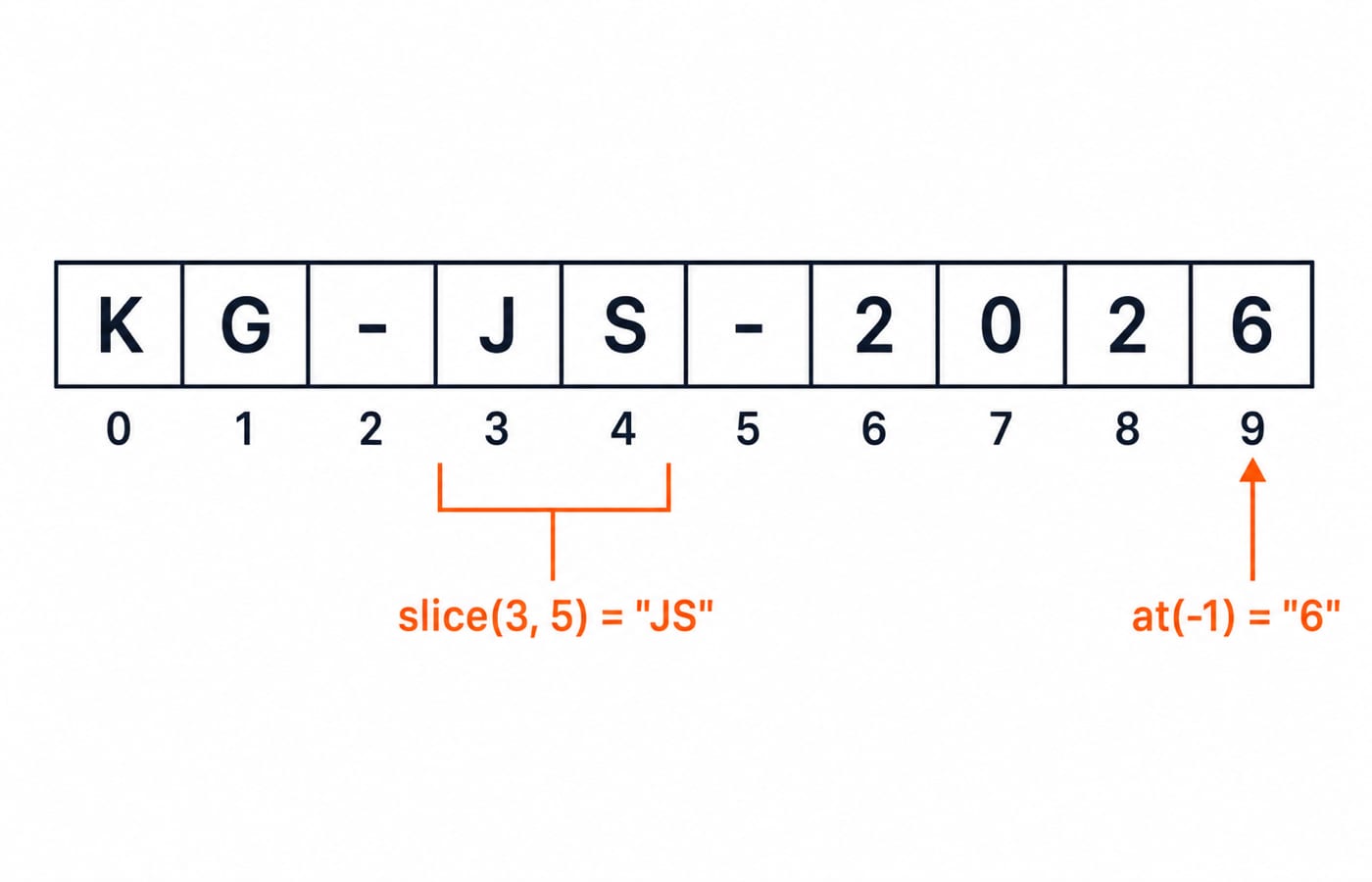
Indexes start at 0, so the ten characters occupy positions 0 through 9. A negative index passed to at() counts from the end. In slice(start, end), the start is included and the end is excluded, so slice(3, 5) takes indexes 3 and 4 only.
Strings are immutable. A method can calculate a changed value, but it cannot edit the original string in place.
const topic = "strings";
const upper = topic.toUpperCase();

console.log(upper); // "STRINGS"
console.log(topic); // "strings"
Store the returned value when you need the transformation.
JavaScript concatenation and template literals with computed values
The + operator joins values when either operand is a string. "Java" + "Script" produces "JavaScript". With names, include the separator explicitly: first + " " + last prevents the words from running together.
Template literals make computed values easier to read:
const learner = "Asha";
const solved = 7;
const total = 10;
const percentage = solved / total * 100;
const summary = `${learner} solved ${solved} of ${total} tasks (${percentage}%).`;

console.log(summary);
// "Asha solved 7 of 10 tasks (70%)."
The calculation is 7 / 10 = 0.7, then 0.7 * 100 = 70. Backticks also preserve intentional line breaks:
const report = `Learner: Asha
Progress: 7/10`;
The rendered lines are Learner: Asha and Progress: 7/10. Backticks earn their place when you interpolate expressions or need multiline text.
JavaScript string methods for searching, cleaning, and transforming text
Start by removing whitespace from both ends:
const raw = "  JavaScript strings are useful  ";
const clean = raw.trim();

console.log(clean);        // "JavaScript strings are useful"
console.log(clean.length); // 29
The raw value still contains its surrounding spaces because trim() returned a new string. Common methods then answer different questions about clean:
Expression | Exact result |
|---|---|
|
|
|
|
|
|
|
|
|
|
Splitting converts a string into an array. clean.split(" ") yields ["JavaScript", "strings", "are", "useful"]. In clean.split(" ").join("-"), JavaScript first creates that four-item array, then join("-") connects the items as "JavaScript-strings-are-useful".
JavaScript strings worked example: normalise a learner and topic key
Suppose an input must become a stable key without changing the submitted text:
const rawEntry = "  Asha Jain | JavaScript Strings  ";
const cleaned = rawEntry.trim();
const divider = cleaned.indexOf("|");

const learnerKey = cleaned
  .slice(0, divider)
  .trim()
  .toLowerCase()
  .replaceAll(" ", "-");

const topicKey = cleaned
  .slice(divider + 1)
  .trim()
  .toLowerCase()
  .replaceAll(" ", "-");

const key = `${learnerKey}/${topicKey}`;
console.log(key); // "asha-jain/javascript-strings"
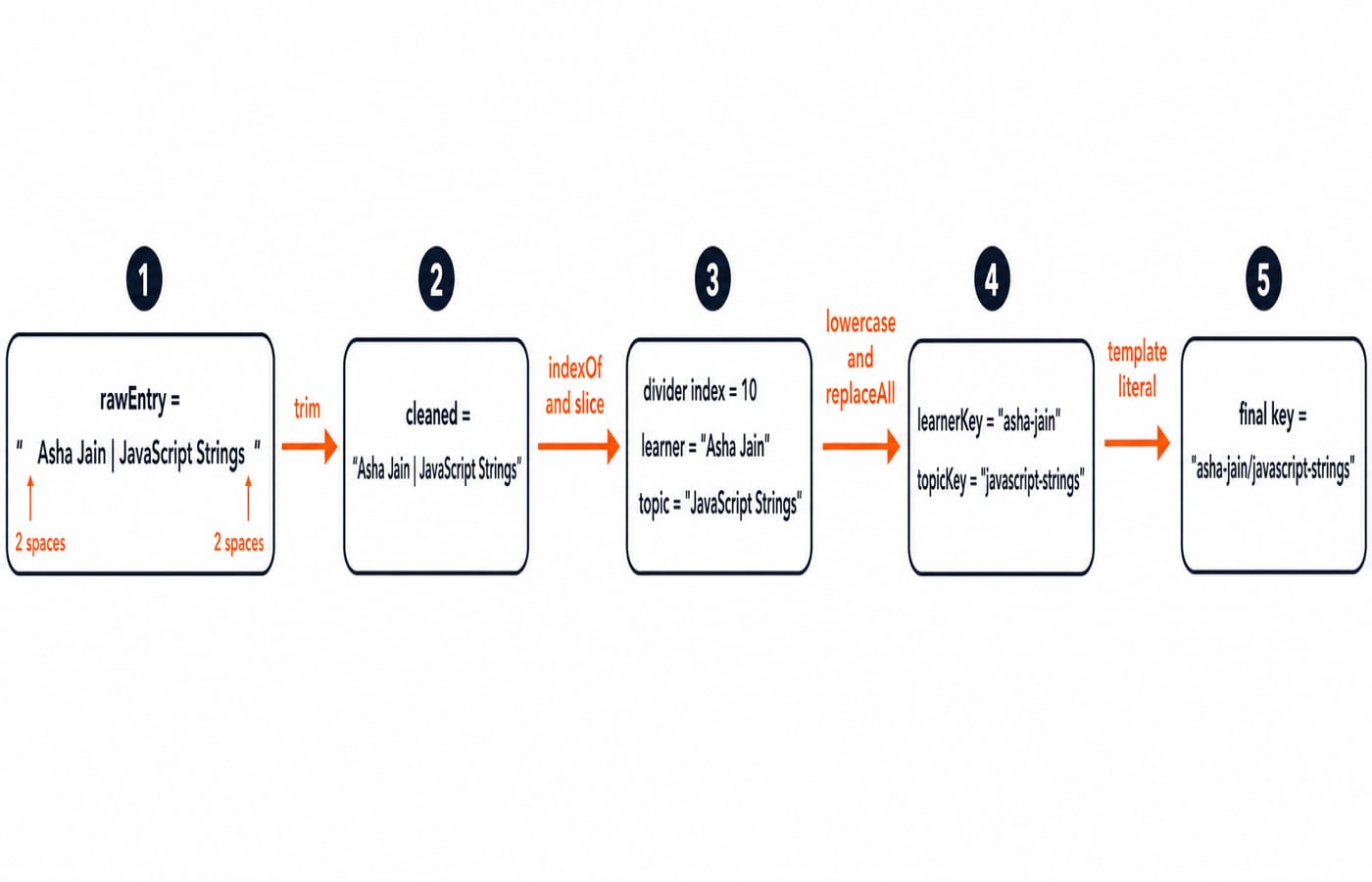
Work through each value. trim() gives "Asha Jain | JavaScript Strings". Counting from zero, Asha occupies indexes 0 to 3, the first space is 4, Jain is 5 to 8, the next space is 9, and | is index 10. Therefore, divider is 10.
The left slice becomes "Asha Jain ", then trimming, lowercasing, and replacing spaces gives "asha-jain". Starting at divider + 1, which is index 11, produces " JavaScript Strings"; the same steps give "javascript-strings". The template literal joins them into "asha-jain/javascript-strings", while rawEntry remains unchanged.
JavaScript string errors: diagnose the output before fixing the code
Mismatched delimiters stop parsing:
const topic = "JavaScript strings'; // SyntaxErrorFix it as const topic = "JavaScript strings";. By contrast, "Asha's lesson" is valid because the apostrophe does not close a double-quoted string.
Other mistakes run without an obvious failure:
new String("KG") === "KG"isfalsebecause an object is not strictly equal to a primitive.After
let label = " KG "; label.trim();,labelis still" KG ". Assign the returned string withlabel = label.trim()."ha ha".replace("ha", "hi")gives"hi ha", whilereplaceAll("ha", "hi")gives"hi hi".
Coercion creates another trap. "5" + 2 is "52" because one operand is a string, while Number("5") + 2 is 7. For slicing, "JavaScript".slice(4, 10) is "Script": index 4 is included, index 10 is excluded, and the second argument is not a character count.
JavaScript strings exercises and common assessment patterns
Run these only after predicting each result:
Evaluate
"JavaScript".slice(4, 10).Compute
" KG AI ".trim().length.Change both occurrences of
bluein"red-blue-blue"togreen.
The answers are "Script", 5, and "red-green-green". The third expression is "red-blue-blue".replaceAll("blue", "green").
For a short build exercise, convert "JavaScript String Practice" to "javascript-string-practice":
const input = "JavaScript String Practice";
const output = input.toLowerCase().replaceAll(" ", "-");
Explain why input stays unchanged. String assessments commonly test output tracing, off-by-one slicing, primitive-versus-object comparison, coercion, and a small normalisation function. For placement preparation beyond language-level output tracing, TCS NQT Exam Structure, Explained Section by Section maps the assessment sections you need to prepare.
JavaScript strings: the short version and next steps
Keep six rules ready:
Match the opening and closing quote.
Start indexes at zero.
Treat every string as immutable.
Use template literals for interpolation and intentional line breaks.
Remember that
slice()excludes its end index.Inspect and store the value returned by each method.
The Complete JavaScript Course is the structured next step if you want the full JavaScript sequence. If you are comparing open learning paths first, use Free Courses & Guidance by Prashant Sir and choose the route that matches your present goal.
Keep learning
Static and Final in Java: Shared State, Constants and Override Rules with Runnable Examples
Learn what static and final control in Java by tracing a shared counter, class initialisation, final references, constants and inheritance errors.
Updated 24 Oct 20266 min readJava
Polymorphism in Java: Overloading, Overriding and Runnable Examples
Learn how Java chooses overloaded methods at compile time and overridden methods at runtime. Trace two complete programs, common traps and practice targets.
Updated 22 Oct 20266 min readJava

Packages and Access Modifiers in Java: Visibility Rules with Runnable Examples
Learn how Java package boundaries change member visibility. Compile a complete example covering public, protected, package-private and private access.
Updated 18 Oct 20265 min readJava

OOP Basics in Java: Classes, Objects and the Four Pillars with Runnable Examples
Connect Java's OOP syntax to design decisions with a complete Account example. Trace two objects through validation, overriding and runtime dispatch to exact output.
Updated 14 Oct 20265 min readJava