SQL Aggregate Functions: COUNT, SUM, AVG, MIN and MAX with Examples
Use one runnable sales table to see exactly how SQL aggregates treat rows, NULL values, duplicates and groups. Every result includes the arithmetic behind it.
KnowledgeGate Team
Exam prep & CS education
Updated 13 Oct 20265 min read
COUNT(*), COUNT(column), SUM, AVG, MIN and MAX look simple until NULL, duplicate values, GROUP BY and HAVING change the answer. The hard part is identifying the exact input set for each function. Use the runnable sales table to check every output instead of memorising rules. The SQL is broadly portable, although data types and number display can vary slightly between database engines.
What SQL aggregate functions calculate
An aggregate function consumes a set of rows and returns one summary value for that set. A normal row-level expression produces a result for each row. Without GROUP BY, the complete result left after filtering is one set. With GROUP BY, each group becomes a separate set and receives its own aggregate result.
The five core functions answer different questions:
COUNTasks how many rows or values exist.SUMasks for the total.AVGcalculates the arithmetic mean.MINfinds the smallest value.MAXfinds the largest value.
Except for COUNT(*), these aggregates ignore NULL inputs. SQL Queries and Joins in DBMS combines GROUP BY with multi-table joins. A single sales table instead isolates which rows each aggregate consumes.
Create one runnable sales table
Run this complete setup first. The two 900.00 amounts are intentionally duplicated, and order 107 intentionally has no amount.
CREATE TABLE sales (
    order_id INT PRIMARY KEY,
    region VARCHAR(10),
    salesperson VARCHAR(20),
    amount DECIMAL(10, 2),
    discount DECIMAL(10, 2)
);

INSERT INTO sales (order_id, region, salesperson, amount, discount) VALUES
    (101, 'North', 'Asha',  1200.00, 100.00),
    (102, 'North', 'Asha',   800.00, NULL),
    (103, 'North', 'Ravi',  1500.00, 150.00),
    (104, 'South', 'Meera',  700.00,  50.00),
    (105, 'South', 'Meera',  900.00, NULL),
    (106, 'South', 'Iqbal',  900.00,  90.00),
    (107, 'South', 'Iqbal',     NULL, NULL);
order_id | region | salesperson | amount | discount |
|---|---|---|---|---|
101 | North | Asha | 1200.00 | 100.00 |
102 | North | Asha | 800.00 | NULL |
103 | North | Ravi | 1500.00 | 150.00 |
104 | South | Meera | 700.00 | 50.00 |
105 | South | Meera | 900.00 | NULL |
106 | South | Iqbal | 900.00 | 90.00 |
107 | South | Iqbal | NULL | NULL |
Before running an aggregate, predict which inputs participate. The amount column has six usable values, while discount has four. A NULL marks a missing or unknown value, so it does not behave like numeric zero.
Run COUNT, SUM, AVG, MIN and MAX together
Use one query to compare every function against identical input:
SELECT
    COUNT(*) AS rows_seen,
    COUNT(amount) AS amount_values,
    SUM(amount) AS total_amount,
    ROUND(AVG(amount), 2) AS average_amount,
    MIN(amount) AS smallest_amount,
    MAX(amount) AS largest_amount
FROM sales;
rows_seen | amount_values | total_amount | average_amount | smallest_amount | largest_amount |
|---|---|---|---|---|---|
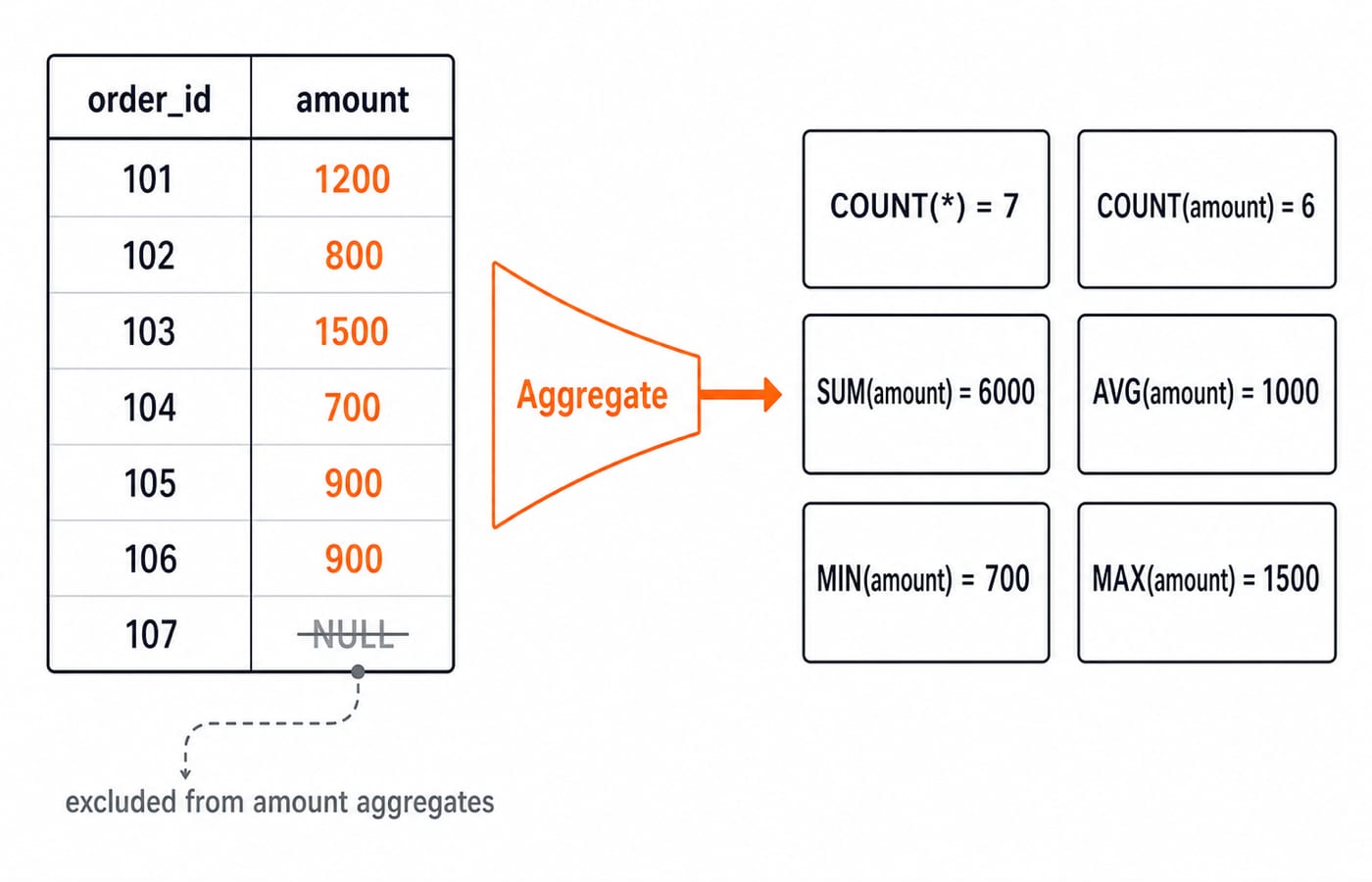
7 | 6 | 6000.00 | 1000.00 | 700.00 | 1500.00 |
The total is 1200 + 800 + 1500 + 700 + 900 + 900 = 6000. The mean is (1200 + 800 + 1500 + 700 + 900 + 900) / 6 = 1000. Never divide by seven here because the NULL amount is excluded.
The counting forms make the distinction clear. COUNT(*) returns 7 because it counts rows. COUNT(amount) returns 6 because it counts non-NULL amounts. COUNT(DISTINCT salesperson) returns 4, for Asha, Ravi, Meera and Iqbal. COUNT(DISTINCT region) returns 2. DISTINCT removes duplicate non-NULL values before counting.
An empty input exposes another important rule:
SELECT COUNT(*) AS n, SUM(amount) AS total
FROM sales
WHERE amount > 9999;
The output is n = 0 and total = NULL. Use COALESCE(SUM(amount), 0) only when the application deliberately wants zero instead of “no aggregate value”.
Summarise per group with GROUP BY and filter groups with HAVING
GROUP BY region changes the input from one complete set into a North set and a South set:
SELECT
    region,
    COUNT(*) AS orders,
    COUNT(amount) AS amount_values,
    SUM(amount) AS total_amount,
    ROUND(AVG(amount), 2) AS average_amount
FROM sales
GROUP BY region
ORDER BY region;
region | orders | amount_values | total_amount | average_amount |
|---|---|---|---|---|
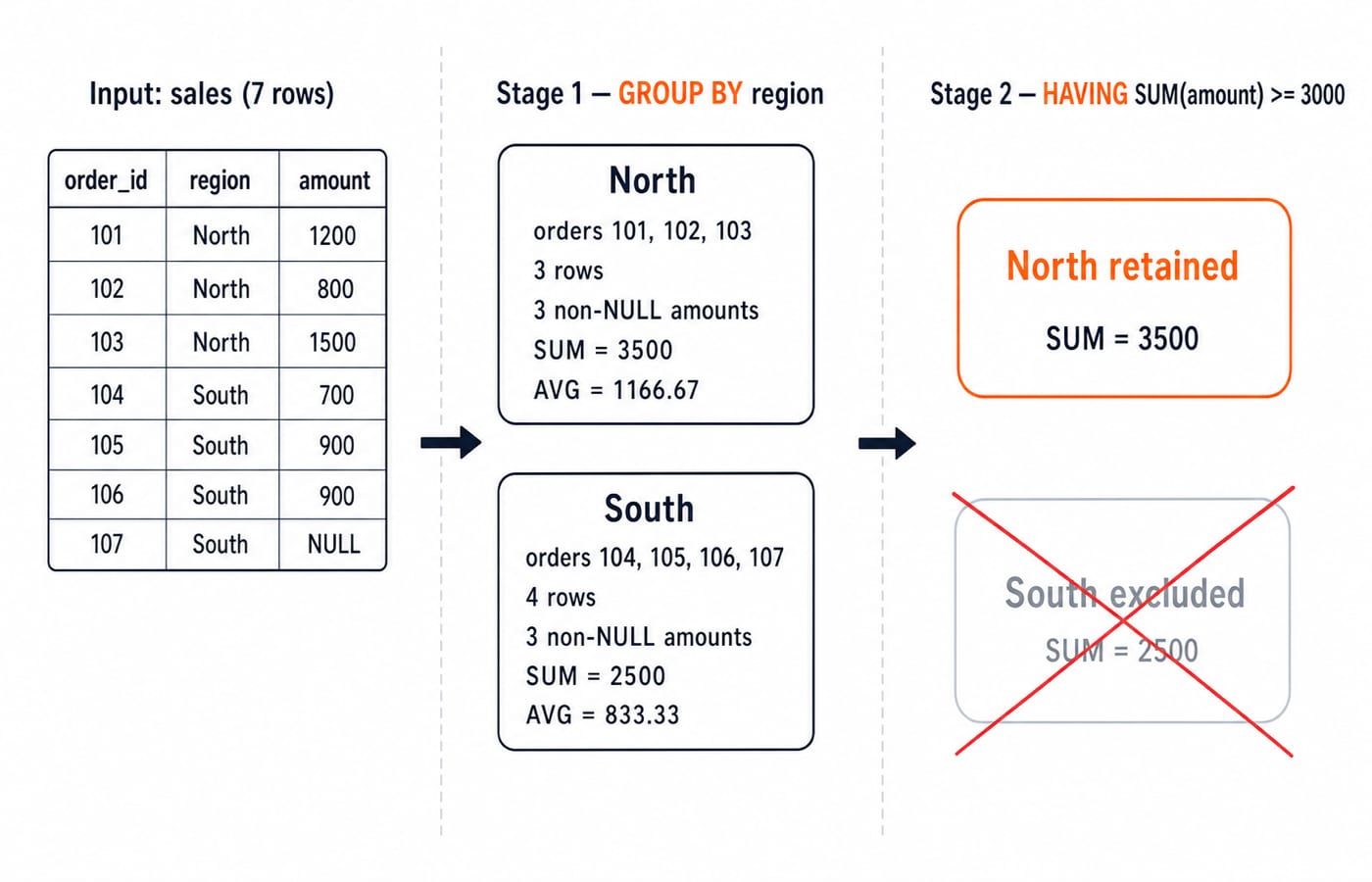
North | 3 | 3 | 3500.00 | 1166.67 |
South | 4 | 3 | 2500.00 | 833.33 |
South measure | Result | Why |
|---|---|---|
Rows | 4 | Orders 104 to 107 all exist |
Non- | 3 | Order 107 has a |
Average | 833.33 |
|
Now separate row filtering from group filtering:
SELECT region, COUNT(*) AS orders, SUM(amount) AS total_amount
FROM sales
WHERE amount >= 900
GROUP BY region
HAVING SUM(amount) >= 2000
ORDER BY region;
WHERE amount >= 900 runs before grouping. North keeps 1200 and 1500, producing 2700.00; South keeps 900 and 900, producing 1800.00. HAVING SUM(amount) >= 2000 then tests those grouped results. The final output is only North | 2 | 2700.00. Using the aggregate expression in HAVING, rather than its alias, is more portable.
A selected column that is not aggregated must normally appear in GROUP BY. Check each selected column against the grouping list before running the query.
NULL, DISTINCT and grouping traps
The discount column proves that most aggregates ignore NULL. It has seven rows but only four known values, so COUNT(*) = 7 and COUNT(discount) = 4. Their sum is 100 + 150 + 50 + 90 = 390, and AVG(discount) = 390 / 4 = 97.50.
Do not replace a missing discount with zero unless zero is the intended value in the domain. AVG(COALESCE(discount, 0)) would calculate 390 / 7 = 55.71 after rounding, which answers a different question.
Duplicates are a separate issue. SUM(amount) = 6000.00, while SUM(DISTINCT amount) = 1200 + 800 + 1500 + 700 + 900 = 5100.00. The latter removes the second 900.00 value, not a salesperson or a complete row. SUM(DISTINCT ...) is a decision about the question being asked, not a general repair for duplicate data.
Wrong approach | Why it fails | Fix |
|---|---|---|
Select | It mixes an ungrouped column with one summary value | Group by |
Write |
| Use |
Divide the amount total by seven |
| Divide |
How exams and interviews test aggregates
Aggregate questions usually take one of three forms. You may trace an output when a column contains NULL, predict grouped totals after both WHERE and HAVING, or diagnose a query that mixes grouped and ungrouped columns. The same table supports all three forms.
Set a five-minute check without running SQL. Find COUNT(*), COUNT(discount), SUM(DISTINCT amount), and the region that survives HAVING SUM(amount) >= 3000 when it is applied to the original regional groups. The answers are 7, 4, 5100.00, and North. The last answer follows because the unfiltered totals are North 3500.00 and South 2500.00.
Continue with SQL Query MCQs for question-level practice on mathematical, aggregate, string and date functions. The useful skill is tracing the rows that actually reach each aggregate, not memorising a fixed exam weightage.
Short version and next step
Aggregate functions return one result per set. GROUP BY defines multiple sets, WHERE filters rows before aggregation, and HAVING filters groups after aggregation. Most aggregates ignore NULL; COUNT(*) counts rows.
Change order 107's amount from NULL to 1000.00, predict every changed result, and rerun the queries. Record your predictions first, because comparison makes the NULL rule stick. For interview-focused DBMS revision, use Computer Science Fundamentals for Placements. For a broader semester-level path, use Zero to Hero. Compare both routes in the CS Fundamentals category.
Keep learning

SQL Joins Explained: INNER, LEFT, RIGHT, FULL, CROSS and SELF with Runnable Examples
Trace all six SQL join types on one support-agent dataset, with runnable queries, exact outputs, NULL behaviour, row counts and filter-placement traps.
Updated 21 Oct 20265 min readDBMS
GROUP BY and HAVING in SQL: Syntax and Worked Examples
Trace eight sales rows through WHERE, GROUP BY, aggregates, and HAVING, then tackle multiple columns, NULLs, COUNT variants, and common query traps.
Updated 17 Oct 20265 min readDBMS

Query Languages in DBMS: Relational Algebra, SQL and a Worked Query
Follow one database request from plain English to relational algebra, intermediate relations, relational calculus and SQL, with every result traced.
Updated 9 Oct 20265 min readDBMS

Data Mining and Data Warehouse Explained: Concepts, OLAP and Worked Examples
Follow six orders from operational sources into a warehouse, calculate OLAP totals, and test an association rule on five shopping baskets.
Updated 4 Oct 20266 min readDBMS