GROUP BY and HAVING in SQL: Syntax and Worked Examples
Trace eight sales rows through WHERE, GROUP BY, aggregates, and HAVING, then tackle multiple columns, NULLs, COUNT variants, and common query traps.
KnowledgeGate Team
Exam prep & CS education
Updated 17 Oct 20265 min read
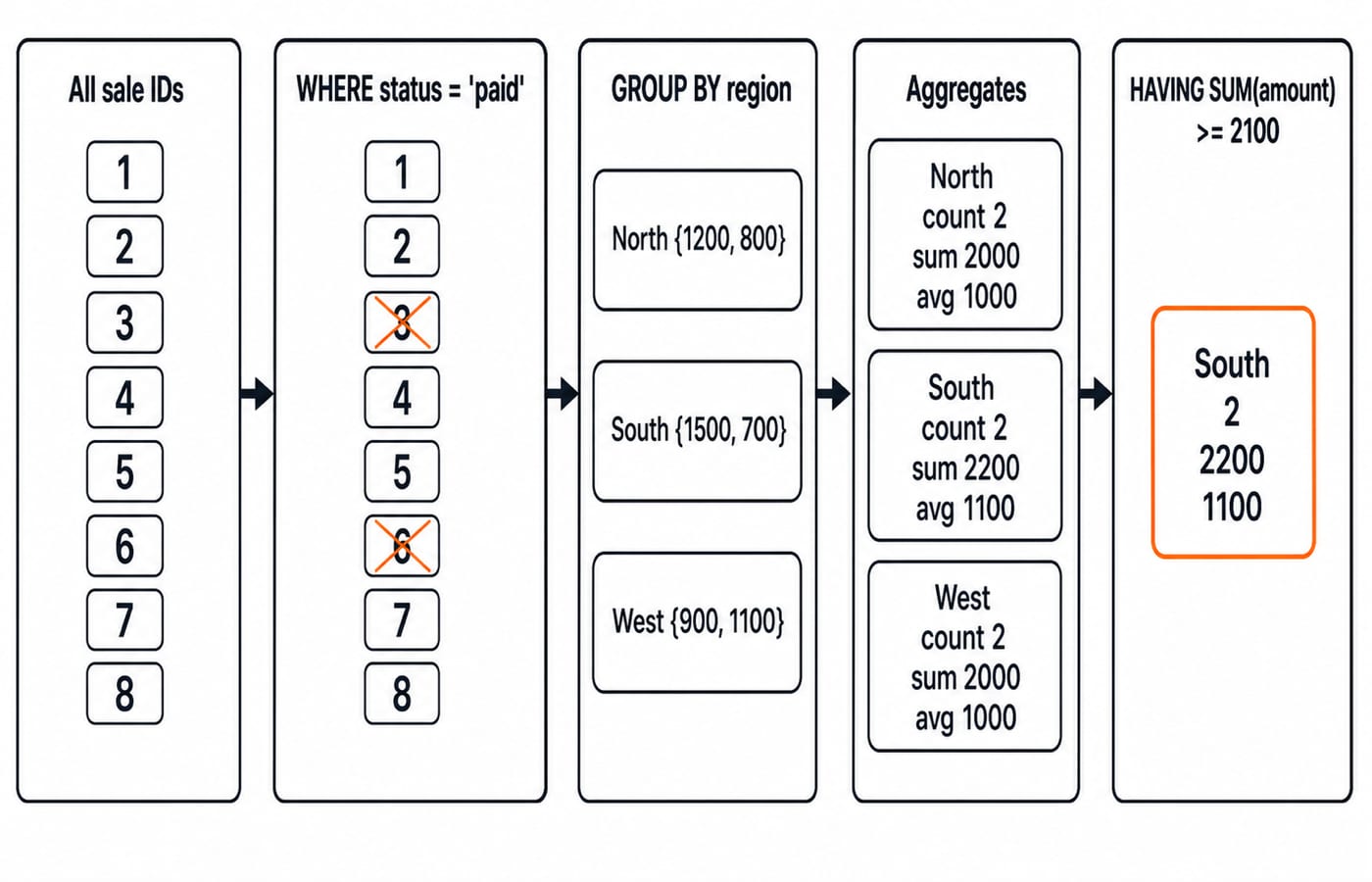
WHERE, GROUP BY, and HAVING can all appear in one SQL query, but they act at different stages. That overlap is where confusion often starts. Keep this mental model: WHERE keeps or removes individual rows, GROUP BY turns the remaining rows into buckets, and HAVING keeps or removes completed buckets. In the worked data, eight source rows become one surviving result row.
1. GROUP BY in SQL: the one-row-per-group idea
GROUP BY collects rows that share the same value, or combination of values. An aggregate such as COUNT, SUM, AVG, MIN, or MAX can then return one result row per group. Without grouping, an aggregate calculates one result over the complete filtered set.
For function semantics, NULL, and DISTINCT, see SQL Aggregate Functions: COUNT, SUM, AVG, MIN and MAX with Examples. GROUP BY and HAVING answer different questions: what the grouping grain is, when each clause acts, and which aggregate rows survive.
Canonical clause shape:
SELECT group_column, AGG(value_column)
FROM table_name
WHERE row_condition
GROUP BY group_column
HAVING aggregate_condition
ORDER BY group_column;
For portable, deterministic SQL, every selected expression should either appear in GROUP BY or be aggregated. Joins commonly build the source row set before this grouping stage.
2. First worked query: group eight sales rows by region
Use this source table:
sale_id | region | channel | amount | status |
|---|---|---|---|---|
1 | North | online | 1200 | paid |
2 | North | store | 800 | paid |
3 | North | online | 500 | refunded |
4 | South | online | 1500 | paid |
5 | South | online | 700 | paid |
6 | South | partner | 300 | refunded |
7 | West | store | 900 | paid |
8 | West | store | 1100 | paid |
SELECT region, COUNT(*) AS orders, SUM(amount) AS gross_amount
FROM sales
GROUP BY region
ORDER BY region;
region | orders | gross_amount |
|---|---|---|
North | 3 | 2500 |
South | 3 | 2500 |
West | 2 | 2000 |
North totals 1200 + 800 + 500 = 2500; South totals 1500 + 700 + 300 = 2500; West totals 900 + 1100 = 2000. Refunded rows still contribute because there is no row filter. GROUP BY does not validate business inputs; it groups the rows it receives.
3. Add WHERE and HAVING, then trace the full result
SELECT
    region,
    COUNT(*) AS paid_orders,
    SUM(amount) AS paid_revenue,
    AVG(amount) AS avg_paid_order
FROM sales
WHERE status = 'paid'
GROUP BY region
HAVING SUM(amount) >= 2100
ORDER BY paid_revenue DESC;
Trace it stage by stage. WHERE removes sale IDs 3 and 6. The six survivors form North (1200, 800), South (1500, 700), and West (900, 1100). Their aggregate rows are North (2, 2000, 1000), South (2, 2200, 1100), and West (2, 2000, 1000), in the order paid orders, paid revenue, and average paid order. Finally, HAVING SUM(amount) >= 2100 removes North and West. The sole result is South (2, 2200, 1100).
4. WHERE vs HAVING: row filters and group filters
Compare two runnable variants. This condition keeps individual paid sales of at least 1000 before grouping:
SELECT region, SUM(amount)
FROM sales
WHERE status = 'paid' AND amount >= 1000
GROUP BY region;
It leaves North 1200, South 1500, and West 1100. By contrast, WHERE status = 'paid' followed by HAVING SUM(amount) >= 2100 evaluates the three completed paid-region totals and leaves only South 2200.
The simplified logical order is FROM -> WHERE -> GROUP BY -> HAVING -> SELECT -> ORDER BY. This explains why WHERE SUM(amount) >= 2100 is wrong: the sum does not exist before grouping. Some engines accept paid_revenue in HAVING, but repeating SUM(amount) is safer across dialects.
Use WHERE when one source row can answer the condition, and HAVING when it needs a group aggregate. An eligible row condition in WHERE also avoids needless aggregation.
5. Multiple grouping columns, NULLs, and COUNT variants
Each distinct (region, channel) pair becomes one group here:
SELECT region, channel, SUM(amount) AS paid_revenue
FROM sales
WHERE status = 'paid'
GROUP BY region, channel
ORDER BY region, channel;
Results are (North, online, 1200), (North, store, 800), (South, online, 2200), and (West, store, 2000).
Consider attempts(id, topic, score):
id | topic | score |
|---|---|---|
1 | DBMS | 80 |
2 | DBMS | NULL |
3 | OS | 70 |
4 | OS | 90 |
5 | NULL | 60 |
SELECT topic, COUNT(*) AS rows_seen, COUNT(score) AS scored,
       AVG(score) AS average_score
FROM attempts
GROUP BY topic;
topic | rows_seen | scored | average_score |
|---|---|---|---|
DBMS | 2 | 1 | 80 |
OS | 2 | 2 | 80 |
NULL | 1 | 1 | 60 |
SQL groups the NULL topic values together for this result. COUNT(*) counts rows, COUNT(score) skips the NULL score, and AVG(score) averages non-NULL scores. This does not mean that NULL equals NULL in ordinary comparisons.
6. Common GROUP BY and HAVING mistakes, with repairs
Mistake | What goes wrong | Repair |
|---|---|---|
Select | The result is invalid or nondeterministic | Group by |
Put | The query requests an aggregate too early | Move the condition to |
Group by | Every sale becomes a one-row group | Group at the required regional grain |
Expect | Grouped output has no promised order | Add |
Filter refunded rows in | The filter is too late and may not express the intended row test | Put |
7. How exams and interviews test this concept
Three useful question forms are: trace result rows, place a predicate in WHERE or HAVING, and judge whether a selected non-aggregate column makes a query legal. Practise all three to build output-tracing skill.
As a checkpoint, change the worked query's threshold to >= 2000. All three regions return, with South first under ORDER BY paid_revenue DESC; North and West tie at 2000 unless you add a second sort key.
SELECT region, channel, SUM(amount) FROM sales GROUP BY region; is not portable or deterministic because channel is neither grouped nor aggregated. Correct it to GROUP BY region, channel; it returns the four paid region-channel rows only if you retain WHERE status = 'paid'.
8. Short version and the next practice step
WHERE filters rows. GROUP BY defines the reporting grain. Aggregates calculate one value per group. HAVING filters those aggregate rows.
Before running a query, predict every intermediate table. Then try thresholds 2000, 2100, and 2300; the final result should contain three, one, and zero rows respectively. Use the SQL Query MCQs for immediate output-tracing practice, and the CS Fundamentals category as your subject hub.
For a broad, structured CS route, choose Zero to Hero. For placement-oriented DBMS and core-CS revision, choose CS Fundamentals for Placements.
Keep learning

SQL Joins Explained: INNER, LEFT, RIGHT, FULL, CROSS and SELF with Runnable Examples
Trace all six SQL join types on one support-agent dataset, with runnable queries, exact outputs, NULL behaviour, row counts and filter-placement traps.
Updated 21 Oct 20265 min readDBMS
SQL Aggregate Functions: COUNT, SUM, AVG, MIN and MAX with Examples
Use one runnable sales table to see exactly how SQL aggregates treat rows, NULL values, duplicates and groups. Every result includes the arithmetic behind it.
Updated 13 Oct 20265 min readDBMS

Query Languages in DBMS: Relational Algebra, SQL and a Worked Query
Follow one database request from plain English to relational algebra, intermediate relations, relational calculus and SQL, with every result traced.
Updated 9 Oct 20265 min readDBMS

Data Mining and Data Warehouse Explained: Concepts, OLAP and Worked Examples
Follow six orders from operational sources into a warehouse, calculate OLAP totals, and test an association rule on five shopping baskets.
Updated 4 Oct 20266 min readDBMS