Python Comprehensions Tutorial: List, Set and Dictionary Examples
Learn to read Python comprehensions in execution order, choose the right output collection, trace nested forms, and repair common syntax mistakes with runnable examples.
KnowledgeGate Team
Exam prep & CS education
Updated 11 Sep 20266 min read
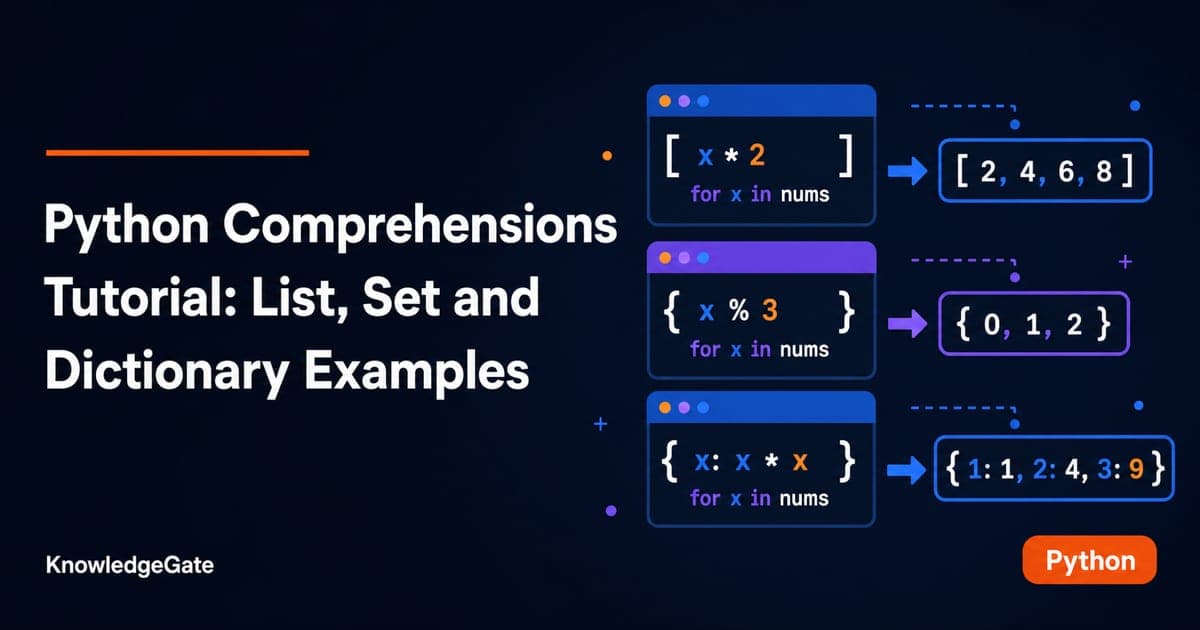
You can write a for loop, but [expression for item in iterable if condition] may look backwards at first. A comprehension is compact syntax for building a new collection from an iterable, and you can understand it by translating a familiar loop one part at a time. Lists preserve order and duplicates, sets remove duplicates, and dictionaries pair generated keys with values. Conditional and nested forms control selection and iteration. Explore the Coding & Skill Development Courses for the broader programming catalogue.
Related reading: Python collections and Python loop patterns.
Read a Python comprehension in execution order
Start with an ordinary loop that squares six numbers:
numbers = [1, 2, 3, 4, 5, 6]
squares = []

for n in numbers:
    squares.append(n * n)

print(squares)  # [1, 4, 9, 16, 25, 36]
The direct comprehension is:
numbers = [1, 2, 3, 4, 5, 6]
squares = [n * n for n in numbers]
print(squares)  # [1, 4, 9, 16, 25, 36]
The parts are output expression n * n, loop variable n, and source iterable numbers. Read it as: “for each n in numbers, emit n * n.” The first iterations are n = 1 giving 1, n = 2 giving 4, and n = 3 giving 9. The rest emit 16, 25, and 36. The source stays unchanged; Python creates a new list.
Filter items or transform every item
The position of a condition changes what the comprehension does. Suppose the scores are:
scores = [48, 73, 61, 90, 37, 84]
adjusted_passes = [score + 5 for score in scores if score >= 60]
print(adjusted_passes)  # [78, 66, 95, 89]
Python checks each value in order: reject 48, emit 78 from 73, emit 66 from 61, emit 95 from 90, reject 37, and emit 89 from 84. The trailing if removes failing values.
Now put an inline conditional before for:
scores = [48, 73, 61, 90, 37, 84]
adjusted_all = [score + 5 if score >= 60 else score for score in scores]
print(adjusted_all)  # [48, 78, 66, 95, 37, 89]

parity = ["even" if n % 2 == 0 else "odd" for n in range(1, 6)]
print(parity)  # ['odd', 'even', 'odd', 'even', 'odd']
This version keeps all six scores. A trailing if filters items out. value_if_true if condition else value_if_false before for chooses what to emit for every item. In the parity example, range(1, 6) supplies 1 through 5, not 6.
![Two comprehension pipelines over scores [48,73,61,90,37,84]: a trailing filter drops values below 60; an inline conditional keeps all six.](https://cdn.knowledgegate.ai/blog-assets/blog_asset_1784181938786_os8grk.jpg)
Use strings, methods and tuple unpacking
The output expression can call methods. They run separately for each item:
raw_names = [" asha ", "RAVI", " Meera"]
clean_names = [name.strip().title() for name in raw_names]
print(clean_names)  # ['Asha', 'Ravi', 'Meera']
For each name, strip() removes spaces before title() fixes capitalisation. A comprehension can also unpack tuples in its for clause:
records = [("Asha", 78), ("Ravi", 91), ("Meera", 85)]
selected = [name for name, mark in records if mark >= 85]
print(selected)  # ['Ravi', 'Meera']
The comparisons are 78 >= 85 false, 91 >= 85 true, and 85 >= 85 true, producing ['Ravi', 'Meera']. The Python Course: Concepts, MCQs and Coding is a structured route from basic to advanced Python concepts.
Choose list, set or dictionary output
Square brackets produce a list. Braces with one expression produce a set, so duplicates disappear:
words = ["Gate", "gate", "Python", "python", "AI"]
normalised = {word.lower() for word in words}

print(normalised == {"gate", "python", "ai"})  # True
print(sorted(normalised))  # ['ai', 'gate', 'python']
A set does not promise a printed order. Use sorted() for deterministic display, a useful habit when comparing results as in Sorting Algorithms: Complexity and Comparison.
Braces with key: value build a dictionary:
scores = {"Asha": 78, "Ravi": 91, "Meera": 85}
adjusted = {name: mark + 5 for name, mark in scores.items() if mark < 90}
print(adjusted)  # {'Asha': 83, 'Meera': 90}
Ravi is filtered out. Asha becomes 83, and Meera becomes 90. There is no tuple-comprehension syntax. (n * n for n in numbers) creates a generator expression, not a tuple.
Follow nested loops from left to right
Nested comprehensions preserve the loop order of nested for statements. First flatten a matrix with ordinary loops:
matrix = [[2, 4, 6], [1, 3, 5]]
flat = []

for row in matrix:
    for cell in row:
        flat.append(cell)

print(flat)  # [2, 4, 6, 1, 3, 5]
The equivalent comprehension keeps the loop headers in the same order:
matrix = [[2, 4, 6], [1, 3, 5]]
flat = [cell for row in matrix for cell in row]
scaled = [[cell * 10 for cell in row] for row in matrix]

print(flat)    # [2, 4, 6, 1, 3, 5]
print(scaled)  # [[20, 40, 60], [10, 30, 50]]
Read the for clauses from left to right as nested loop headers. The first row emits 2, 4, 6; the second emits 1, 3, 5. The scaled version transforms each cell while its outer list preserves the two-row shape. Flattening and shape preservation are different operations.
![Flattening matrix [[2,4,6],[1,3,5]] to [2,4,6,1,3,5] versus a nested comprehension preserving its two rows as [[20,40,60],[10,30,50]].](https://cdn.knowledgegate.ai/blog-assets/blog_asset_1784181939306_yp0pll.jpg)
Fix common comprehension errors
In [n for n in numbers if n % 2 == 0 else -1], else is misplaced because a trailing if is only a filter. Move the inline conditional before for:
numbers = [1, 2, 3, 4]
values = [n if n % 2 == 0 else -1 for n in numbers]
print(values)  # [-1, 2, -1, 4]
[x, y for x in [1, 2] for y in [3, 4]] is invalid because a tuple expression needs parentheses. Correct it like this:
pairs = [(x, y) for x in [1, 2] for y in [3, 4]]
print(pairs)  # [(1, 3), (1, 4), (2, 3), (2, 4)]

square_set = {n * n for n in [1, 2, 2, 3]}
square_dict = {n: n * n for n in [1, 2, 2, 3]}
print(square_set == {1, 4, 9})  # True
print(square_dict)              # {1: 1, 2: 4, 3: 9}
One expression inside braces makes a set; key: value makes a dictionary. Prefer a loop for logging, exception handling, several mutated targets, or more than two mental filters or loops. Measure before claiming a speed advantage.
Trace comprehension output in tests and interviews
Typical tasks ask you to predict output, translate a loop, repair filter-versus-conditional syntax, or choose the output collection. Try these rapid checks:
odd_squares = [n * n for n in range(1, 5) if n % 2]
letters = {ch for ch in "gate"}
remainders = {n: n % 2 for n in [2, 3, 4]}

print(odd_squares)                         # [1, 9]
print(letters == {"g", "a", "t", "e"})  # True
print(remainders)                          # {2: 0, 3: 1, 4: 0}
The set has no promised print order, but its members are exactly g, a, t, and e. For larger problem-solving tasks, DSA Using Python is the relevant Coding & DSA course.
Exercises, the short version and next step
Write one comprehension for each task:
Square only the even values in
[3, 4, 7, 8, 10].Convert
[("pen", 12), ("book", 55), ("bag", 80)]into a dictionary containing only prices of at least50.Flatten
[[1, 2], [3], [4, 5]]and add10to every value.
Checkpoints:
even_squares = [n * n for n in [3, 4, 7, 8, 10] if n % 2 == 0]
costs = {item: price for item, price in [("pen", 12), ("book", 55), ("bag", 80)] if price >= 50}
shifted = [value + 10 for row in [[1, 2], [3], [4, 5]] for value in row]

print(even_squares)  # [16, 64, 100]
print(costs)         # {'book': 55, 'bag': 80}
print(shifted)       # [11, 12, 13, 14, 15]
The short version: choose the collection, write the expression, add for, then filter only when items should disappear. If confused, expand it into loops and trace values. Continue with the Python course. Later, Dynamic Programming Explained: 0/1 Knapsack shows a move from compact transformations to larger state-based problems. Comprehensions do not solve dynamic programming by themselves.
Keep learning
Decorators in Python: @ Syntax, Wrappers and Worked Examples
Understand when decoration happens, what a wrapper receives, and how return values travel back. Runnable examples cover parameters, stacking and built-ins.
Updated 22 Oct 20266 min readPython
Exceptions in Python: Handle Errors with try, except and finally
Learn how Python exceptions change control flow, how to catch expected failures without hiding bugs, and when to use else, finally, raise, and custom exceptions.
Updated 18 Oct 20265 min readPython

Context Managers in Python: with, __enter__, __exit__ and contextlib
Learn how Python's with statement guarantees cleanup, then build and trace class-based and generator-based context managers with runnable examples.
Updated 14 Oct 20266 min readPython
Python Arguments and Scope: Parameters, LEGB, and Worked Examples
Trace how Python binds arguments, handles mutation and rebinding, and resolves names through LEGB. Runnable examples turn scope rules into predictable output.
Updated 10 Oct 20265 min readPython