CSS Container Queries: Build a React Card That Adapts to Its Container
Build one portable React card that responds to the space its parent provides. Follow its layout, padding and title size at three exact container widths.
KnowledgeGate Team
Exam prep & CS education
Updated 25 Oct 20266 min read

A card styled only with viewport media queries may look right across a full page but feel cramped inside a 280 px sidebar, even when both appear in the same 1440 px browser window. One React card responds to the width its parent offers, with exact states at 280 px, 440 px and 760 px. Explore coding and skill development courses for the wider learning path.
CSS Container Queries: The Component, Not the Viewport, Chooses the Layout
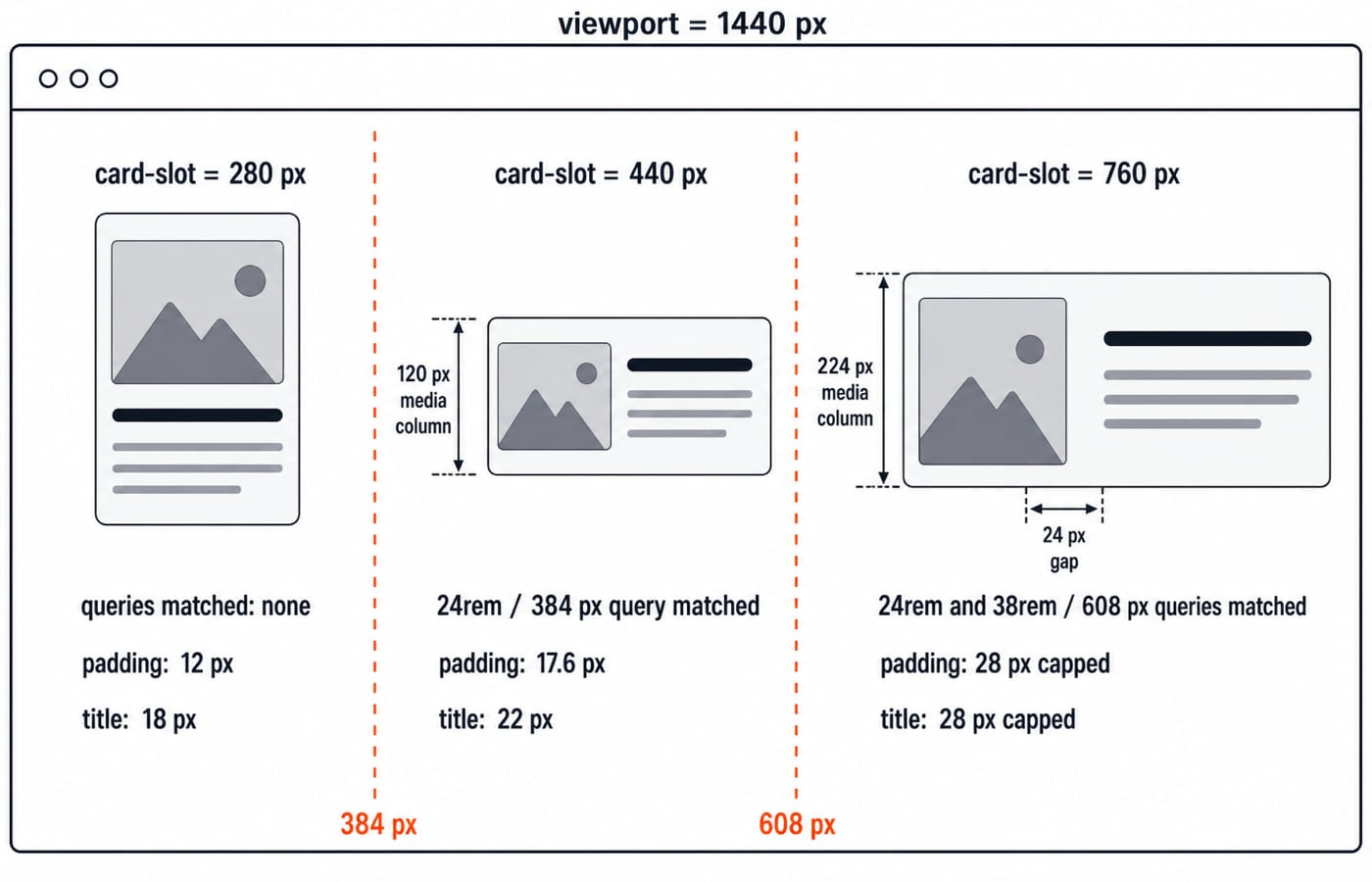
@media (min-width: 768px) asks whether the viewport is at least 768 px wide. @container card-slot (min-width: 24rem) asks whether the selected ancestor named card-slot is at least 24 rem wide. Our viewport stays at 1440 px while the same card gets 280 px in a sidebar, 440 px in a grid tile and 760 px in a main-content slot.
This creates a useful component contract. The host owns the available width, while the card owns its internal layout. One React component can therefore move among a sidebar, dashboard grid and full-width page without reading window.innerWidth, installing a resize listener or receiving a compact prop.
Inline-size container queries make the thresholds follow the container's inline axis. They do not replace every viewport media query. Viewport queries still make sense for page-level changes. Use CSS Flexbox vs Grid to arrange the outer card collection; container queries solve a different problem here, changing one card's internal tracks according to the width that outer layout provides.
Build One React Card and Render It in Three Host Widths
The card uses a text-based media panel, so it stays self-contained. Its article and heading preserve useful document structure.
export function CourseCard() {
  return (
    <article className="cq-card">
      <div className="cq-card__media" aria-hidden="true">CSS</div>
      <div className="cq-card__body">
        <p className="cq-card__eyebrow">Web Development</p>
        <h2>Portable React Card</h2>
        <p className="cq-card__description">
          One component for a sidebar, a grid tile and a full-width page.
        </p>
        <a href="https://www.knowledgegate.ai/courses/COMPLETE-CSS">
          Explore CSS lessons
        </a>
      </div>
    </article>
  );
}
Render it in three hosts:
<div className="card-slot card-slot--sidebar"><CourseCard /></div>
<div className="card-slot card-slot--grid"><CourseCard /></div>
<div className="card-slot card-slot--main"><CourseCard /></div>
The three hosts assign 17.5rem, 27.5rem and 47.5rem, equal to 280 px, 440 px and 760 px when the root font size is 16 px. In production, Grid, Flexbox or normal flow can determine each width. The React and Redux Course covers the component foundations behind this pattern.
Establish a Named Inline-Size Container and a Narrow-First Base Style
Contain the host, not .cq-card. The shorthand below expands to container-name: card-slot and container-type: inline-size. A container query styles descendants of the matching ancestor. The card cannot select itself as its own query container.
.card-slot {
  container: card-slot / inline-size;
  max-inline-size: 100%;
}

.card-slot--sidebar { inline-size: 17.5rem; }
.card-slot--grid { inline-size: 27.5rem; }
.card-slot--main { inline-size: 47.5rem; }

.cq-card,
.cq-card * {
  box-sizing: border-box;
}

.cq-card {
  display: grid;
  grid-template-columns: minmax(0, 1fr);
  gap: 1rem;
  padding: 0.75rem;
  padding: clamp(0.75rem, 4cqi, 1.75rem);
  border: 1px solid #94a3b8;
  border-radius: 0.75rem;
  overflow: hidden;
}

.cq-card__media {
  display: grid;
  place-items: center;
  min-block-size: 9rem;
  background: linear-gradient(135deg, #2563eb, #7c3aed);
  color: white;
  font-weight: 700;
}

.cq-card__body {
  min-inline-size: 0;
}

.cq-card__body h2 {
  font-size: 1.125rem;
  font-size: clamp(1.125rem, 5cqi, 1.75rem);
}

.cq-card__body,
.cq-card__body h2,
.cq-card__body p,
.cq-card__body a {
  overflow-wrap: anywhere;
}
This narrow-first base works below the first breakpoint and when container queries are unavailable: the card remains readable and stacked, with every essential line still in the DOM. The web technologies guide is a useful HTML and HTTP refresher, though it does not teach this implementation.
Add Two Container Breakpoints for Compact and Wide Card Layouts
At 24rem, equal to 384 px under the 16 px root assumption, the card becomes a compact row. At 38rem, equal to 608 px under the same assumption, it becomes a wider row.
@container card-slot (min-width: 24rem) {
  .cq-card {
    grid-template-columns: 7.5rem minmax(0, 1fr);
    align-items: center;
  }

  .cq-card__media {
    min-block-size: 7.5rem;
  }
}

@container card-slot (min-width: 38rem) {
  .cq-card {
    grid-template-columns: 14rem minmax(0, 1fr);
    gap: 1.5rem;
  }

  .cq-card__media {
    min-block-size: 10rem;
  }
}
minmax(0, 1fr) and min-inline-size: 0 stop a long title or URL from forcing the content column beyond the container. Naming card-slot in both queries prevents a nearer unrelated container from becoming the measurement source. Later matching rules override only what they redeclare. The base border, radius, padding and content styles remain.
Trace the Worked Example at 280 px, 440 px and 760 px
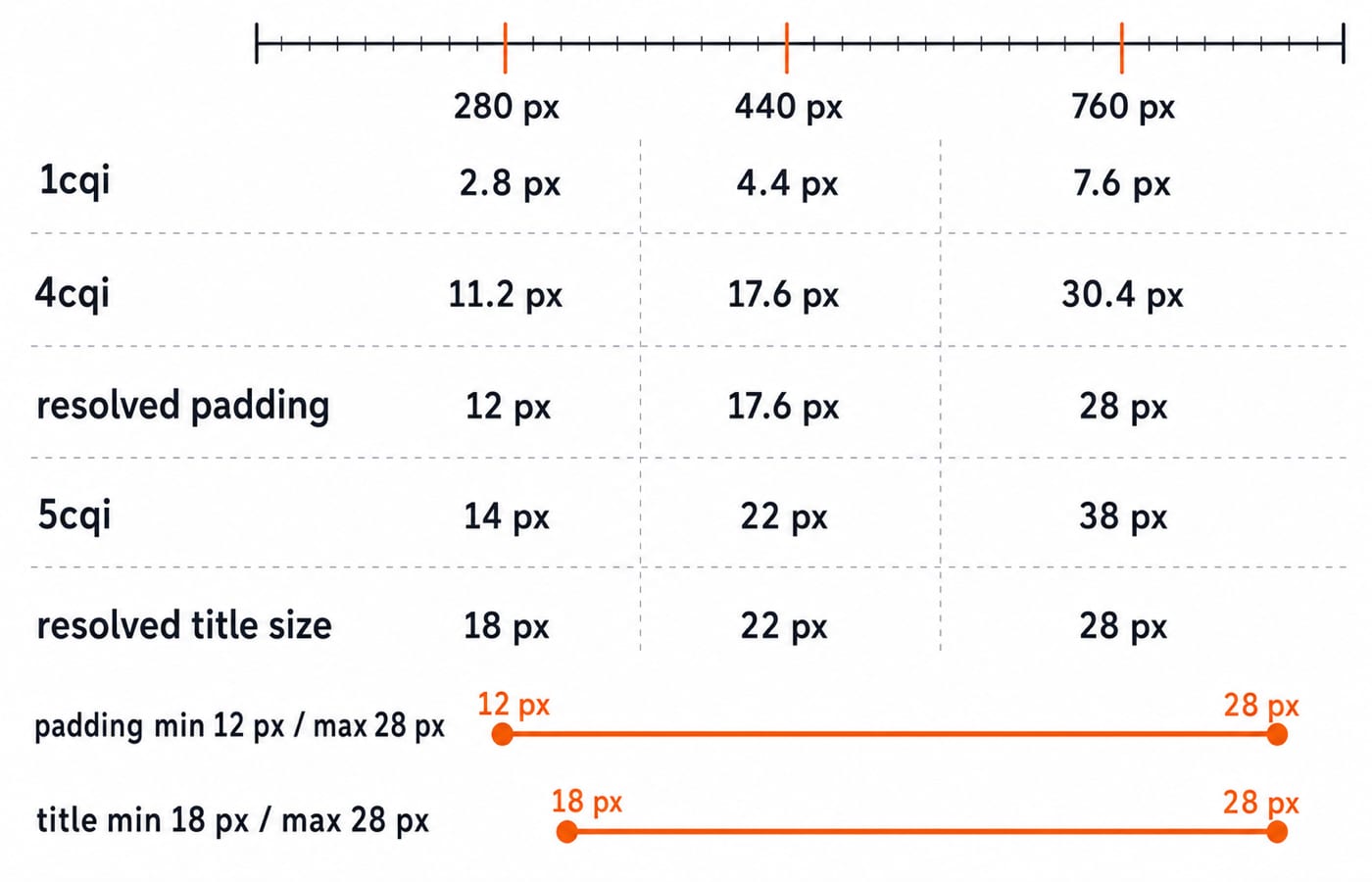
At 280 px, neither threshold is reached, so the card stays stacked. Padding is 4cqi = 0.04 × 280 = 11.2 px, then the clamp raises it to the 12 px minimum. The title is 5cqi = 0.05 × 280 = 14 px, then rises to its 18 px minimum.
At 440 px, only the 384 px query matches. The card uses a 120 px media column because 7.5 × 16 = 120, followed by the flexible column. Padding is 0.04 × 440 = 17.6 px, and the title is 0.05 × 440 = 22 px. Both lie inside their clamp limits.
At 760 px, both queries match. The later rule gives a 224 px media column because 14 × 16 = 224, a flexible content column and a 24 px gap because 1.5 × 16 = 24. Raw padding is 0.04 × 760 = 30.4 px, capped at 28 px. Raw title size is 0.05 × 760 = 38 px, also capped at 28 px. The viewport stayed 1440 px throughout. Only the container changed.
Container Query Units: Scale Within Bounds, Not Without Limits
1cqi is 1 percent of the query container's inline size. It equals 2.8 px at 280 px, 4.4 px at 440 px and 7.6 px at 760 px. Multiplying those values by four and five produces the raw padding and title sizes calculated above.
Bounds matter. Raw 4cqi padding would be 8 px inside a 200 px container and 48 px inside a 1200 px container. clamp(0.75rem, 4cqi, 1.75rem) keeps it between 12 px and 28 px under a 16 px root assumption. Those pixel equivalents are not universal because a user can choose another root font size.
Breakpoints handle discrete structural changes. cqi adjusts spacing and type smoothly within safe limits. Converting every dimension to query units would ignore readable minimums, sensible maximums and intrinsic content.
Debugging Traps and Practical Container-Query Checks
Containment is on the card. If
container-typesits on.cq-card, it becomes the container for its own descendants, so rules that restyle the card itself never match. Move containment to the ancestor,.card-slot.The wrapper uses
display: contents. It then generates no box for this container to measure. Use a box-generating wrapper.The layout still uses a viewport query. At a 1440 px viewport, all three cards choose the same state. Move component-specific rules into the named container queries.
Long content expands the grid. A content track with an automatic minimum may overflow. Use
minmax(0, 1fr),min-inline-size: 0and wrapping.Narrow means hidden content. Hiding the description or call to action may make a screenshot fit, but it removes useful content. Keep essential copy and keyboard access available. Container queries should change presentation, not meaning or reading order.
For a precise DevTools test, leave the viewport fixed and drag only .card-slot through 383 px, 384 px, 607 px and 608 px. The expected states are stacked, compact, compact and wide. Predict intermediate values too: 360 px stays stacked with 0.04 × 360 = 14.4 px padding; 600 px is compact with 0.04 × 600 = 24 px padding; 620 px is wide with 0.04 × 620 = 24.8 px padding.
The Short Version and a Useful Next Exercise
Choose an ancestor container, name it with inline-size containment, write a narrow-first card, then add structural breakpoints and bounded cqi scaling. The component responds to 280 px, 440 px and 760 px hosts without React state, resize listeners or viewport assumptions.
Next, change the thresholds to 28rem and 44rem, equal to 448 px and 704 px at a 16 px root. Predict: 280 px and 440 px remain stacked, while 760 px crosses both thresholds and becomes wide. Continue with the Complete CSS Course for a broader CSS learning path.
Keep learning

Hoisting in JavaScript: Predict Output with var, let, const and Functions
Build a reliable scope-setup model for JavaScript hoisting, then use it to trace declarations, diagnose three common errors and solve output questions.
Updated 26 Oct 20266 min readWeb Development

Regular Expressions in JavaScript: Match, Extract, Replace, and Validate
Learn JavaScript regex by tracing what each token consumes. Build a validator and a named-group log parser, then practise extraction, replacement, flags, and common traps.
Updated 23 Oct 20265 min readWeb Development

Functions and Arrow Functions in JavaScript: Syntax, Scope and Runnable Examples
Build function declarations, expressions and arrows in JavaScript, then trace parameters, closures, lexical this and array callbacks through exact outputs.
Updated 19 Oct 20266 min readWeb Development

Modules in JavaScript: Import, Export, and Runnable Examples
Build JavaScript modules from scratch with a shopping-cart project that runs in Node.js and the browser. Learn live bindings, re-exports, lazy loading, and practical fixes.
Updated 15 Oct 20265 min readWeb Development