Functions in Python: Parameters, Return Values, Scope and Examples
Build, call and debug Python functions through traced examples. Learn how arguments, local scope and return values work, then test yourself with short exercises.
KnowledgeGate Team
Exam prep & CS education
Updated 2 Sep 20265 min read
You can run short Python statements, but copying a calculation for each new value becomes messy. Functions name that work once so you can reuse, test and debug it. A function receives values through parameters, calculates with local names and returns a result that later code can use.
What a Python function is and why it helps
A function is a named, reusable block for one focused job. Here def starts the definition, rectangle_area is the name, the parentheses hold the parameters, and the colon introduces the indented body:
def rectangle_area(length, width):
    area = length * width
    return area

result = rectangle_area(6, 4)
print(result)
Defining the function does not run its body. When the call is reached, length receives 6, width receives 4, and the local variable area becomes 24. return sends 24 to the caller, result stores it, and the only printed output is 24.
Instead of writing 6 * 4, 8 * 5 and 10 * 3 separately, reuse one rule. rectangle_area(8, 5) returns 40, while rectangle_area(10, 3) returns 30. The Coding & DSA Courses category is a broader path for strengthening such programming foundations.
Parameters, arguments, defaults and keyword calls
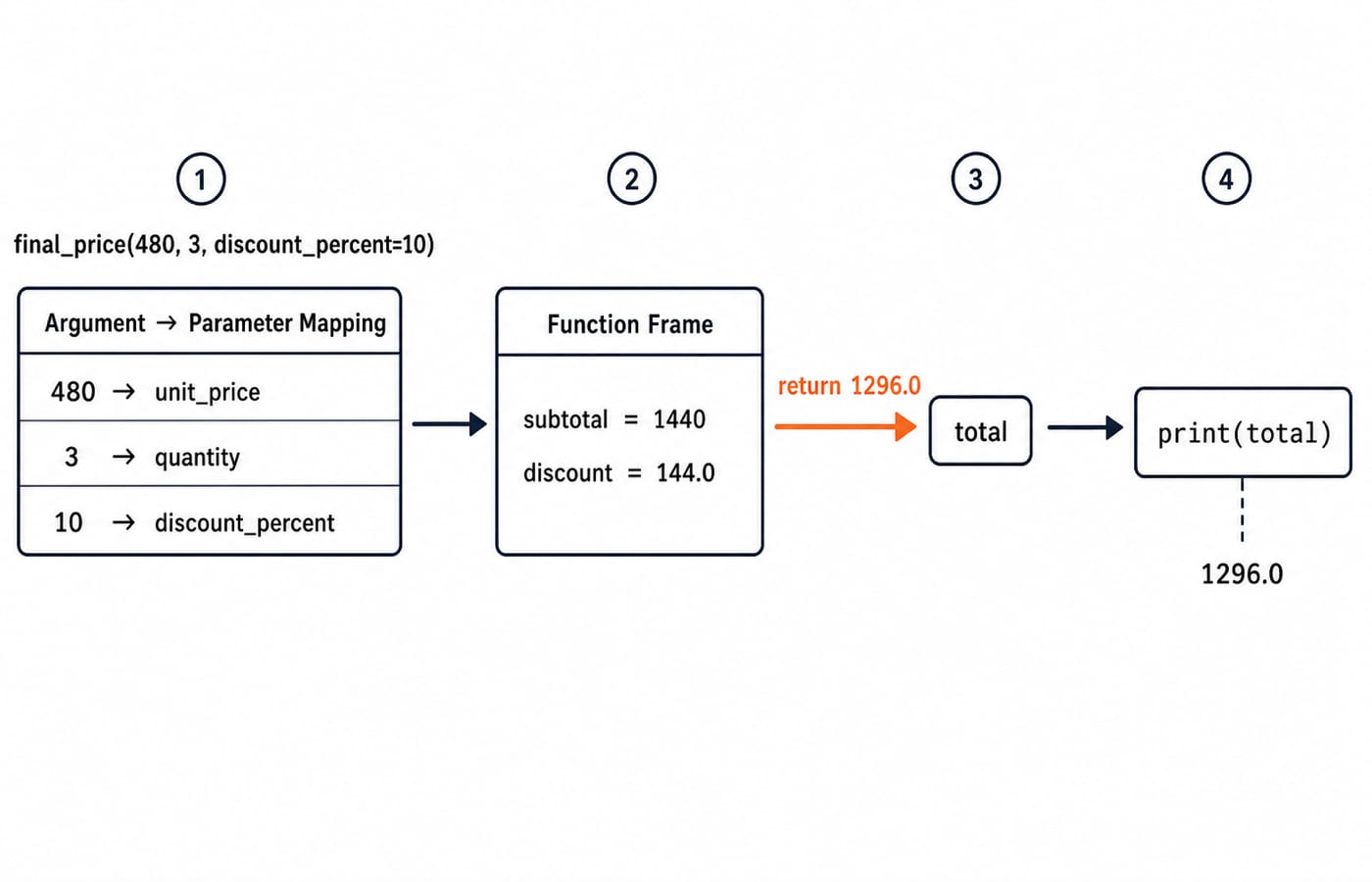
Parameters are definition names; arguments are call values. Here, unit_price, quantity and discount_percent are parameters; 480, 3 and 10 are arguments.
def final_price(unit_price, quantity, discount_percent=0):
    subtotal = unit_price * quantity
    discount = subtotal * discount_percent / 100
    return subtotal - discount

total = final_price(480, 3, discount_percent=10)
print(total)
Trace it in order:
subtotal = 480 * 3 = 1440discount = 1440 * 10 / 100 = 144.0The returned total is
1440 - 144.0 = 1296.0.print(total)displays1296.0.
The default lets final_price(480, 2) use discount_percent = 0, calculate 960 - 0.0, and return 960.0. A fully keyword-based call, final_price(quantity=3, unit_price=480, discount_percent=10), also returns 1296.0 because parameter names, not keyword order, control the matching.
Calls must still satisfy the signature. final_price(480) raises TypeError because quantity is missing. final_price(480, 3, unit_price=500) raises TypeError because unit_price receives both a positional and a keyword value.
return versus print, including multiple return values
print displays something now. return hands a value back so later code can store, combine, compare or print it.
def show_double(number):
    print(number * 2)

value = show_double(6)
print(value)
Output is 12 and then None. The function displayed 12 but had no explicit return, so Python returned None. Correct it with def double(number): return number * 2. Now value = double(6) stores 12, and print(value + 3) prints 15.
A function can return several values:
def min_max(scores):
    return min(scores), max(scores)

low, high = min_max([18, 7, 24, 11])
print(low, high)
The function returns the tuple (7, 24). Unpacking assigns low = 7 and high = 24, so the output is 7 24. The Python Course: Concepts, MCQs & Coding provides a structured path through Python programming coverage.
Use one function's return value in another
A returned value can become an argument to another function. That keeps each function responsible for one step:
def percentage(obtained, total):
    return obtained / total * 100

def result_line(name, obtained, total):
    score = percentage(obtained, total)
    return f"{name}: {score:.1f}%"

print(result_line("Asha", 72, 80))
percentage(72, 80) calculates 72 / 80 * 100 = 90.0. result_line stores that value in local score, formats one decimal place and returns "Asha: 90.0%". The outer print displays the returned string; neither function prints internally.
For flexible binding, closures and advanced scope failures, Python Functions: *args, **kwargs & Mutable Default Trap provides the deeper trace. Prefer ordinary named parameters when inputs are known, and use flexible parameters only when call shapes genuinely vary.
Local scope, global names and what a call can change
Scope is the region where a name can be read.
bonus_rate = 0.10

def final_salary(base):
    bonus = base * bonus_rate
    return base + bonus

print(final_salary(50000))
print(bonus)
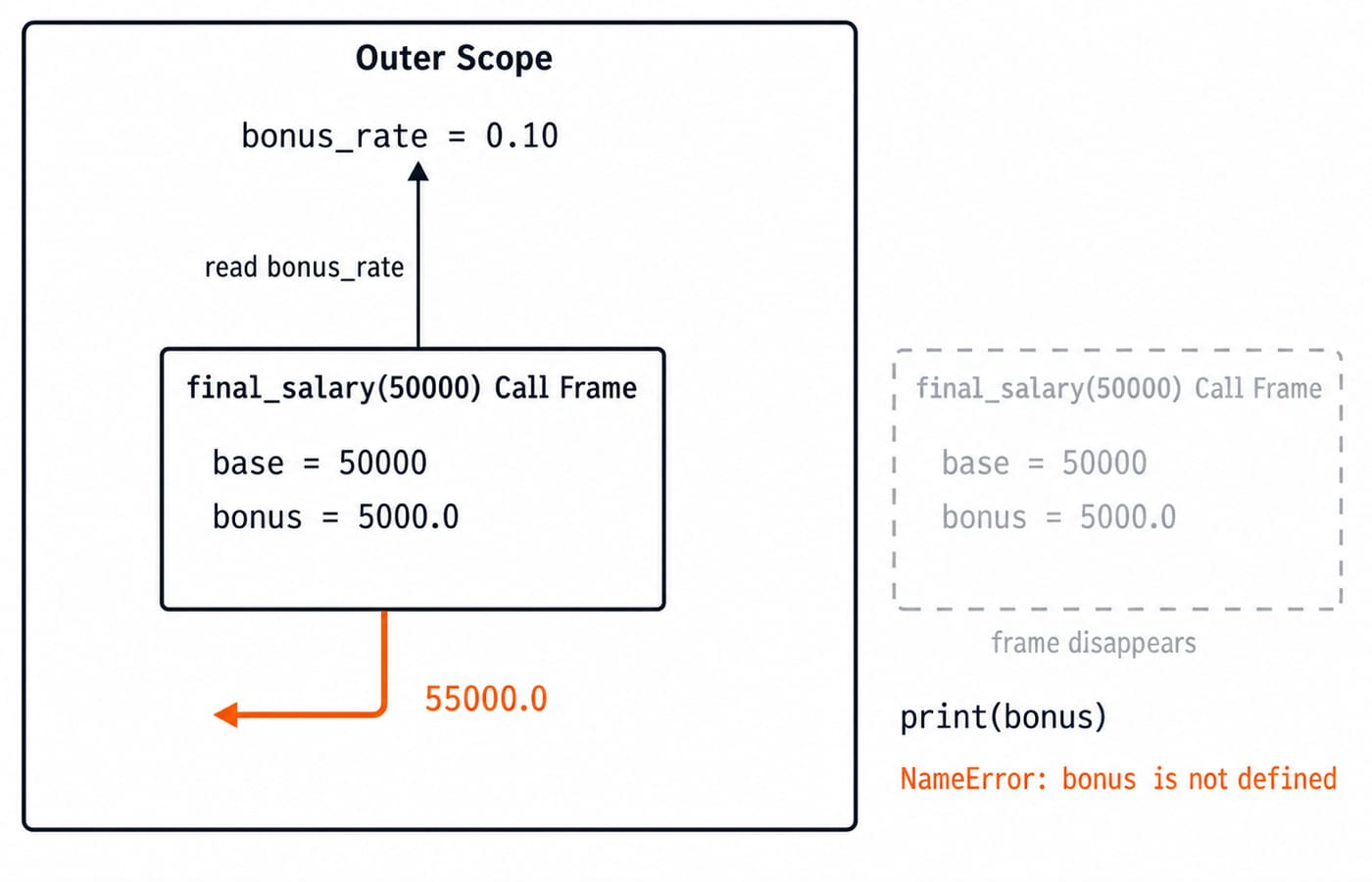
For the first call, base = 50000; the function reads global bonus_rate = 0.10; and local bonus = 5000.0. It returns 55000.0, so the first print displays 55000.0. The later print(bonus) raises NameError because local bonus is unavailable after the call.
points = 10

def add_points(points):
    points += 5
    return points

new_points = add_points(points)
print(points, new_points)
The output is 10 15. The parameter initially refers to 10, then its local name is rebound to 15; outer points remains 10. The global keyword can explicitly rebind a global name, but use it deliberately rather than as a default scope fix.
Common function mistakes and their fixes
A partial return also hides bugs:
def is_positive(number):
    if number > 0:
        return True
This returns True for 5 but None for -3. Add return False after the if so is_positive(-3) returns False.
Avoid shadowing built-ins. After sum = 10, sum([2, 3]) raises TypeError because sum refers to the integer 10. Rename the variable to total, and the built-in call returns 5. At module level, calling welcome("Riya") before execution reaches def welcome(name): ... raises NameError; move the call below the definition.
When debugging, inspect the argument count, trace every local value, confirm every required path reaches return, and check whether a name shadows a built-in.
How functions are tested, plus three exercises
In tests and interviews, you may need to predict output, identify an argument or scope error, complete a missing return, or write a function from input-output examples. Map each argument, trace every local name and record the returned value before checking printed output.
def adjust(value):
    value += 4
    return value

x = 6
y = adjust(x)
print(x, y)
The answer is 6 10: value is local, outer integer x remains 6, and y stores the returned 10.
Try these before reading the solutions:
Write
count_even(values)for[3, 8, 10, 11, 14].Predict this code:
def power(base, exponent=2):
    return base ** exponent

print(power(3), power(3, 3))
Write
split_minutes(total)to return hours and remaining minutes for135.
Solutions: loop through the first list and count values where value % 2 == 0; the check value is 3. The power output is 9 27. For time, return total // 60, total % 60; split_minutes(135) returns (2, 15) and unpacks to hours = 2, minutes = 15.
The short version and the next practice step
Define one job, choose clear parameters, calculate with local names, return the reusable result, and test normal plus edge inputs. In the central example, parameters receive 480, 3 and 10; local calculations produce 1440 and 144.0; return sends back 1296.0; and the caller stores it in total.
Now run final_price, change the call to final_price(250, 4, discount_percent=15), and predict the result. The subtotal is 1000, the discount is 150.0, and the returned total is 850.0. Verify it in Python. Use the structured Python course linked above if you need a full language sequence, or move to DSA Using Python when you are ready to apply functions in data-structure implementations.
Keep learning
Decorators in Python: @ Syntax, Wrappers and Worked Examples
Understand when decoration happens, what a wrapper receives, and how return values travel back. Runnable examples cover parameters, stacking and built-ins.
Updated 22 Oct 20266 min readPython
Exceptions in Python: Handle Errors with try, except and finally
Learn how Python exceptions change control flow, how to catch expected failures without hiding bugs, and when to use else, finally, raise, and custom exceptions.
Updated 18 Oct 20265 min readPython

Context Managers in Python: with, __enter__, __exit__ and contextlib
Learn how Python's with statement guarantees cleanup, then build and trace class-based and generator-based context managers with runnable examples.
Updated 14 Oct 20266 min readPython
Python Arguments and Scope: Parameters, LEGB, and Worked Examples
Trace how Python binds arguments, handles mutation and rebinding, and resolves names through LEGB. Runnable examples turn scope rules into predictable output.
Updated 10 Oct 20265 min readPython