Itertools in Python: Lazy Iterators, Pipelines and Worked Examples
Learn how Python's itertools builds readable, lazy pipelines. Runnable examples cover infinite iterators, filtering, running totals, adjacent pairs, tee, combinations and groupby.
KnowledgeGate Team
Exam prep & CS education
Updated 26 Oct 20266 min read
You have two lists of orders and need to combine, filter and summarise them. It is easy to reach for nested loops, temporary lists, counters and index arithmetic until the simple task becomes hard to trace. itertools provides iterator tools, and a small pipeline can make inputs and outputs explicit. Readable iteration can avoid unnecessary intermediate collections without relying on clever one-liners.
What itertools gives you, and why laziness matters
The official Python itertools reference describes iterator-building tools in broad groups: infinite iterators, tools that work on finite input, and combinatoric iterators. Most of these functions return an iterator. Values are produced when iteration requests them, rather than being returned immediately as a completed list.
An iterator is stateful and usually consumed once:
stream = iter([2, 4, 6])

print(next(stream))  # 2
print(list(stream))  # [4, 6]
print(list(stream))  # []
The first call consumes 2; the first list consumes what remains; the second finds nothing. This does not mean every iterable is one-shot. A list can create a fresh iterator each time, but stream itself cannot rewind.
Use these itertools tools:
from itertools import (
    accumulate, chain, combinations, count, cycle, filterfalse,
    groupby, islice, pairwise, permutations, product, repeat, tee,
)
In a real program, import only the names you use. If iterables and function calls are still unfamiliar, the Python Course provides the broader language route.
Control infinite iterators with a finite boundary
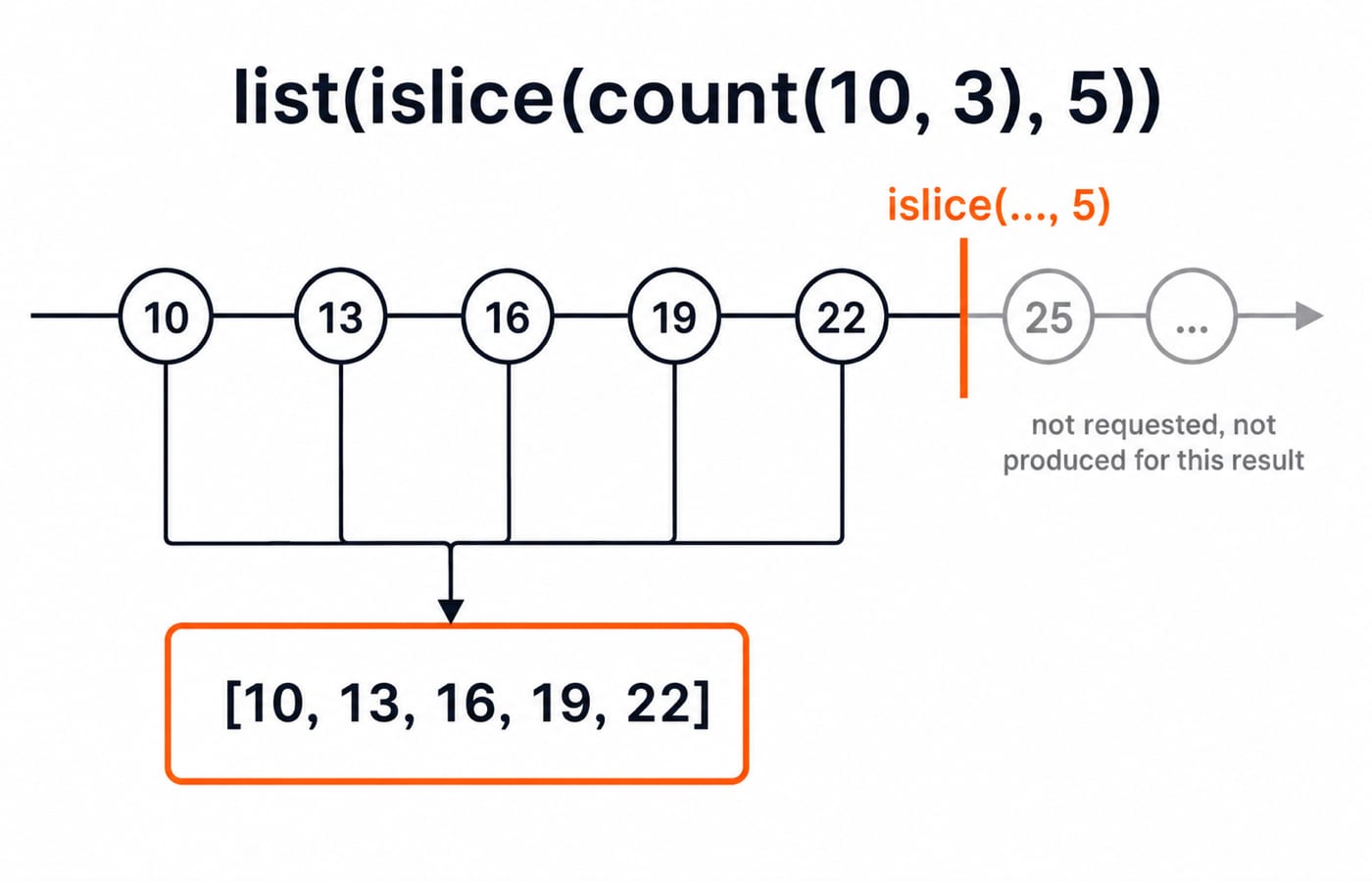
count(start, step) keeps producing evenly spaced values. Give it a boundary with islice:
print(list(islice(count(10, 3), 5)))
#=> [10, 13, 16, 19, 22]
The sequence starts at 10 and adds 3 each time. count does not stop, while islice(..., 5) requests only five items. cycle repeats indefinitely, while repeat can stop after a count:
print(list(islice(cycle("AB"), 6)))
#=> ['A', 'B', 'A', 'B', 'A', 'B']

print(list(repeat("ping", 3)))
#=> ['ping', 'ping', 'ping']
cycle("AB") repeats indefinitely, but repeat("ping", 3) is finite because it includes a count. Never call list(count()) or list(cycle(...)). Every loop over an infinite iterator needs islice, a break, or another verifiable stopping condition.
Fully worked pipeline with chain, filter and running totals
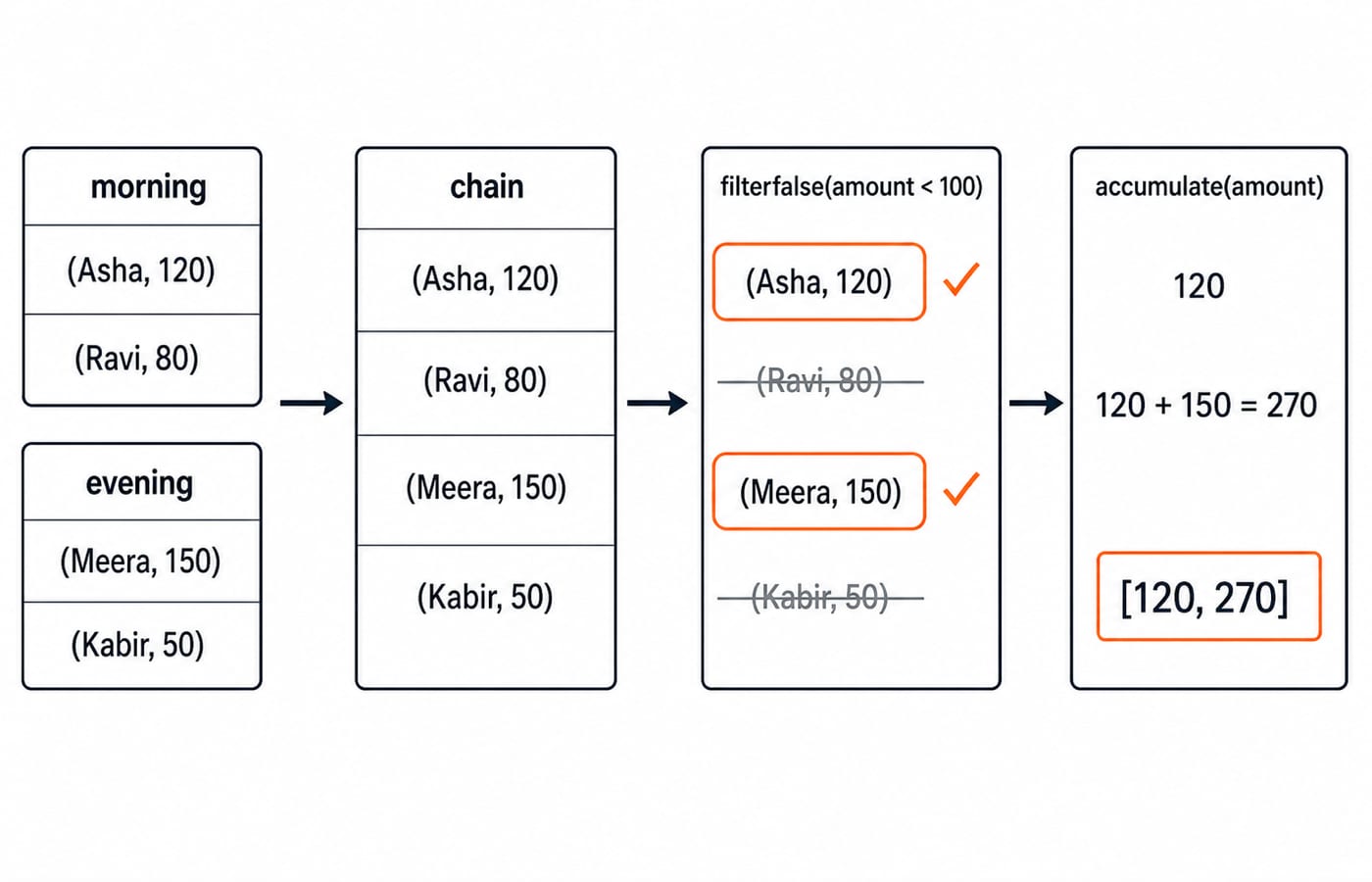
Combine the orders, filter out low amounts, and compute running totals:
morning = [("Asha", 120), ("Ravi", 80)]
evening = [("Meera", 150), ("Kabir", 50)]

all_orders = chain(morning, evening)
eligible = list(filterfalse(lambda row: row[1] < 100, all_orders))
running_totals = list(accumulate(amount for _, amount in eligible))

print(eligible)
#=> [('Asha', 120), ('Meera', 150)]
print(running_totals)
#=> [120, 270]
chain reads every morning order before the evening orders. The predicate asks whether an amount is below 100; filterfalse keeps rows for which that test is false. Ravi at 80 and Kabir at 50 are removed, leaving Asha at 120 and Meera at 150.
Now trace accumulate: the first running total is 120. The next is 120 + 150 = 270. Therefore it emits [120, 270], not just the final sum. The list materialises eligible because it is small and useful for debugging. With larger data, pass iterators onward and consume them once. Laziness can reduce intermediate storage, but it does not automatically make every pipeline faster.
Window and duplicate a stream with islice, pairwise and tee
A full islice call can select positions without indexing the source:
list(islice(range(100, 111), 2, 9, 3))
#=> [102, 105, 108]
Here 2 is the start index, 9 is the excluded stop index and 3 is the step. These are positions, not conditions on the values.
For adjacent comparisons, pairwise removes manual index arithmetic:
readings = [21, 24, 23, 29]
print(list(pairwise(readings)))
#=> [(21, 24), (24, 23), (23, 29)]
print([b - a for a, b in pairwise(readings)])
#=> [3, -1, 6]
tee creates independent iterators from one source, but their positions can differ:
source = iter([10, 20, 30])
left, right = tee(source)

next(left)   # 10
next(left)   # 20
next(right)  # 10
list(right)  # [20, 30]
list(left)   # [30]
The lagging iterator still sees values already requested by the leading one. That requires shared buffered storage. If the consumers drift far apart, the buffer can become substantial, so redesign the flow or materialise a known-small source.
Generate products, arrangements and selections
Choose the tool by the rule of the problem. product chooses one value from each pool:
list(product(["S", "M"], ["black", "blue"]))
#=> [('S', 'black'), ('S', 'blue'), ('M', 'black'), ('M', 'blue')]
There are 2 * 2 = 4 size-colour pairs. This is not a permutation. For three symbols taken two at a time:
list(permutations(["A", "B", "C"], 2))
#=> [('A', 'B'), ('A', 'C'), ('B', 'A'),
#=> ('B', 'C'), ('C', 'A'), ('C', 'B')]

list(combinations(["A", "B", "C"], 2))
#=> [('A', 'B'), ('A', 'C'), ('B', 'C')]
For permutations, order matters, so the count is 3 * 2 = 6. For combinations, swapping the same two members does not make a new selection, so the count is 3. Use product for pools, permutations for arrangements and combinations for membership. Their results are lazy iterators, but the number of possible outputs can still grow quickly. Estimate the count before building a large list.
groupby traps that make correct-looking code fail
groupby groups consecutive equal keys, not every matching key across the whole input. Start with records whose languages alternate:
records = [
    ("Asha", "Python"), ("Ravi", "Java"),
    ("Meera", "Python"), ("Kabir", "Java"),
]
Grouping directly produces four runs: Python -> ['Asha'], Java -> ['Ravi'], Python -> ['Meera'], then Java -> ['Kabir']. Sort by the same key first when you want complete language groups:
ordered = sorted(records, key=lambda row: row[1])
grouped = [
    (language, [name for name, _ in rows])
    for language, rows in groupby(ordered, key=lambda row: row[1])
]
#=> [('Java', ['Ravi', 'Kabir']), ('Python', ['Asha', 'Meera'])]
Keep four failure modes specific:
Reusing an exhausted iterator loses data. Recreate it or deliberately materialise a small result.
Advancing the outer
groupbyinvalidates an unconsumed group iterator. Consume each group inside its loop.Materialising an infinite source never completes. Bound it first.
Letting
teeconsumers drift apart grows the buffer. Redesign or materialise a known-small source.
How assessments and interviews test itertools
Typical tasks ask you to predict output, choose among the three combinatoric tools, find an exhausted-iterator bug, bound an infinite stream, or repair an unsorted groupby. Check these three exercises immediately:
list(islice(count(4, 4), 4))gives[4, 8, 12, 16].list(combinations("WXY", 2))gives[('W', 'X'), ('W', 'Y'), ('X', 'Y')].Change the pipeline threshold from
100to50. All four orders remain, andlist(accumulate([120, 80, 150, 50]))gives[120, 200, 350, 400]because the steps are120,120 + 80 = 200,200 + 150 = 350, and350 + 50 = 400.
Build lazy producers with yield, suspended frames and StopIteration in Python Decorators and Generators: yield, Closures and the Trace-the-Output Interview Questions. itertools solves a different layer: composing and bounding existing iterables with ready-made standard-library tools.
The short version and the next step
Keep five rules in view: know whether the source is finite; expect one-pass consumption; bound infinite sources with islice; choose a combinatoric tool by whether pools or order matter; sort before groupby when equal keys are not already consecutive.
Rerun the order pipeline after changing one amount or the threshold, and verify each intermediate value. Use the Coding & Skills category to choose a broader programming track. Beginners can follow the Python course linked earlier, while learners moving into problem solving can continue with DSA Using Python. Type each example, predict its output before running it, and inspect exactly where every iterator is consumed.
Keep learning

File Handling in Python: Read, Write, Append, CSV and Binary Examples
Learn a reliable file-handling workflow through one scores file, then apply it to cursor control, append mode, CSV quoting, binary records and common errors.
Updated 24 Oct 20266 min readPython
Decorators in Python: @ Syntax, Wrappers and Worked Examples
Understand when decoration happens, what a wrapper receives, and how return values travel back. Runnable examples cover parameters, stacking and built-ins.
Updated 22 Oct 20266 min readPython

Exceptions in Python: Handle Errors with try, except and finally
Learn how Python exceptions change control flow, how to catch expected failures without hiding bugs, and when to use else, finally, raise, and custom exceptions.
Updated 18 Oct 20265 min readPython

Context Managers in Python: with, __enter__, __exit__ and contextlib
Learn how Python's with statement guarantees cleanup, then build and trace class-based and generator-based context managers with runnable examples.
Updated 14 Oct 20266 min readPython