Map, Set and WeakMap in JavaScript: Runnable Examples and Common Errors
Choose the right JavaScript collection by tracing a stock Map, deduplicating IDs with Set, and attaching object-owned metadata with WeakMap. Includes output traps and self-checking exercises.
KnowledgeGate Team
Exam prep & CS education
Updated 26 Aug 20265 min read

You can already store values in objects and arrays, yet Map, Set and WeakMap can look interchangeable. The difference appears when key type, duplication, iteration or object lifetime changes the result. Map stores key-value pairs, Set stores unique values, and WeakMap ties metadata to an object's lifetime.
Map, Set and WeakMap in JavaScript: choose by the data question
Question | Map | Set | WeakMap |
|---|---|---|---|
Purpose | Key-value lookup | Unique values and membership | Metadata tied to a key's lifetime |
Stored shape | Key-value pairs | Values | Object or non-registered Symbol keys mapped to values |
Allowed keys or values | Keys of any JavaScript type | Values of any JavaScript type | Object or non-registered Symbol keys |
Duplicates | One value per key | Duplicate values collapse | One value per key |
Iteration | Yes, in insertion order | Yes, in insertion order | No |
Size |
|
| Not available |
Best use | Dynamic lookup | Uniqueness | Object-owned metadata |
Ask three questions. Do I need a value for each key? Choose Map. Do I only need membership or uniqueness? Choose Set. Is this metadata meaningful only while an object is alive? Choose WeakMap.
An ordinary object is still right for a fixed record shape and JSON-friendly fields. Choose Map for dynamic keys, object keys, reliable insertion-order iteration and direct size. JavaScript does not require every engine to implement Map or Set as a hash table, so do not attach a worst-case O(1) promise to them.
JavaScript Map: trace a stock ledger from start to finish
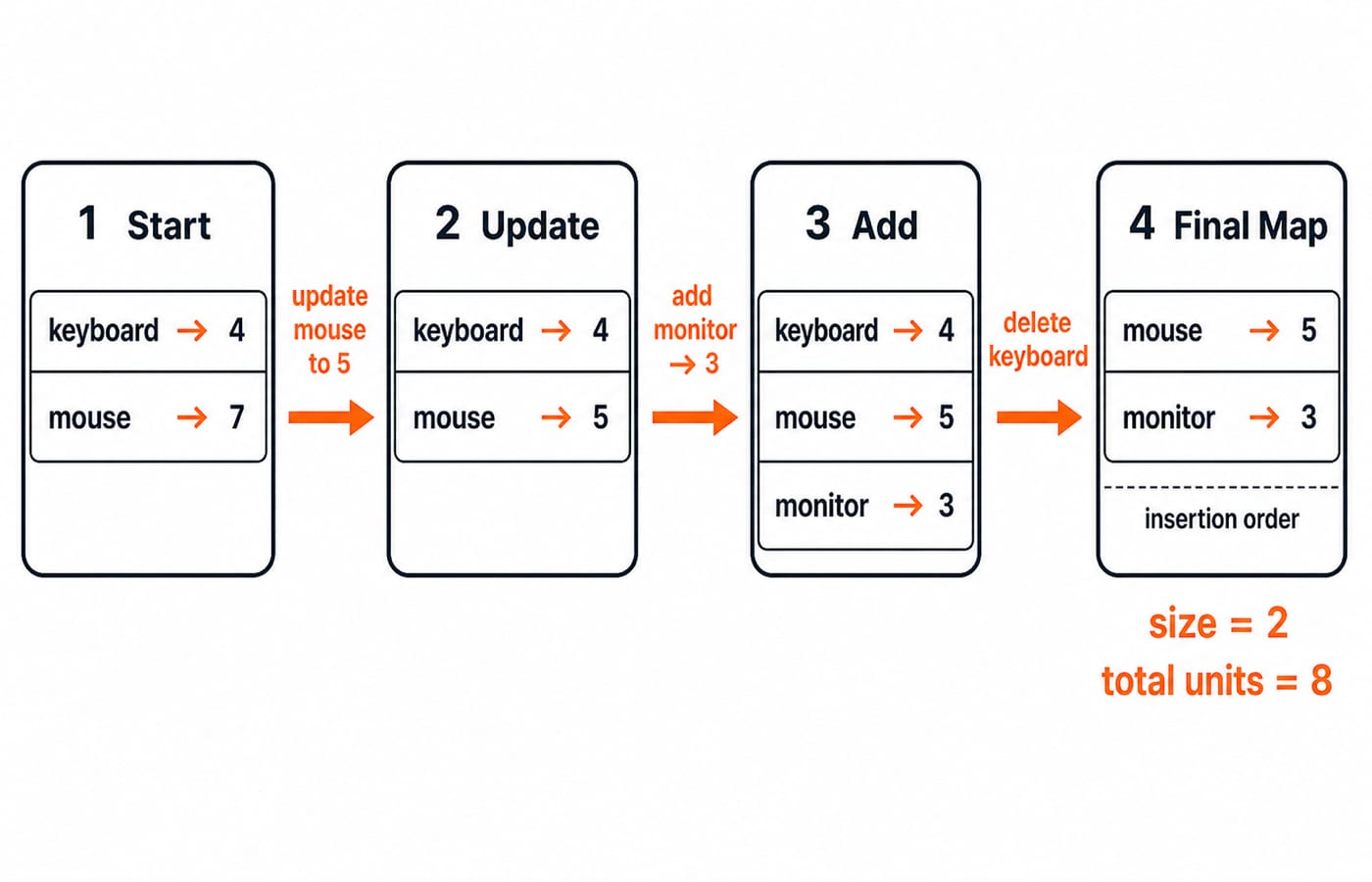
Run this complete trace:
const stock = new Map([["keyboard", 4], ["mouse", 7]]);
stock.set("mouse", stock.get("mouse") - 2);
stock.set("monitor", 3);
stock.delete("keyboard");

console.log([...stock]);
console.log(stock.size);
console.log(stock.get("mouse"));
console.log(stock.has("keyboard"));
console.log([...stock.values()].reduce((total, units) => total + units, 0));
The initial entries are [["keyboard", 4], ["mouse", 7]]. Updating mouse changes 7 to 5 without creating another key. Monitor is appended with value 3. Deleting keyboard leaves [["mouse", 5], ["monitor", 3]].
The outputs are therefore the remaining entries, size 2, mouse stock 5, false, and total units 5 + 3 = 8. set inserts or updates, get reads, has checks presence, and delete removes. keys(), values() and entries() return iterators; a Map itself can also be traversed with for...of. Iteration follows insertion order, and updating mouse did not move it.
JavaScript Set: remove duplicates and compare two groups
const submissions = [104, 101, 104, 107, 101, 109];
const unique = new Set(submissions);
const passed = new Set([101, 104, 110]);

const intersection = [...unique].filter(id => passed.has(id));
const difference = [...unique].filter(id => !passed.has(id));

console.log([...unique]);       // [104, 101, 107, 109]
console.log(unique.size);       // 4
console.log(intersection);      // [104, 101]
console.log(difference);        // [107, 109]
Set drops repeated primitive values but preserves first-insertion order, so the result is not automatically sorted. During the intersection, 104 and 101 are present in passed; 107 and 109 are not. The difference makes the opposite decision. The filtering order comes from unique, which explains [104, 101].
Use add, has, delete and clear to change or query a Set. Iterate it with for...of, values() or a spread. Beyond deduplication, a Set can record visited node IDs in BFS or DFS. The Graph MCQs: 10 Solved BFS, DFS, Connectivity (GATE) article gives wider graph practice.
JavaScript WeakMap: attach metadata to object identity
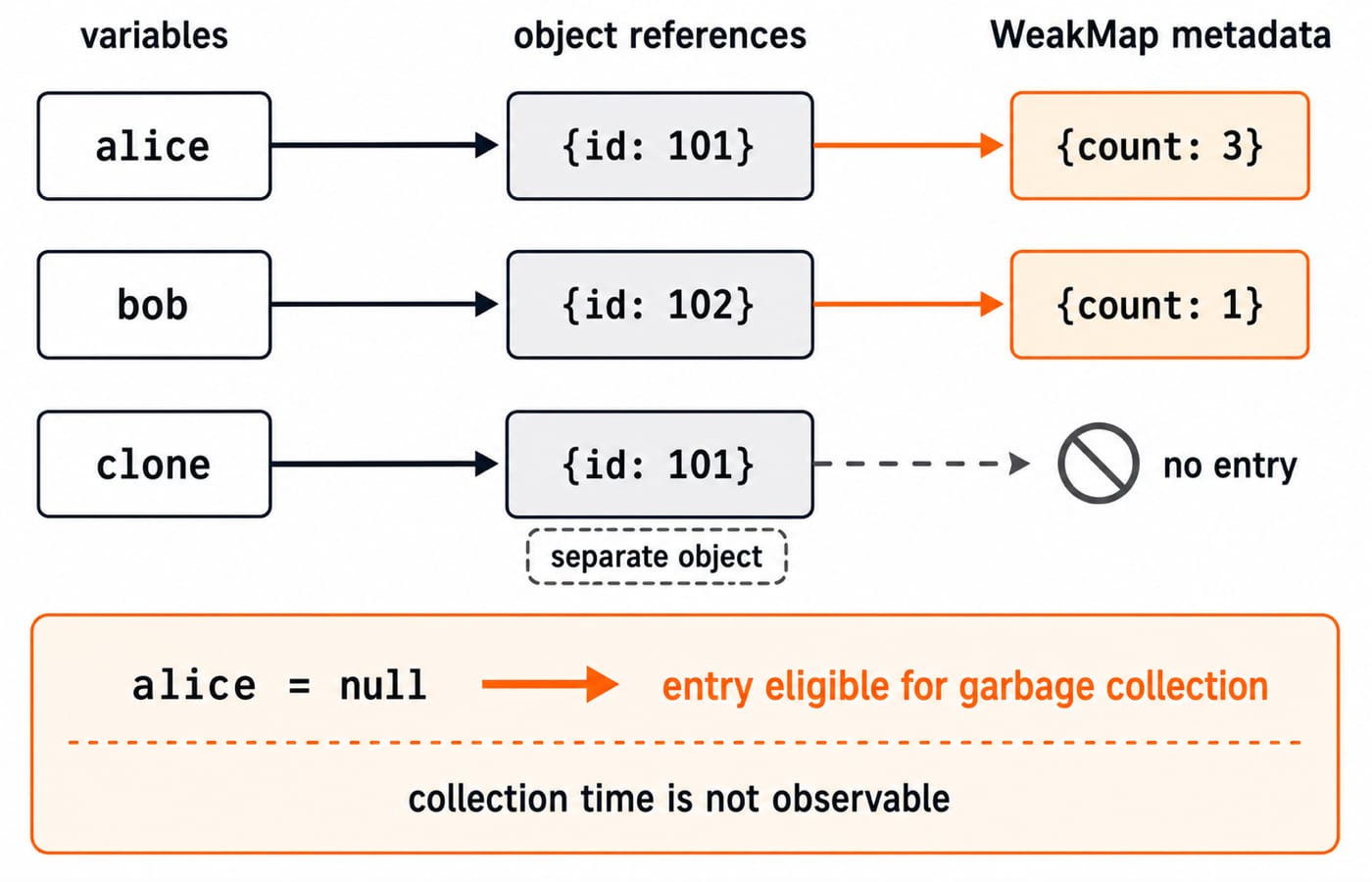
let alice = { id: 101 };
const bob = { id: 102 };
const attempts = new WeakMap([
  [alice, { count: 2 }],
  [bob, { count: 1 }]
]);

attempts.get(alice).count += 1;

console.log(attempts.get(alice).count); // 3
console.log(attempts.get(bob).count);   // 1
console.log(attempts.get({ id: 101 })); // undefined

alice = null;
The clone { id: 101 } has matching content but a different identity, so it is not Alice's key. After alice = null, Alice's object and entry become eligible for garbage collection only if no other strong reference remains. Collection time is not promised or observable with a timer.
WeakMap offers set, get, has and delete. It deliberately has no iteration, size, keys, entries, forEach or clear, because exposing its current contents would reveal garbage-collection timing. Typical uses include per-DOM-node metadata, private state keyed by an instance, and memoised data that must not keep its owner alive. Objects are the normal keys; non-registered Symbols are also allowed, but strings and numbers are not.
Map, Set and WeakMap errors that change the output
Four small mistakes change the answer:
const m = new Map();
m["x"] = 1;
console.log(m.size, m.get("x")); // 0 undefined

const scores = new Map([["A", 0]]);
console.log(scores.get("A") || 10); // 10, wrong fallback
console.log(scores.get("A") ?? 10); // 0

console.log(new Set([{ id: 1 }, { id: 1 }]).size); // 2
console.log(new Map([[{ id: 1 }, "saved"]]).get({ id: 1 })); // undefined
Bracket assignment adds an ordinary property, not a Map entry. Use set. A truthy fallback loses the valid value 0; use ??, or has when presence matters. Separate object literals are separate references, even when their fields match. Reuse one object variable when identity is intended.
new WeakMap().set("alice", 1) throws a TypeError because a string cannot be a WeakMap key. WeakMap is also wrong when the program must list or count every entry. Use Map when you need primitive keys, iteration or size.
How coding tests and interviews probe Map, Set and WeakMap
Predict these outputs before running them:
new Set([NaN, NaN, 0, -0]).size; // 2

const order = new Map([["a", 1], ["b", 2]]);
order.set("a", 3);
[...order]; // [["a", 3], ["b", 2]]

const key = {};
new Map([[key, 5]]).get({}); // undefined
Set uses SameValueZero equality, so the two NaN values match and 0 matches -0. Updating "a" does not reorder it. The final {} is not key.
For a choice question, unique skill tags such as ["js", "react", "js"] need Set. Product quantities keyed by SKU need Map. Metadata owned by live DOM nodes needs WeakMap. Name the deciding property, not only the constructor. For broader selection practice, try Data Structures MCQs.
JavaScript Map, Set and WeakMap exercises with checkable outputs
Count
const colours = ["red", "blue", "red", "green", "blue", "red"]usinggetandset. Solution: the final entries are[["red", 3], ["blue", 2], ["green", 1]]in first-seen order. The most frequent colour is"red", with count3.Deduplicate
const tags = ["js", "web", "js", "es6", "web"]. Solution:[...new Set(tags)]is["js", "web", "es6"], size is3, andhas("js")istrue. Afterdelete("web"), the spread is["js", "es6"].Create
tabA = { id: "A" }andtabB = { id: "B" }. Store visit counts 2 and 1 in a WeakMap, then increment tabA. Solution: reads for tabA and tabB are3and1; probing the clone{ id: "A" }returnsundefined.
Map, Set and WeakMap in JavaScript: the short version and next step
Use Map for enumerable key-to-value lookup. Use Set for uniqueness and membership. Use WeakMap for object-owned metadata that should not keep its key alive. For object keys, shared identity matters, not matching contents.
For a wider sequence with hands-on projects, continue with the Complete JavaScript Course. If you first want to explore the available learning routes, browse Free Courses & Guidance by Prashant Sir.
Keep learning

Static and Final in Java: Shared State, Constants and Override Rules with Runnable Examples
Learn what static and final control in Java by tracing a shared counter, class initialisation, final references, constants and inheritance errors.
Updated 24 Oct 20266 min readJava
Polymorphism in Java: Overloading, Overriding and Runnable Examples
Learn how Java chooses overloaded methods at compile time and overridden methods at runtime. Trace two complete programs, common traps and practice targets.
Updated 22 Oct 20266 min readJava

Packages and Access Modifiers in Java: Visibility Rules with Runnable Examples
Learn how Java package boundaries change member visibility. Compile a complete example covering public, protected, package-private and private access.
Updated 18 Oct 20265 min readJava

OOP Basics in Java: Classes, Objects and the Four Pillars with Runnable Examples
Connect Java's OOP syntax to design decisions with a complete Account example. Trace two objects through validation, overriding and runtime dispatch to exact output.
Updated 14 Oct 20265 min readJava