Types of Indexing in DBMS: Primary, Clustering, Secondary and Multilevel Examples
Learn how file order, uniqueness and entry coverage determine an index type. Two worked examples build index levels and count simplified block reads.
KnowledgeGate Team
Exam prep & CS education
Updated 24 Oct 20266 min read
You may know that an index speeds retrieval yet still hesitate when a question asks whether an index is primary, clustering, secondary, dense or sparse. Classify an index by the data file's physical blocks, its index entries, and the resulting block I/O calculation. The governing idea is simple: identify how the data file is ordered, whether the search field is unique, and how many index entries are stored.
Indexing basics: search key, index entry and data pointer
A DBMS index separately maps a search-key value to a record, block or identifier list. In 1050 -> D2, 1050 is the search key and D2 the block pointer. A search key is any lookup attribute set and need not be unique.
The index file is distinct from the data file. It can replace a scan with an index search and targeted read, but costs storage and maintenance on inserts, deletes and indexed-column updates. Query selectivity, physical order, ranges and write load decide whether it helps.
For a route through DBMS and core subjects, Zero to Hero: Complete CS Course is an optional starting point.
Primary, clustering and secondary indexes: classify by file order first
Conventional file-organisation definitions are:
index type | physical order of data file | search field unique? | typical textbook entry pattern | one-line use |
|---|---|---|---|---|
primary | Ordered by primary key | Yes | Usually sparse, one boundary per block | Find the key |
clustering | Ordered by non-key field | No | Usually one entry per distinct value or group | Find a contiguous group |
secondary | Not ordered by search field | Either | Usually dense; duplicates may use an identifier bucket | Alternate access path |
Engine terms such as clustered index, nonclustered index, index-organised table and heap-plus-index differ. Textbook labels are not universal SQL or storage behaviour.
Classify by ordering field, uniqueness and whether each record, block or group needs an entry. Then identify a single-level, multilevel, tree or hash structure. Dense or sparse describes coverage; primary or secondary describes file order.
Worked example: build a sparse primary index and find key 1060
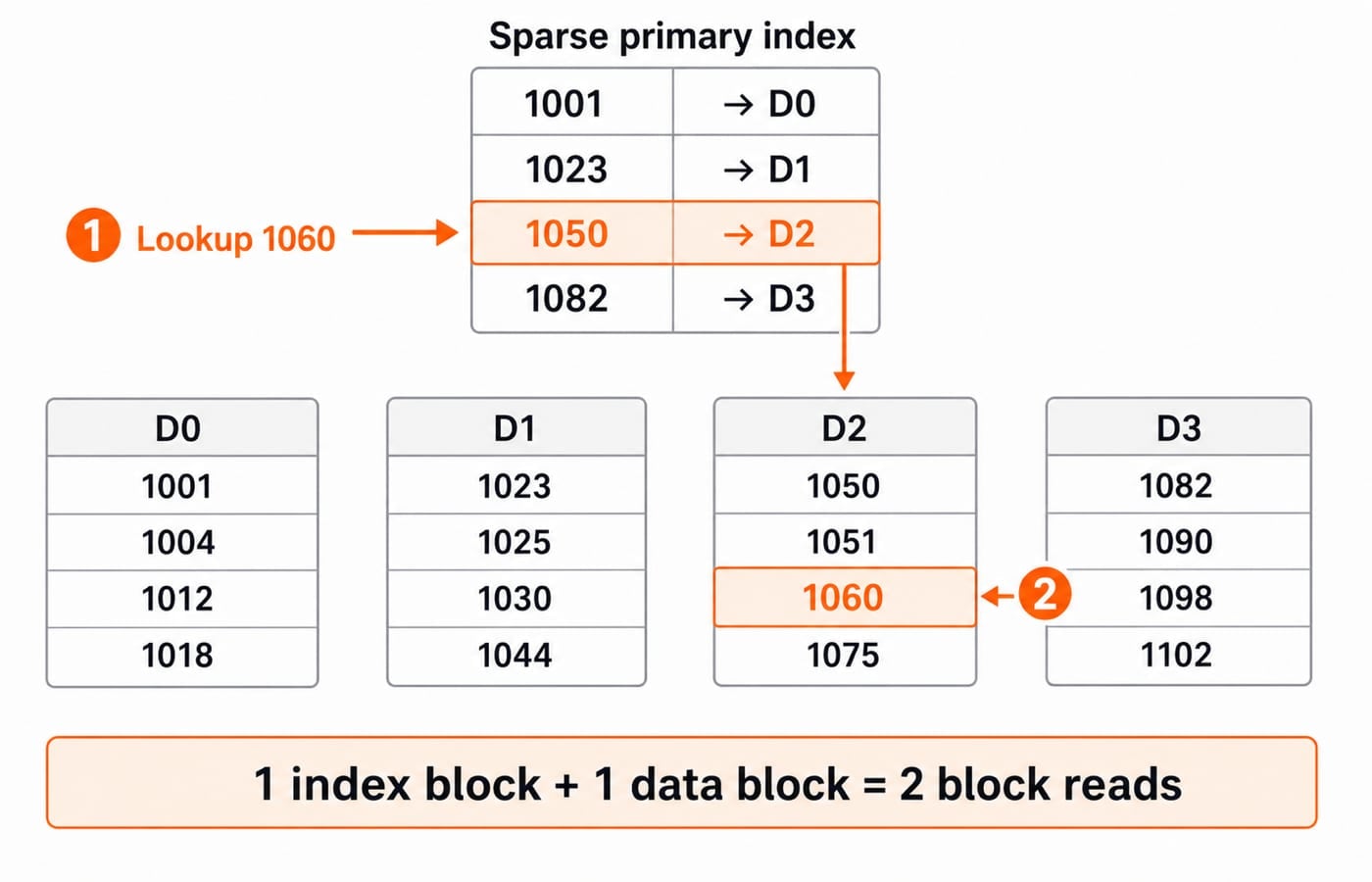
This file is ordered by unique student_id, four records per block:
D0 = [1001, 1004, 1012, 1018]D1 = [1023, 1025, 1030, 1044]D2 = [1050, 1051, 1060, 1075]D3 = [1082, 1090, 1098, 1102]
The sparse primary index is [1001 -> D0, 1023 -> D1, 1050 -> D2, 1082 -> D3], one first-key entry per block.
For 1060, select the greatest index key not greater than it: 1050. Follow 1050 -> D2, scan [1050, 1051, 1060, 1075], and return 1060. With a one-block index, this costs 1 index-block plus 1 data-block read, or 2 reads. A scan could inspect all 4 blocks, but this is not measured latency.
The boundary works because keys from 1050 up to, but excluding, 1082 lie in D2. Moving 1060 arbitrarily to D0 would break it.
Dense and sparse indexes on the same records
Add branch: D0 has 1001 CS, 1004 EE, 1012 CS, 1018 ME; D1 has 1023 CS, 1025 EE, 1030 CS, 1044 CE; D2 has 1050 ME, 1051 CS, 1060 EE, 1075 CS; D3 has 1082 CS, 1090 CE, 1098 EE, 1102 CS.
Since the file is ordered by student_id, a branch index is secondary. Its dense form has one branch-key and identifier entry per record. CS returns eight identifiers: 1001, 1012, 1023, 1030, 1051, 1075, 1082, 1102, across D0 to D3.
One CS entry may instead point to their identifier bucket. It remains secondary; CS -> first data block is unsafe because records are scattered. Reorder by branch and the eight CS records fill two adjacent four-record blocks. Clustering entry CS -> first CS block then leads to the group, though inserts may need overflow or reorganisation.
Multilevel indexing worked example: from 48,000 blocks to one short path
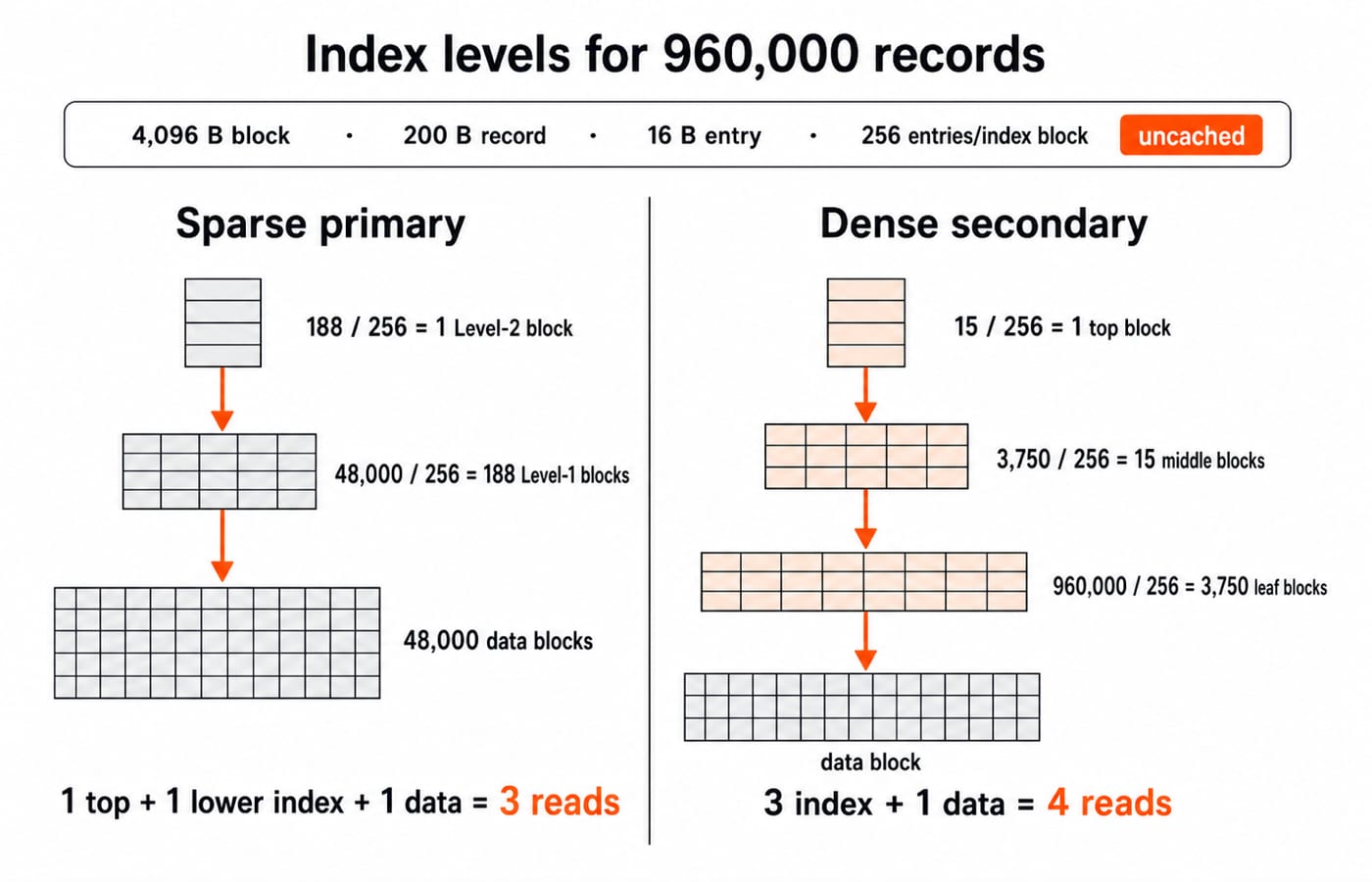
Assume 960,000 fixed 200-byte records and 4,096-byte blocks, without spanning, headers, fill loss or unstated overhead.
Blocking factor is floor(4,096 / 200) = 20, giving 960,000 / 20 = 48,000 blocks. An 8-byte key plus 8-byte pointer gives floor(4,096 / 16) = 256 entries per index block.
Level 1 needs ceil(48,000 / 256) = 188 blocks. Its 188 entries fit in 1 Level-2 block. An uncached lookup reads one block at each level plus one data block, totalling 3. Binary search over ordered data blocks takes about ceil(log2 48,000) = 16 probes.
For a dense secondary index on a unique 8-byte key: 960,000 / 256 = 3,750 leaf blocks, ceil(3,750 / 256) = 15 middle blocks, and ceil(15 / 256) = 1 top block. Lookup costs 3 index plus 1 data read. Caching, headers, variable keys, fill factor and multiple matches alter real costs.
B+ tree, hash and composite indexes serve different query shapes
A static multilevel index has fixed levels. A B+ tree stays balanced and links leaves for ordered scans. Basic hashing supports equality, not ordered ranges. B+ Trees and Database Indexing: why indexes are fast, with a worked insert provides the canonical dense-versus-sparse foundation and a stepwise B+ tree insertion. The calculations here extend that foundation into sparse boundary lookups, dense-secondary levels, hash contrast and composite-prefix choices.
WHERE student_id = 1060 can use hashing or a tree. WHERE student_id BETWEEN 1050 AND 1082 ORDER BY student_id favours a B+ tree, which seeks and continues across leaves. This is structural, not an optimiser promise.
For WHERE branch = 'CS' AND cgpa >= 8.50 ORDER BY cgpa, a B+ tree on (branch, cgpa, student_id) isolates CS, scans CGPAs in order and covers student_id in this simplified model. Its prefix serves a cgpa-only lookup less directly. Check the execution plan.
Exam traps and common indexing question forms
wrong shortcut | why it fails | correct test |
|---|---|---|
primary index means any index on a primary key | It ignores physical file order | Check the ordering field |
sparse means one entry for every few arbitrary records | It ignores block or group boundaries | Check what each entry covers |
secondary means the search field has duplicates | It confuses file order with uniqueness | Ask whether the field determines physical order |
hashing is always faster | It ignores ranges and collisions | Inspect the predicate |
more indexes always help | It ignores storage and update maintenance | Compare read benefit with write cost |
Indexing problems usually provide the file order, key properties, block size, record size and pointer size. From those inputs, classify the index, compute its levels and compare access structures. DBMS Interview Questions for Freshers: Top 50 Answers supports revision.
Checklist: underline the ordering attribute; mark key or non-key; identify pointer granularity; use floor for entries that fit and ceil for blocks required; label I/O assumptions. Thus 48,000 / 256 = 187.5 requires 188 blocks.
Types of indexing in DBMS: the short version and next practice
Primary means an ordering key.
Clustering means ordering non-key groups.
Secondary means a non-ordering search field.
Dense versus sparse describes entry coverage.
Multilevel, B+ tree and hash describe access-structure organisation.
A useful index follows from query and file organisation. Self-check: find 1090 from boundary 1082. With 8,192-byte blocks, floor(8,192 / 200) = 40 records, 960,000 / 40 = 24,000 data blocks and floor(8,192 / 16) = 512 index entries. Level 1 needs ceil(24,000 / 512) = 47 blocks. Explain both changes.
Continue with CS Fundamentals for Exams & Placements for broader revision. For a structured DBMS sequence, use CS Fundamentals for Placements by Sanchit Sir.
Keep learning
INNER JOIN in SQL: Syntax, Worked Examples, and Common Errors
Build INNER JOIN intuition with a customer-order dataset. Trace exact row matches, handle one-to-many results, extend to payments, and practise common interview patterns.
Updated 25 Oct 20266 min readDBMS

SQL Joins Explained: INNER, LEFT, RIGHT, FULL, CROSS and SELF with Runnable Examples
Trace all six SQL join types on one support-agent dataset, with runnable queries, exact outputs, NULL behaviour, row counts and filter-placement traps.
Updated 21 Oct 20265 min readDBMS
GROUP BY and HAVING in SQL: Syntax and Worked Examples
Trace eight sales rows through WHERE, GROUP BY, aggregates, and HAVING, then tackle multiple columns, NULLs, COUNT variants, and common query traps.
Updated 17 Oct 20265 min readDBMS
SQL Aggregate Functions: COUNT, SUM, AVG, MIN and MAX with Examples
Use one runnable sales table to see exactly how SQL aggregates treat rows, NULL values, duplicates and groups. Every result includes the arithmetic behind it.
Updated 13 Oct 20265 min readDBMS