Conditionals in Python: If, Elif and Else with Worked Examples
Learn how Python chooses a branch, then trace exact examples covering Boolean operators, truthiness, nesting, short-circuiting and common mistakes.
KnowledgeGate Team
Exam prep & CS education
Updated 26 Aug 20266 min read
Writing a comparison is easy. Predicting which block runs becomes harder when elif, and, nested decisions and indentation appear together. A branch-by-branch model, runnable examples with exact outputs, and a grading decision traced from inputs to result show how Python reaches each result. The central rule is simple: Python checks conditions from top to bottom, executes the first true branch in one if/elif/else chain, and uses indentation to decide which statements belong to that branch.
How a Python if statement makes a decision
A condition is an expression whose truth value decides whether an indented block runs.
temperature = 31

if temperature > 30:
    print("Hot day")

print("Check complete")
The output is:
Hot day
Check complete
Python evaluates 31 > 30 as True, so it runs the indented print(). The final print() is outside the block, so it runs regardless. The keyword if starts the decision, the condition comes before a colon, and the body uses consistent indentation, normally four spaces. If temperature were 24, the condition would be False and only Check complete would print.
The Coding & Skills category is a broader route for comparing Python, other programming languages and DSA courses.
Choose between if, if/else, and if/elif/else
Use if alone when an action is optional. With is_logged_in = True, if is_logged_in: print("Dashboard") prints Dashboard. With False, that block prints nothing.
Use if/else when exactly one of two outcomes is required. For number = 7, the test number % 2 == 0 is False, so the program prints Odd.
Use an if/elif/else chain for ordered alternatives:
score = 76

if score >= 80:
    print("Grade A")
elif score >= 65:
    print("Grade B")
else:
    print("Grade C")
The output is Grade B. The first test is false, the second is true, and the chain stops. It does not continue to else.
Order matters when conditions overlap. With score = 92, checking >= 80 before >= 65 produces Grade A. Put >= 65 first and that broader test captures 92, incorrectly producing Grade B. That is a logic-order error, not a syntax error.
Fully worked example: trace an eligibility and grade decision
Run this exact program:
marks = 76
attendance = 82
project_submitted = True

if attendance < 75:
    result = "Not eligible"
elif marks >= 80 and project_submitted:
    result = "Grade A"
elif marks >= 65:
    result = "Grade B"
else:
    result = "Grade C"

print(result)
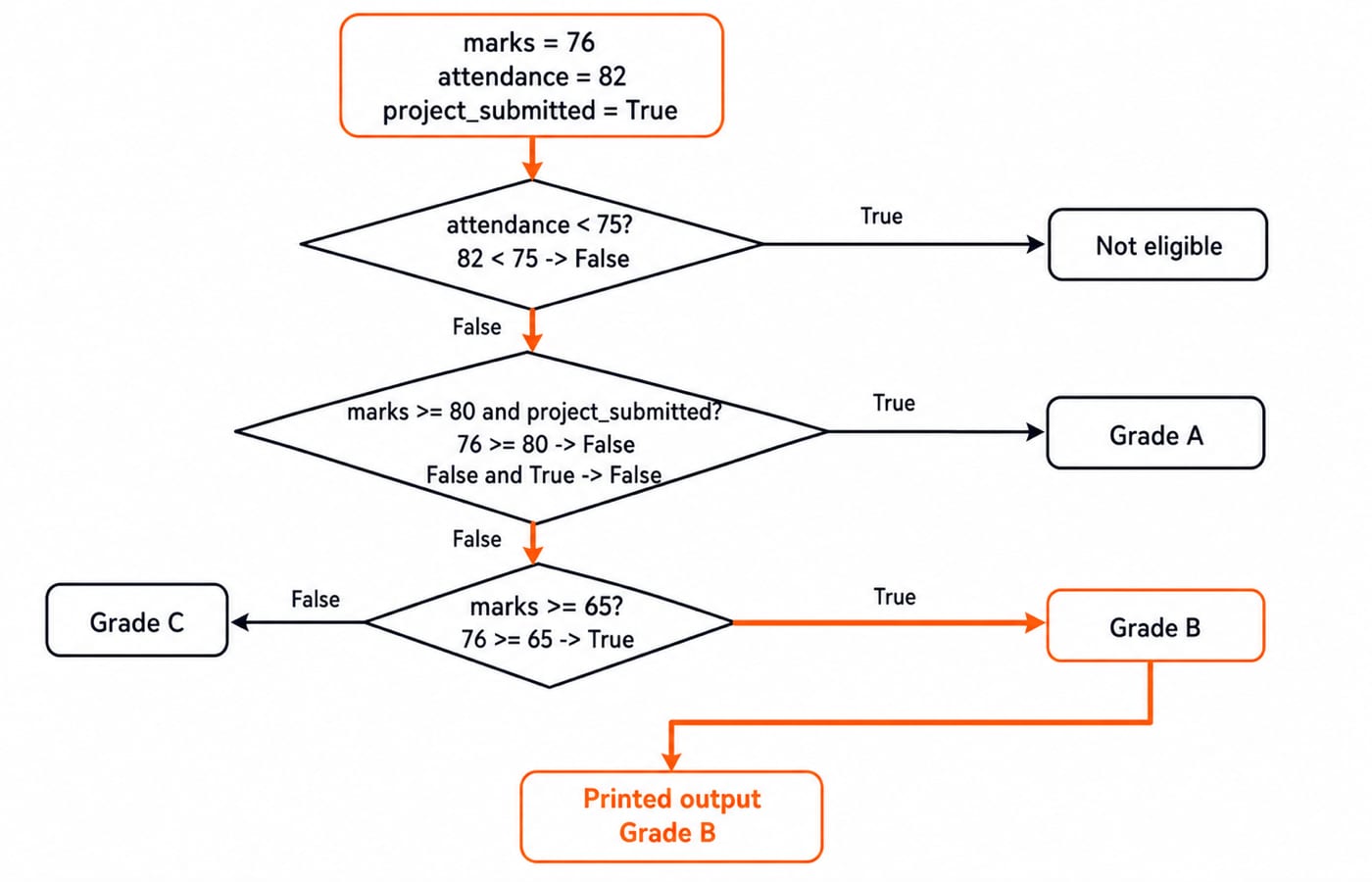
Trace it from the top. 82 < 75 is False. Next, 76 >= 80 is False, so False and True is False. Then 76 >= 65 is True. Python assigns "Grade B", skips the remaining else, and prints exactly:
Grade BPredict these reruns before executing them:
Marks | Attendance | Project submitted | Result | Decisive test |
|---|---|---|---|---|
88 | 82 | True | Grade A |
|
88 | 70 | True | Not eligible |
|
64 | 90 | True | Grade C | Every earlier branch is false |
Build conditions with comparisons, Boolean operators and truthiness
For age = 19, age >= 18 is True, age == 19 is True, age != 19 is False, and 18 <= age < 60 is True. Remember that = assigns a value, while == compares two values.
Boolean operators combine tests. With age = 19 and has_id = True, age >= 18 and has_id is True. With day = "Sunday" and is_holiday = False, day == "Sunday" or is_holiday is True. With logged_in = False, not logged_in is True. The propositional and predicate logic explainer provides optional background on truth values and logical operators.
Python also treats some non-Boolean values as truthy or falsy. With items = [], if items takes the false branch and prints Cart is empty. With items = ["book"], it prints 1 item(s).
Short-circuiting means Python may stop evaluating a Boolean expression as soon as its result is known. With denominator = 0, denominator != 0 and 120 / denominator > 2 is safely False. Python does not attempt the division because the first operand is already false.
Use nested conditionals and the conditional expression deliberately
Nesting is useful when an inner question matters only after an outer test passes:
age = 19
has_id = True
balance = 350

if age >= 18 and has_id:
    if balance >= 500:
        access = "Full access"
    else:
        access = "Limited access"
else:
    access = "No access"

print(access)
The outer condition is True. Inside it, 350 >= 500 is False, so the output is exactly Limited access. This nesting carries meaning because the balance test matters only after age and ID have passed. Avoid adding layers when one ordered elif chain states the decision more clearly.
A conditional expression is suitable for selecting one value. With score = 76, this assigns Pass:
label = "Pass" if score >= 50 else "Retry"Do not compress a multi-rule grading decision or several stacked choices into one line.
Common conditional mistakes and boundary traps
if score = 50: is invalid because = assigns. Write if score == 50: to compare. A missing colon prevents the statement from parsing, while inconsistent indentation breaks the block.
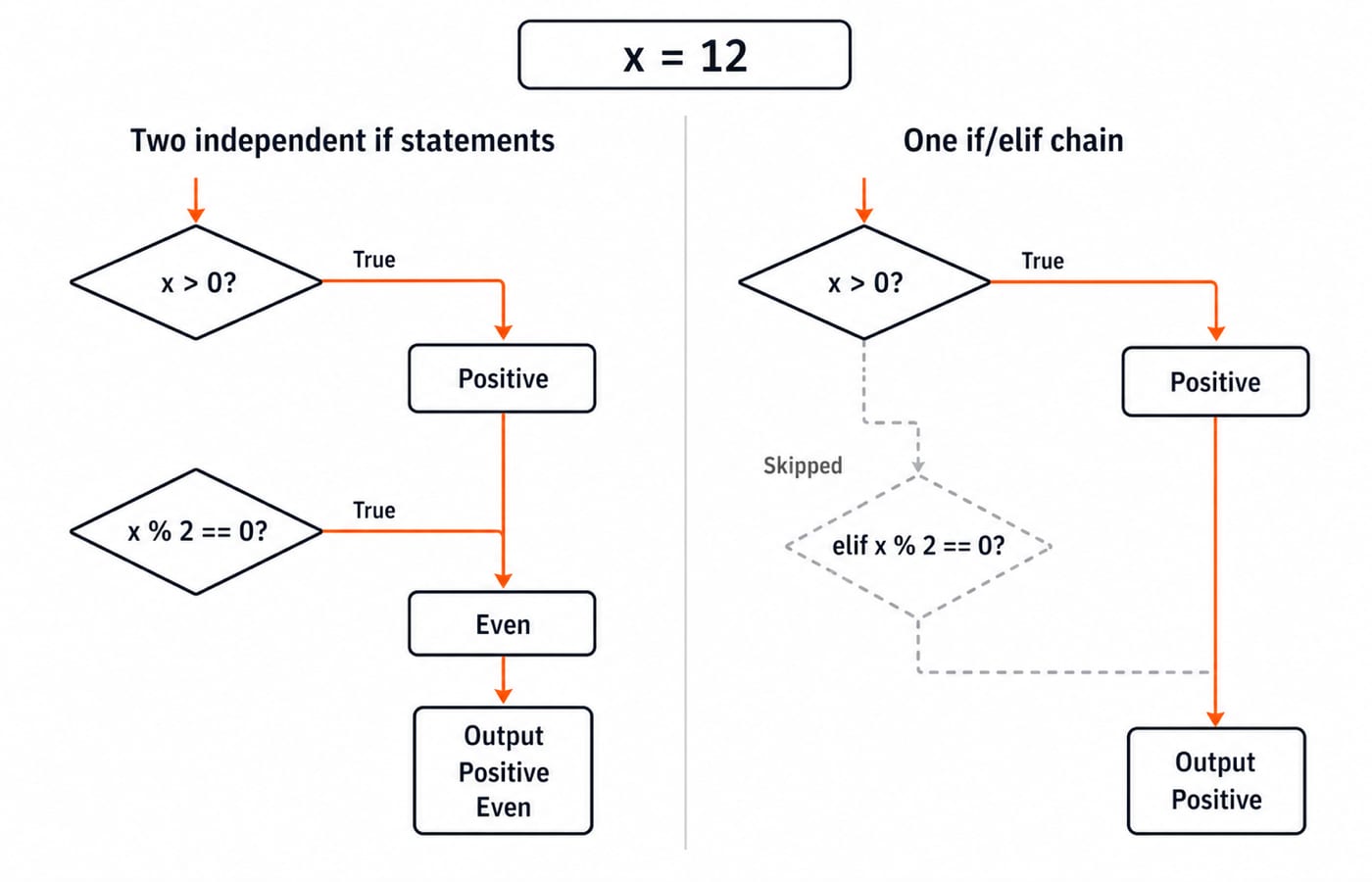
Separate if statements are independent. With x = 12, these statements print both Positive and Even:
if x > 0:
    print("Positive")
if x % 2 == 0:
    print("Even")
Replace the second if with elif and only Positive prints, because one chain stops at its first true branch.
Check boundaries exactly. At score = 50, score > 50 is False, but score >= 50 is True. Compare values with ==, not is. Order overlapping thresholds from highest or most specific to lowest or broadest. Use pass only as a placeholder for an intentionally empty branch, never to conceal unfinished logic.
How assessments and coding rounds test conditionals
Practice questions often test branch attachment. With x = 8, an if x > 5 prints A. A second if x % 2 == 0 prints B, and its else belongs only to that second if. The output is therefore A followed by B, never C.
Three useful predict-before-running checks are:
value = 0makesif valuetake the false branch because zero is falsy.With
x = 5,if x < 10followed byelif x < 20selects only the first branch.With
n = 0,n != 0 and 10 / n > 1isFalsewithout division by zero because evaluation short-circuits.
For a focused follow-up, continue with the if-else Conditional Statement lesson in the Python learning module.
Python conditionals: the short version and next step
Keep six rules in mind:
A condition has a truth value.
Indentation defines the branch body.
One
if/elif/elsechain stops at its first true branch.Separate
ifstatements can both run.Overlapping tests must be ordered carefully.
Boundaries should be checked with values equal to the threshold.
Now transfer the model to one last exercise:
solved = 18
attempted = 24
reviewed_errors = True
accuracy = solved / attempted * 100

if accuracy >= 80 and reviewed_errors:
    next_set = "Hard set"
elif accuracy >= 70 and reviewed_errors:
    next_set = "Medium set"
else:
    next_set = "Review basics"

print(accuracy, next_set)
Since 18 / 24 = 0.75 and 0.75 * 100 = 75.0, the first branch is false and the second is true. The predicted final output is 75.0 Medium set.
The Python Programming course is the immediate structured next step for syntax, concepts, MCQs and coding practice. Once conditionals, loops, functions and collections feel comfortable, DSA Using Python is a later route. Neither course is required to run these examples.
Keep learning
Decorators in Python: @ Syntax, Wrappers and Worked Examples
Understand when decoration happens, what a wrapper receives, and how return values travel back. Runnable examples cover parameters, stacking and built-ins.
Updated 22 Oct 20266 min readPython
Exceptions in Python: Handle Errors with try, except and finally
Learn how Python exceptions change control flow, how to catch expected failures without hiding bugs, and when to use else, finally, raise, and custom exceptions.
Updated 18 Oct 20265 min readPython
Context Managers in Python: with, __enter__, __exit__ and contextlib
Learn how Python's with statement guarantees cleanup, then build and trace class-based and generator-based context managers with runnable examples.
Updated 14 Oct 20266 min readPython
Python Arguments and Scope: Parameters, LEGB, and Worked Examples
Trace how Python binds arguments, handles mutation and rebinding, and resolves names through LEGB. Runnable examples turn scope rules into predictable output.
Updated 10 Oct 20265 min readPython