Introduction to Operating System: Core Concepts with a Worked CPU Schedule
Build a connected model of operating-system services, privilege, process states and kernel structures. Then trace an FCFS schedule with I/O and switching costs.
KnowledgeGate Team
Exam prep & CS education
Updated 1 Sep 20266 min read62 views
It is easy to memorise that an operating system is an interface, yet still miss what happens when a ready process needs the CPU, a file read reaches a device, or a user program tries to touch protected memory. Operating-system roles, services, system calls, types and kernel structures connect these events to one exact CPU and I/O timeline.
What an operating system actually does
An operating system has two roles. As an abstraction layer, it gives programs processes, virtual address spaces and files. As a resource manager, it allocates CPU, memory, storage and devices while enforcing protection. It is neither merely a graphical interface nor merely a collection of device drivers.
When editor process P1 saves notes.txt, it uses a file abstraction. The OS checks access, maps the request to storage blocks, coordinates the device and records the result. Its service families include program execution, process control, I/O, files, communication, error handling, allocation, accounting and protection.
The goals can conflict: convenience, efficient resource use, fair and responsive sharing, isolation, reliability and controlled access. Fairness may reduce raw throughput. This foundation fits naturally into the broader GATE preparation route.
User mode, kernel mode and the system-call boundary
The path is user application -> library/API wrapper -> system call -> kernel service -> driver or managed resource. Applications run in restricted user mode; the kernel performs privileged operations. A hardware-controlled transfer prevents a user program from directly changing page tables, programming a device or disabling interrupts.
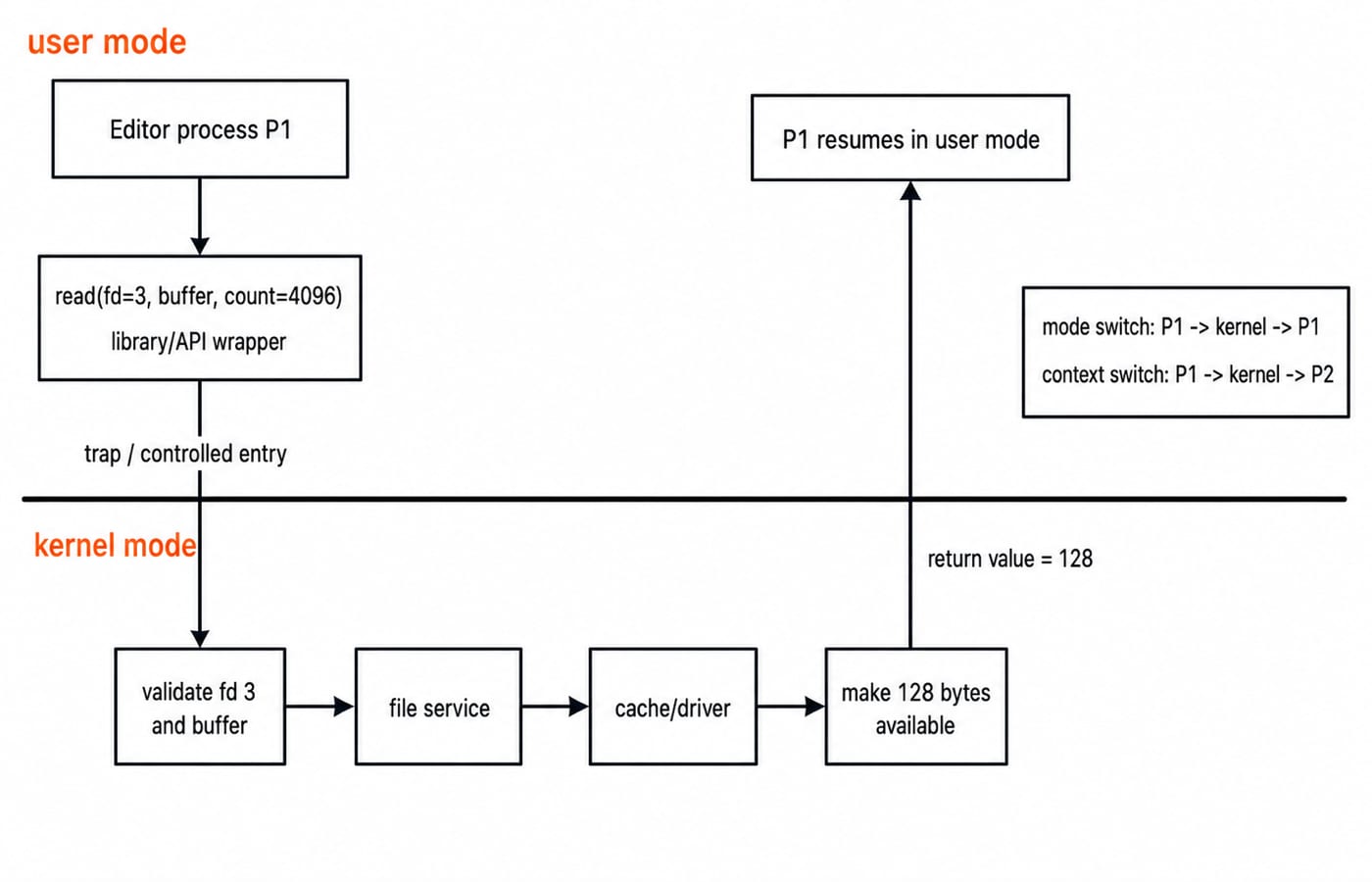
In a Unix-like example, editor process P1 calls read(fd=3, buffer, count=4096). The wrapper places the identifier and arguments according to the calling convention, then a trap enters the kernel. The kernel validates descriptor 3, the buffer range and access. File and I/O layers obtain the data, make 128 bytes available, and return 128. P1 resumes in user mode. An API call and a kernel system call are related, but not automatically identical in every operating system.
Keep three events separate. A system call changes the control path and privilege. A mode switch changes execution privilege and may return to the same P1. A context switch changes the running process or thread, perhaps replacing P1 with P2.
The core management areas form one system
These areas interact.
Area | Object managed | Decision | Failure if unmanaged |
|---|---|---|---|
Process management |
|
|
|
Memory management |
|
|
|
File/storage management |
|
|
|
I/O management |
|
|
|
Protection |
|
|
|
A program is stored code and data. A process is a running instance with address space, execution state, resources and OS records. A thread is an execution stream sharing process resources. These distinctions provide required state and scheduling information.
Shared state raises correctness problems beyond scheduling, as Process Synchronization and Semaphores explains.
OS types and kernel structures answer different questions
An OS type describes workload or timing behaviour. A kernel structure describes privileged-service organisation.
OS type | Main idea |
|---|---|
Batch | Executes queued jobs with little interaction |
Multiprogramming | Keeps multiple jobs available so another can run during a wait |
Time-sharing | Uses rapid preemption to support interactive users or tasks |
Real-time | Is designed around deadline constraints; a hard real-time system treats a missed critical deadline as system failure, while a soft real-time system tolerates occasional misses with degraded value |
A monolithic kernel keeps services in one privileged address space for direct communication, but enlarges the trusted failure surface. A layered design uses defined levels that can become awkward. A microkernel keeps fewer mechanisms privileged, improving isolation but adding communication. Modular or hybrid designs combine boundaries and loadable components. None is universally best.
Multiprogramming is not multiprocessing. The former concerns scheduling and residency; the latter requires multiple processing units.
Worked example: process states, I/O overlap and scheduling metrics
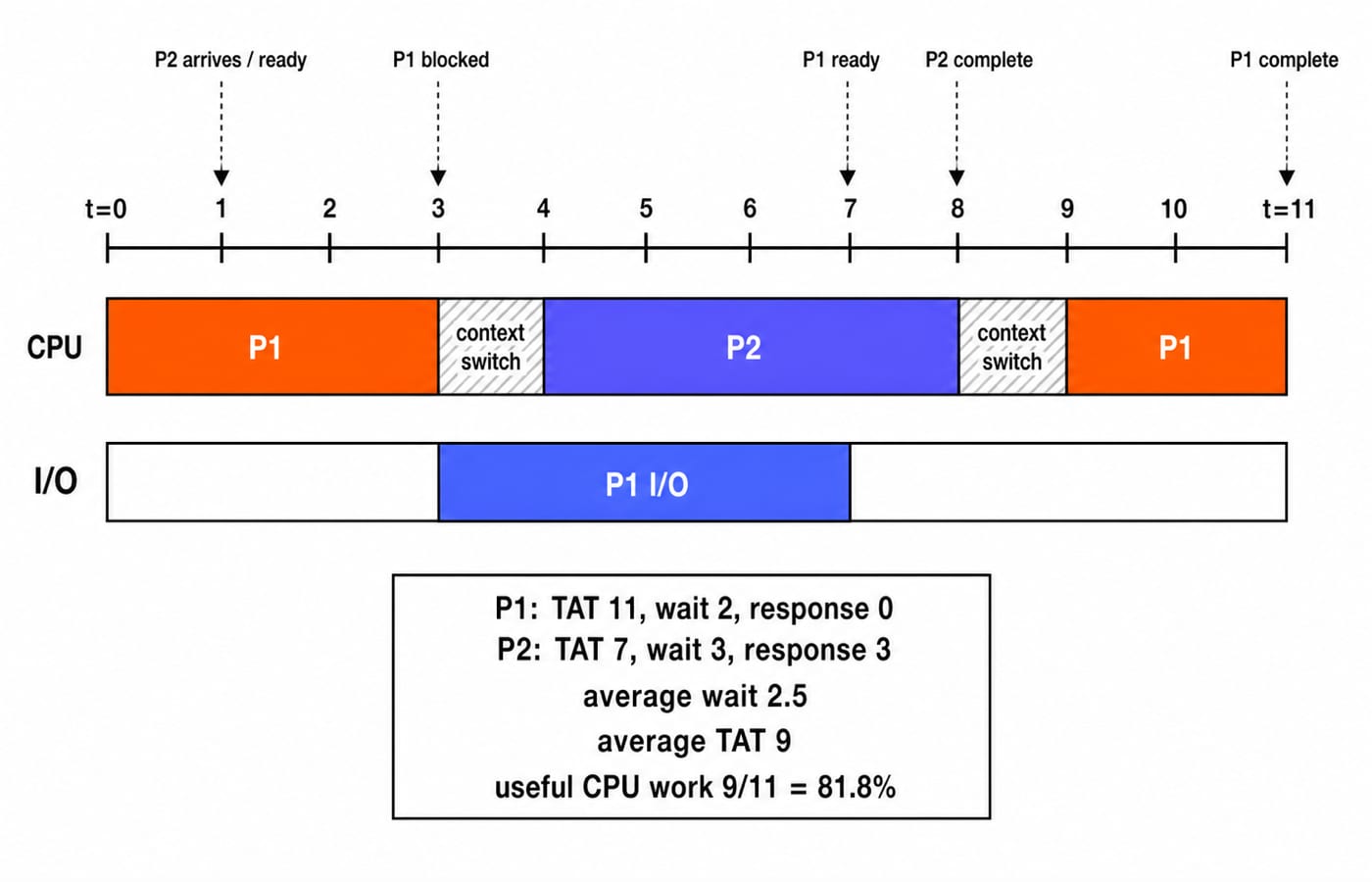
Assume one CPU and an independent I/O device. Ready processes use non-preemptive FCFS. Initial dispatch costs 0; later switches cost 1 time unit. P1 arrives at t=0 with CPU 3, I/O 4, CPU 2. P2 arrives at t=1 with CPU 4. A process awaiting I/O is blocked, not ready.
The trace is:
P1runs0-3, starts I/O att=3, and is blocked untilt=7.Switching occupies
3-4.P2, ready sincet=1, runs4-8.At
t=7,P1finishes I/O and becomes ready.P2completes att=8.Switching occupies
8-9.P1runs9-11and completes.
The CPU never idles because P2 executes while P1 is blocked.
Metrics from that trace:
P1turnaround = completion minus arrival =11 - 0 = 11.P1waiting = turnaround minus CPU and I/O =11 - (3 + 2) - 4 = 2.P1response = first run minus arrival =0 - 0 = 0.P2turnaround =8 - 1 = 7.P2waiting =7 - 4 = 3.P2response =4 - 1 = 3.Average waiting time =
(2 + 3) / 2 = 2.5.Average turnaround time =
(11 + 7) / 2 = 9.
Useful execution is 3 + 2 + 4 = 9 of 11 units, or 9/11 x 100 = 81.8%. The other 2 units are switch overhead. Because switching is non-idle work, 81.8% is the useful-execution share, not total non-idle CPU utilisation.
Common Introduction to OS traps
Trap | Why it fails | Correction |
|---|---|---|
| Ignores user-space components | Kernel is the privileged core |
| Omits state and resources | Process adds both |
| Confuses waits | Event wait is blocked; CPU wait is ready |
| Kernel entry may return to same process | Separate |
| Overlap is not parallel hardware | Multiprocessing needs multiple processing units |
| Service and I/O consume time | Use |
| Excludes busy switching | It is the useful process-execution share |
How objective exams and interviews test the foundation
Objective questions and interview prompts commonly ask you to identify privileged operations, trace user-to-kernel control, distinguish programs, processes and threads, classify process states, compare OS types, identify structure trade-offs, or calculate scheduling metrics.
Use this 60-second routine:
Write the resource being managed and identify the current process state.
Mark every arrival and I/O completion.
Separate useful CPU bursts from overhead.
Apply each formula with time units.
At the checkpoint P1 becomes ready at 7 but resumes at 9, its ready-queue wait is 9 - 7 = 2, not the 4 units spent doing I/O. For the wider topic map, continue with Operating Systems for GATE: Deadlocks, Scheduling, Memory. When you want optional timed practice, use the GATE Test Series.
Introduction to Operating System: the short version and next step
Keep five points: the OS provides abstractions and manages resources; protected work crosses a system-call boundary; process state determines CPU eligibility; OS types and kernel structures classify different properties; and metrics require consistent accounting for arrivals, I/O and overhead. Remember read 4096 -> return 128, P1 I/O 3-7, P1 ready 7-9, average wait 2.5, and useful CPU work 9/11 = 81.8%. For an organised subject sequence, use GATE Guidance by Sanchit Sir. Then redraw both diagrams from memory and explain who owns every transition.
Keep learning
Operating System for GATE: An 8-Week Topic-by-Topic Preparation Plan
Build OS preparation around dependencies, visible calculations and an error log. This eight-week timetable includes weekly hour splits, worked checks and a practical recovery rule.
Updated 25 Oct 20265 min readOperating Systems
Operating Systems Semester Guide: Learn Theory, Solve Numericals and Practise Labs
Connect OS concepts to semester calculations and programs through scheduling, Banker's Algorithm, paging, storage, and five lab checks.
Updated 24 Oct 20266 min readOperating Systems
Critical Section in Process Synchronization: Race Conditions and Correctness Worked Step by Step
See how two sensible updates to x can finish at 6, 7, or 8. The worked trace connects race conditions to mutual exclusion, progress, bounded waiting, and safe synchronization choices.
Updated 21 Oct 20266 min readOperating Systems
System Calls and Dual Mode in OS: Mode-Bit Trace, Worked Example and Exam Traps
Follow one read() call across the user-kernel boundary, calculate its stated overhead, and learn the distinctions that make system-call questions easier.
Updated 17 Oct 20265 min readOperating Systems