JSX in React: Syntax, Expressions, Lists and a Runnable Worked Example
Learn the mental model behind JSX, then build and trace a five-topic React component. The examples cover syntax rules, calculations, props, events, conditional output, list keys and common repairs.
KnowledgeGate Team
Exam prep & CS education
Updated 26 Aug 20266 min read

JSX looks like HTML, so it is easy to bring HTML habits into a React component. Trouble starts when JavaScript expressions, arrays or conditions enter and familiar markup produces errors or surprising output. JSX turns JavaScript values into an element tree: braces evaluate expressions, conditions choose children, and map turns records into keyed elements. In the five-record StudyProgress component, three completed topics render 3 of 5 topics complete (60%), while stable IDs preserve each list item's identity.
JSX in React: the JavaScript-to-interface mental model
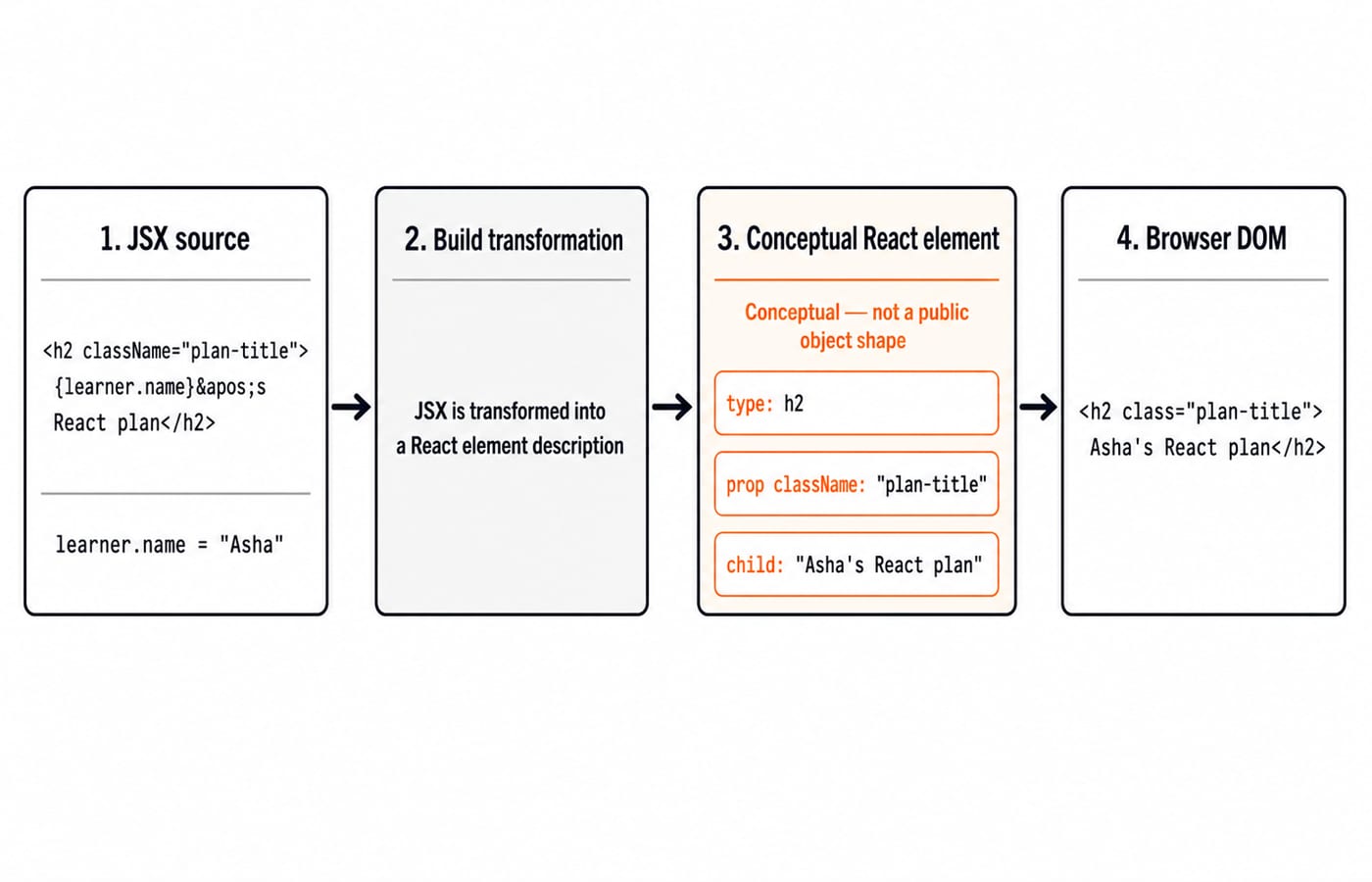
JSX is a syntax extension for JavaScript that describes a React element tree. Build tooling transforms it, React receives element descriptions, and the renderer updates the browser DOM. JSX is not a string, template language or second copy of HTML.
Consider this exact element description:
const learner = { name: "Asha", target: 5 };
const heading = (
<h2 className="plan-title">
{learner.name}'s React plan
</h2>
);The visible text is exactly Asha's React plan. Here, h2 is the element type, className="plan-title" is a prop, and Asha's React plan is the resolved child. Lowercase tags such as <h2> represent built-in DOM elements; uppercase names such as <StudyProgress /> represent components.
JSX syntax rules: one root, closed tags and React prop names
A JSX expression needs one root. A fragment supplies it without adding a DOM wrapper:
const summary = (
  <>
    <h3>Week 1</h3>
    <img src="/react-mark.svg" alt="React mark" />
    <p>Three topics complete.</p>
  </>
);
Tag names must pair exactly. Void-looking HTML elements such as img must be self-closed. React props also use JavaScript-friendly names.
HTML habit | JSX form | Reason |
|---|---|---|
|
| Avoids the JavaScript |
|
| Uses React's label prop name |
|
| DOM prop uses camel case |
|
| Event prop uses camel case |
|
| JSX requires the tag to close |
aria- and data- attributes keep their hyphens. If const, objects, arrays, template literals or arrow functions are unfamiliar, start with the Complete JavaScript Course.
JSX expressions: calculate and render exact values
Curly braces move from JSX into a JavaScript expression, so the calculation remains ordinary JavaScript:
const completed = 3;
const total = 5;
const percentage = Math.round((completed / total) * 100);

<p>
  {completed} of {total} topics complete ({percentage}%)
</p>
Work it in order: 3 / 5 = 0.6, then 0.6 * 100 = 60, and finally Math.round(60) = 60. The rendered text is exactly 3 of 5 topics complete (60%).
Braces accept value-producing expressions: property reads, arithmetic, calls, template literals and ternaries. They cannot directly contain an if statement or for loop. Calculate before return, or use array methods and conditional expressions.
At the rendering boundary, {0} renders 0, while {false}, {null} and {undefined} render no visible child. { { completed: 3 } } is invalid because a plain object is not a renderable child.
JSX props, styles and events: pass JavaScript values correctly
Props can carry strings, numbers, Boolean values, objects and functions:
function showMessage() {
  console.log("Goal: 5 topics");
}

<button
  className="goal-button"
  data-goal="weekly"
  tabIndex={0}
  disabled={false}
  style={{ borderColor: "#f97316", opacity: 1 }}
  onClick={showMessage}
>
  Show goal
</button>
Quoted props are strings; braces pass JavaScript values, so 0 and false keep their types. style receives an object whose keys, such as borderColor, use camel case. In style={{ ... }}, the inner braces form the object and the outer braces embed it.
onClick={showMessage} passes the function for a later click. onClick={showMessage()} calls it during rendering and passes its result. Clicking this button once logs exactly Goal: 5 topics.
Conditional JSX: choose one branch without hiding zero
With completed = 3, total = 5 and percentage = 60, remaining = total - completed = 5 - 3 = 2. A ternary chooses one value:
const status = percentage >= 60 ? "On track" : "Keep going";
<strong>{status}</strong>
Because 60 >= 60 is true, the visible status is exactly On track. Use an explicit Boolean comparison for an optional child:
{remaining > 0 && <p>{remaining} topics remaining</p>}With remaining = 2, it renders 2 topics remaining. If remaining is zero, {remaining && ...} can render a stray 0; {remaining > 0 && ...} renders nothing.
For an empty collection, place an early return before the main component tree:
if (topics.length === 0) {
  return <p>No topics yet.</p>;
}
Use early returns for whole branches, ternaries for two inline choices, and && for optional output.
JSX lists and keys: build the complete StudyProgress component
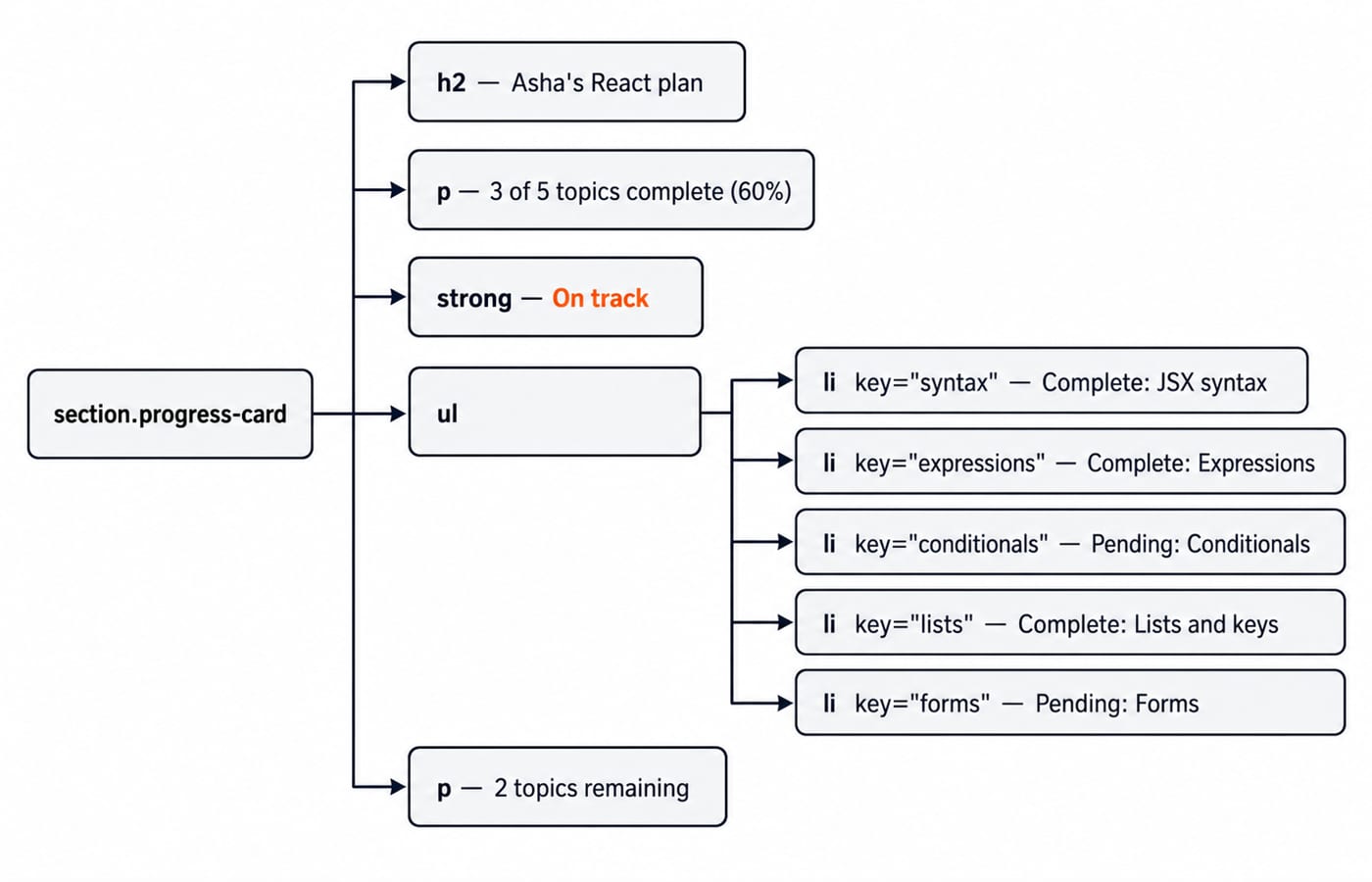
The component keeps five records in order. filter finds the three whose done value is true; map makes five li elements. Put key={topic.id} on the outer element returned by map. A key identifies a sibling record but is neither displayed nor passed as an ordinary prop. Stable IDs prevent insertions or reordering from transferring identity between items.
Replace src/App.jsx in a Vite React project with this component. It needs no packages beyond the standard React setup:
const topics = [
{ id: "syntax", label: "JSX syntax", done: true },
{ id: "expressions", label: "Expressions", done: true },
{ id: "conditionals", label: "Conditionals", done: false },
{ id: "lists", label: "Lists and keys", done: true },
{ id: "forms", label: "Forms", done: false }
];
export default function StudyProgress() {
const learner = "Asha";
if (topics.length === 0) {
return <p>No topics yet.</p>;
}
const completed = topics.filter((topic) => topic.done).length;
const total = topics.length;
const percentage = Math.round((completed / total) * 100);
const remaining = total - completed;
const status = percentage >= 60 ? "On track" : "Keep going";
return (
<section className="progress-card">
<h2>{learner}'s React plan</h2>
<p>{completed} of {total} topics complete ({percentage}%)</p>
<strong>{status}</strong>
<ul>
{topics.map((topic) => (
<li key={topic.id}>
{topic.done ? "Complete" : "Pending"}: {topic.label}
</li>
))}
</ul>
{remaining > 0 && <p>{remaining} topics remaining</p>}
</section>
);
}The calculation pass turns records into values; the rendering pass builds one section. The early return precedes division, so an empty array produces No topics yet. instead of a percentage from zero topics.
Trace the visible output from top to bottom:
Asha's React plan3 of 5 topics complete (60%)On trackComplete: JSX syntaxComplete: ExpressionsPending: ConditionalsComplete: Lists and keysPending: Forms2 topics remaining
Three true values produce completed = 3; five records produce total = 5. The calculation gives 60, the threshold selects On track, and subtraction gives 2 remaining.
JSX errors and interview-style checks: diagnose, repair and predict
Mistake | Cause and symptom | Correction |
|---|---|---|
Adjacent | No root causes a JSX parse error | Wrap in a fragment |
Unclosed | JSX expects the element to close | Write |
| A string is the wrong shape | Use |
Newline after | Automatic semicolon insertion ends the return | Keep |
| Warnings and fragile updates | Add |
If conditionals.done changes from false to true, 4 / 5 = 0.8, 0.8 * 100 = 80, and Math.round(80) = 80. Output: 4 of 5 topics complete (80%) and 1 topics remaining. The grammar needs repair.
With every done value false, output is 0 of 5 topics complete (0%), Keep going and 5 topics remaining. If topics is [], only No topics yet. appears.
Repair the singular label:
<p>
  {remaining} {remaining === 1 ? "topic" : "topics"} remaining
</p>
The four-complete output is now 1 topic remaining. The trace exposes both the arithmetic change and the label bug.
JSX in React: the short version and next step
Remember five rules: JSX describes an element tree; each expression needs one root; braces contain JavaScript expressions; conditions choose children; keys preserve sibling identity. 3 of 5 topics complete (60%) is the checksum.
Next, use the React and Redux Course for components, state and larger interfaces, or browse Free Courses & Guidance by Prashant Sir. Then test the same rendering rules with React Interview Questions for Freshers, where output and debugging questions turn syntax recall into practice.
Keep learning
Hoisting in JavaScript: Predict Output with var, let, const and Functions
Build a reliable scope-setup model for JavaScript hoisting, then use it to trace declarations, diagnose three common errors and solve output questions.
Updated 26 Oct 20266 min readWeb Development

CSS Container Queries: Build a React Card That Adapts to Its Container
Build one portable React card that responds to the space its parent provides. Follow its layout, padding and title size at three exact container widths.
Updated 25 Oct 20266 min readWeb Development

Regular Expressions in JavaScript: Match, Extract, Replace, and Validate
Learn JavaScript regex by tracing what each token consumes. Build a validator and a named-group log parser, then practise extraction, replacement, flags, and common traps.
Updated 23 Oct 20265 min readWeb Development
Functions and Arrow Functions in JavaScript: Syntax, Scope and Runnable Examples
Build function declarations, expressions and arrows in JavaScript, then trace parameters, closures, lexical this and array callbacks through exact outputs.
Updated 19 Oct 20266 min readWeb Development