Office Mixed Concepts Explained: Access, Clipboard, File Formats and Exam Traps
Learn how Word, Excel, PowerPoint and Access differ, then trace six learner records through a query, an export, a linked chart and a static picture.
KnowledgeGate Team
Exam prep & CS education
Updated 25 Oct 20265 min read
A mixed Office question asks you to choose the right application, object, data type, format or transfer method. That is why memorised menus fail. MS Office Applications for Knowledge of ICT: Worked Word, Excel and PowerPoint Tasks builds a Word-first report and slide deck from an Excel score sheet; the Access-first state trace uses a query and one-time export, then separates a refreshable PowerPoint link from a static Word picture. Use MS Office for CS Teaching Exams for suite fundamentals and classroom tools; menus shift between versions, so the concepts, not the screenshots, are what earn marks.
Choose the Office application from the shape of the task
Application | Primary object | Best-fit task | Modern file extension |
|---|---|---|---|
Word | Document | Continuous prose and page layout |
|
Excel | Workbook | Grid calculation, analysis and charts |
|
PowerPoint | Presentation | A sequence of slides for an audience |
|
Access | Database containing tables and other objects | Store, filter and reuse structured records |
|
Microsoft Support calls .accdb the current default Access format. Let the job decide:
Prose and page layout? Word.
Formulas and cell analysis? Excel.
Slides for an audience? PowerPoint.
Reusable records, forms, queries or reports? Access.
Copy, paste, save, print and undo are shared, but a Word paragraph, Excel cell, PowerPoint slide and Access record are different objects.
Access objects and field types without the usual confusion
In Classroom.accdb, a table stores, a query selects or calculates, a form controls entry or viewing, and a report lays data out. A form is not stored data; a report is not a filtering rule.
Field | Access data type | Purpose |
|---|---|---|
| Number | IDs 101 to 106 |
| Short Text | Learner names |
| Short Text | Section A or B |
| Number | Numeric scores |
| Long Text | Sentences or paragraphs |
Microsoft Support uses Short Text and Long Text; older material says Text and Memo. .mdb is older, and conversion needs compatibility checks.
Save, export, copy, link and embed are different operations
Save updates the working file. Save As chooses another name, location or supported format. Export creates output for another use. Menus vary, and PDF is not the editable native format of all four applications.
Copy leaves the source and places a transferable representation on the clipboard. Cut marks or removes the source for movement; Paste inserts clipboard content. The current Office Clipboard holds up to 24 items in products listed on Microsoft's Office Clipboard support page, not necessarily every platform or historical version.
An Excel linked object can refresh from its source but depends on that source remaining available. An embedded object carries a non-live copy and can enlarge the destination. A pasted picture is a static snapshot, not editable worksheet data.
Worked example: move six records through four applications
Start with this Access table. Each row also has a Reflection field, irrelevant to this score query.
LearnerID | LearnerName | Section | QuizScore |
|---|---|---|---|
101 | Asha | A | 72 |
102 | Bhavna | A | 58 |
103 | Charu | B | 81 |
104 | Deepak | A | 64 |
105 | Esha | B | 49 |
106 | Farhan | A | 90 |
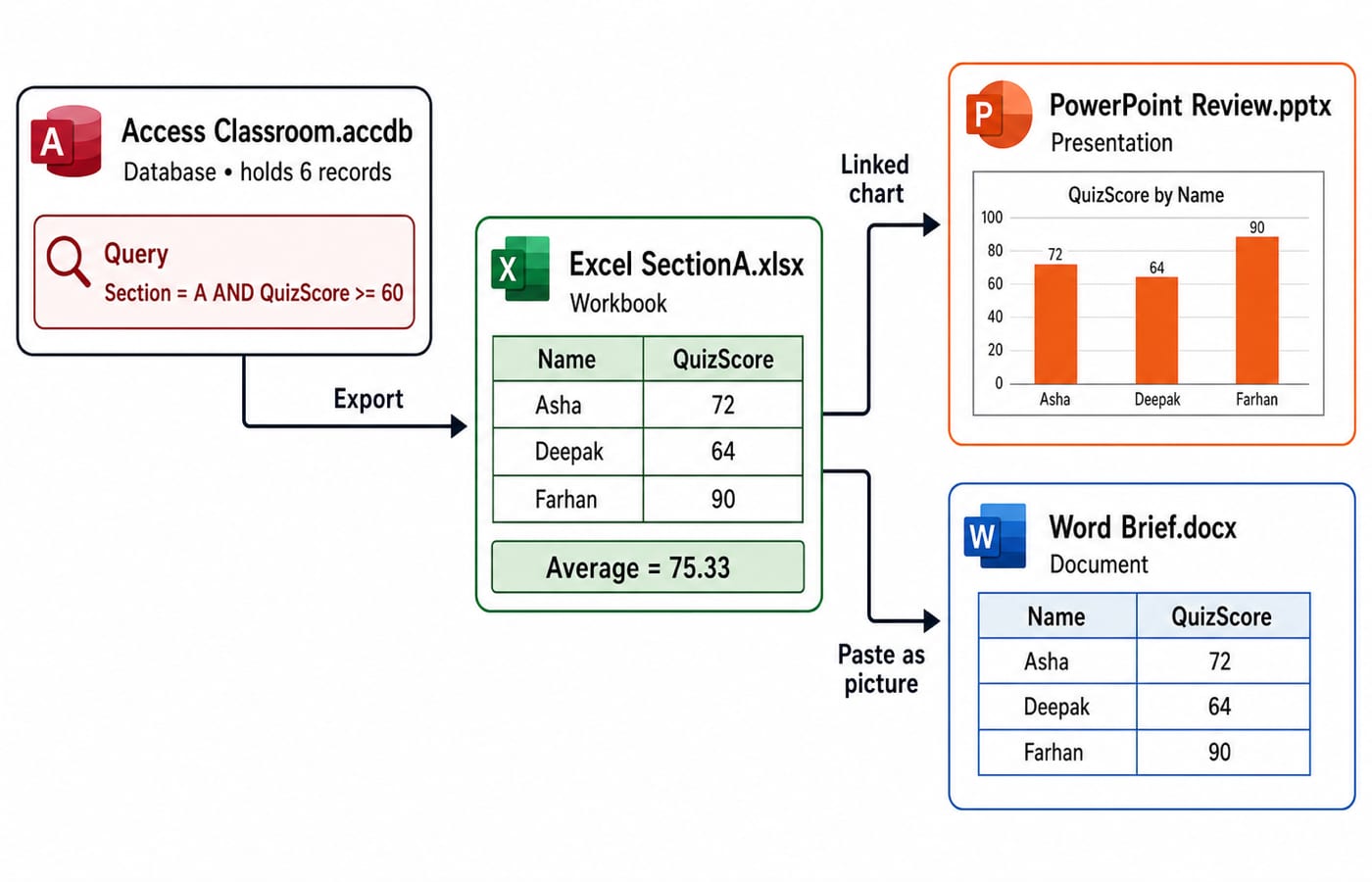
Apply Section = "A" AND QuizScore >= 60. It returns Asha 72, Deepak 64 and Farhan 90. Bhavna fails the score test; Charu and Esha fail the section test.
Export a one-time Excel copy, with names in A2:A4, scores 72, 64 and 90 in B2:B4, and =AVERAGE(B2:B4) in B5:
72 + 64 + 90 = 226226 / 3 = 75.333...Formatted to two decimal places, the displayed average is
75.33.
Formatting changes only the display. Insert the chart in Review.pptx as linked, and in Brief.docx as a picture.
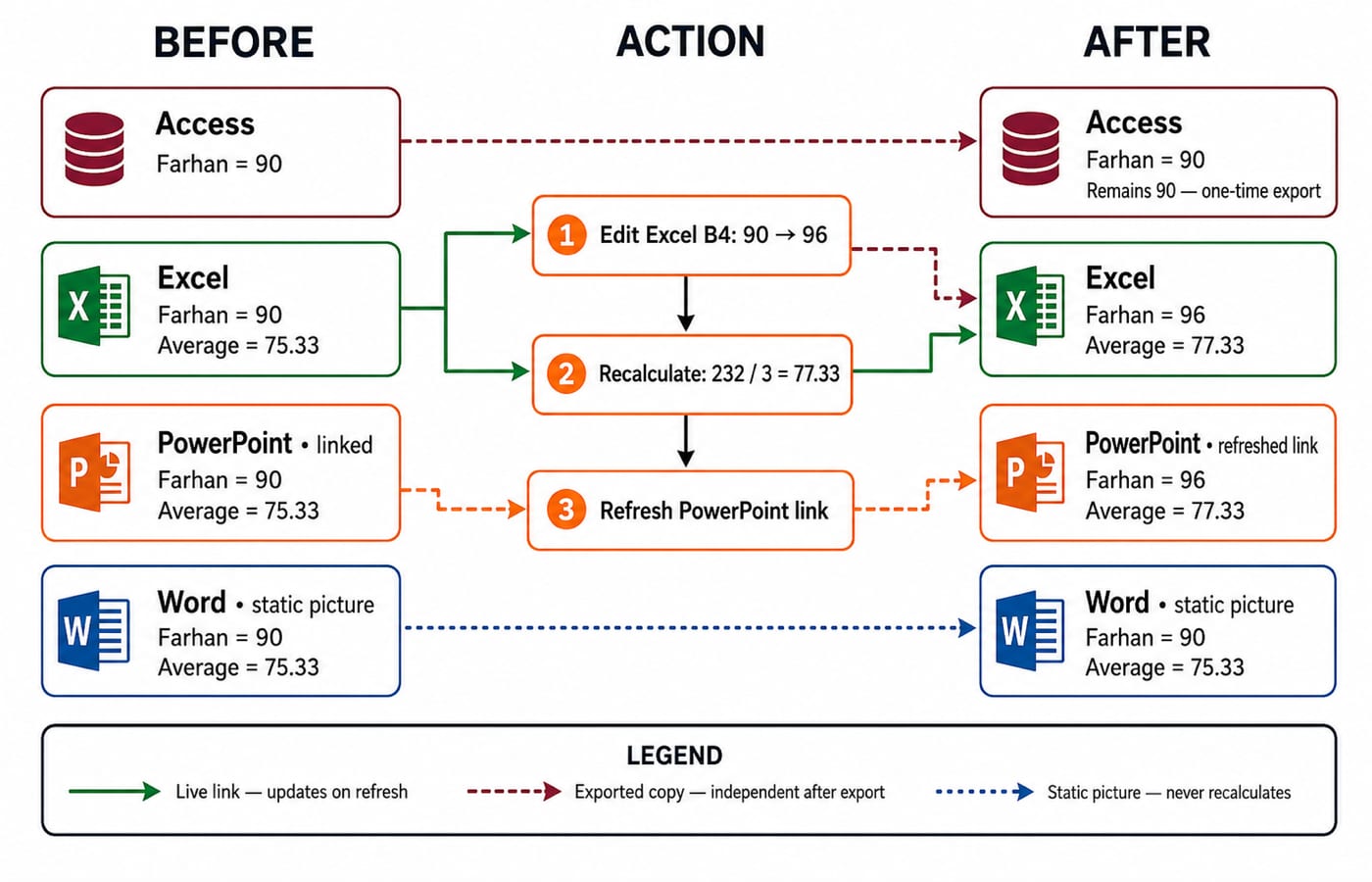
Now change Farhan's Excel score from 90 to 96:
72 + 64 + 96 = 232232 / 3 = 77.333..., displayed as77.33The rise is
77.33 - 75.33 = 2.00score points.
After refresh, PowerPoint can show 96 and 77.33. The Word picture stays at 90 and 75.33. Access stays at 90 because Excel received an export, not a live link back.
Shared interface terms and shortcuts need context
The Ribbon holds tabs; each tab arranges related groups and commands. A dialog box collects settings, the Quick Access Toolbar exposes chosen commands, and the status bar shows state. Placement varies, so identify purpose rather than one screenshot.
Shared shortcuts include Ctrl+C, Ctrl+X, Ctrl+V, Ctrl+Z, Ctrl+S, Ctrl+P and Ctrl+F. Each acts on the current selection and app context. In PowerPoint presentation context, F5 can start from the beginning; elsewhere its effect or hardware modifier can differ.
Traps that make plausible distractors look correct
Trap | Why it fails | Correction |
|---|---|---|
Spreadsheet versus database | Both show grids | Excel analyses cells; Access manages reusable records and objects |
Table versus query | Both can display records | A table stores; a query selects or calculates |
Form versus report | Both present data | A form supports interaction; a report prepares output |
Short Text versus Long Text | Both store characters | Choose Long Text for sentences or paragraphs |
Linked versus embedded | Both appear in a destination | A link can refresh from its source; an embed carries a copy |
Native file versus PDF | Both preserve appearance | The native format is editable; PDF is exported output |
The query returns three records, not four, because Bhavna scores only 58. The first mean is 75.33, not a prematurely rounded 75.3. Editing Excel does not rewrite Access, and refreshing PowerPoint does not refresh Word's picture. “Paste” does not identify a link, embed, table, text or picture; “Office file” identifies no application or extension. Trace the resulting state.
How objective questions test mixed Office concepts
Recurring forms are task matching, extension matching, Access object or field-type selection, shortcuts in context, and linked-versus-static state traces.
Which Access object selects Section A scores of at least 60? A query. A table stores, a form provides an interface, and a report presents.
After Excel changes 90 to 96, which destination can update after refresh? The linked PowerPoint chart, not the static Word picture or the one-time Access export.
Which modern native-format set is correct? Word
.docx, Excel.xlsx, PowerPoint.pptx, Access.accdb.
Practise the same distinctions in mixed Office questions, then check your own exam's official notice for marks, timing and syllabus detail.
The short version and the next revision step
Prose and page layout point to Word.
A calculation grid points to Excel.
An audience sequence points to PowerPoint.
Structured reusable records point to Access.
Queries select; reports present.
Links can refresh; pictures stay fixed.
Recompute 75.33 and 77.33, then explain why Access and Word stay unchanged. For the general paper, use the DSSSB Section A 2026 Complete Course. For computer science, use the DSSSB TGT Computer Science 2026 Section B Course. Government Teaching Job Exam Preparation compares related routes.
Keep learning
MS Word Basics: Editing, Formatting, a Worked Document and Exam Traps
Learn how Word applies commands to characters, paragraphs, pages and files. Build an ICT revision plan, audit every state change and avoid common exam traps.
Updated 23 Oct 20266 min readTeaching Recruitment (Computer Science)
Excel Functions and Charts Explained: Formulas, a Worked Sheet and Exam Traps
Learn how Excel formulas, references and charts work by building one mock-test worksheet from scratch. Every output is calculated and every common trap has a fix.
Updated 19 Oct 20265 min readTeaching Recruitment (Computer Science)

Digital Society Explained: Core Concepts, a Worked Inclusion Audit and Exam Patterns
Learn to separate access, skills and outcomes, audit digital inclusion with a worked funnel, apply data minimisation and solve common exam cases.
Updated 15 Oct 20266 min readTeaching Recruitment (Computer Science)
Common Editing Ctrl Keys Explained: Copy, Cut, Paste, Undo and Redo with Worked Examples
Learn what each common Ctrl key does, then trace the document, clipboard, cursor and edit history through precise examples without confusing Copy, Cut or Undo.
Updated 11 Oct 20266 min readTeaching Recruitment (Computer Science)