Security in Mobile and Wireless Computing: Threats, Controls and a Worked Replay-Attack Example
Learn where wireless, device, application and identity controls apply, then trace exactly how a server detects message tampering and rejects a replay.
KnowledgeGate Team
Exam prep & CS education
Updated 10 Oct 20266 min read
A phone can show the Wi-Fi icon while connected to a hostile access point. Even an encrypted radio link can lead to an unsafe app or a compromised device. The CS Fundamentals for Exams & Placements framework therefore separates five trust boundaries: radio network, mobile device, app, identity and remote service. Message tampering and replay also need different checks, integrity and freshness.
Begin with assets, attackers and security goals
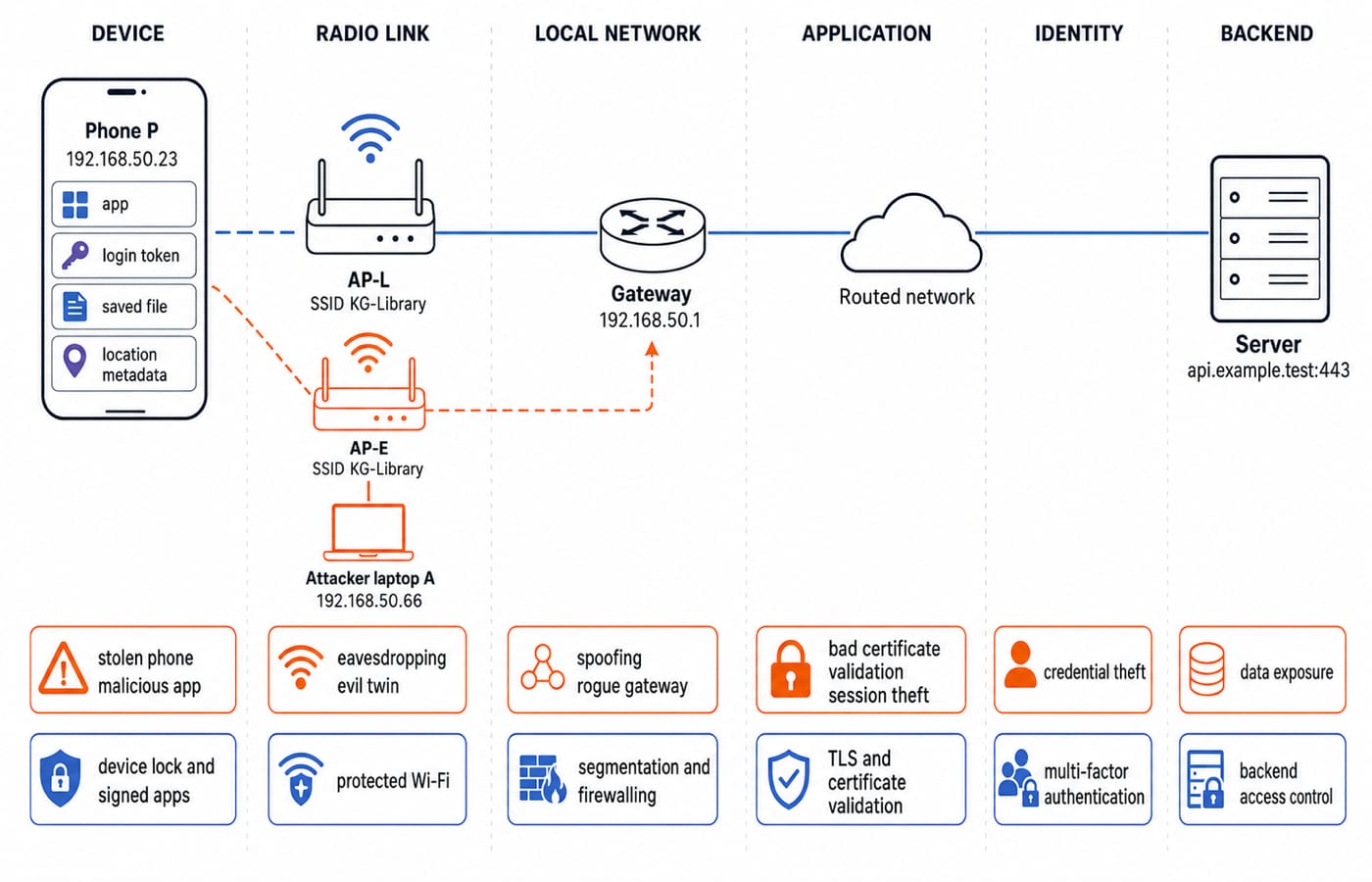
Consider phone P at 192.168.50.23, joined to legitimate access point AP-L. Its Service Set Identifier (SSID), or network name, is KG-Library; the default gateway is 192.168.50.1, and the app contacts api.example.test:443. Assets include its login token, saved files and location metadata. An SSID names a network. It does not prove that an access point is genuine.
Reading a message breaks confidentiality. Changing amount=750 to amount=7500 breaks integrity. Logging in as user 42 breaks authentication. Reusing a valid request breaks freshness. Flooding the access point breaks availability, while inferring repeated visits from metadata harms privacy. Passive attacks include eavesdropping and traffic analysis. Active attacks include impersonation, modification, replay and denial of service.
Mobile security is not one cipher. It coordinates protection across the device, radio link, local network, application session, identity and backend data.
Protect the wireless link, but know its boundary
Association connects a device to an access point, but its name does not authenticate it. Open Wi-Fi provides no radio-link encryption. A shared-passphrase network uses one shared secret. An enterprise network uses individual credentials or certificates. Wi-Fi Protected Access versions 2 and 3 (WPA2 and WPA3) are protection families whose guarantees depend on mode and configuration.
Threat | What happens | Control |
|---|---|---|
Open-network capture | Nearby traffic observed | Protected Wi-Fi plus TLS |
Weak or reused passphrase | Unauthorised device joins | Strong, unique credentials |
Evil twin using the SSID | Device joins attacker | Validate expected authentication |
Rogue access point | Unmanaged network path | Managed inventory, monitoring, segmentation |
Deauthentication or jamming | Availability falls | Monitoring and response |
Exposed local service | Nearby access | Host firewall and segmentation |
A captive-portal login page is not radio-link encryption. Wi-Fi protection covers the device-to-access-point hop. It does not replace Transport Layer Security (TLS), secure apps, endpoint updates or backend controls.
Secure the mobile device, application and identity
Apply controls throughout the lifecycle. At install time, require signed software, trusted distribution and minimal permissions. At rest, use a screen lock, device encryption and protected key storage, and keep plaintext tokens out of logs and shared storage. At runtime, use sandboxing, least privilege, inter-app communication and certificate validation. Over time, apply updates, safe backups and remote lock or wipe where configured.
A password is something the user knows. A hardware or app-bound key is something the user has. A biometric is something the user is. A fingerprint normally unlocks a locally protected credential; it is not a secret sent to every server. Multi-factor authentication combines independent factor types, not two passwords.
An organisation may require supported operating-system versions, device lock, encrypted storage, managed profiles, restricted app installation and incident reporting. Mobile-device management can enforce policy, but it cannot make an already compromised device trustworthy.
Put each secure communication mechanism in its layer
Mechanism | Protects | Important limit |
|---|---|---|
Protected Wi-Fi | Radio hop | Ends at the access point |
TLS | Authenticated encrypted session | Needs certificate validation |
Virtual private network (VPN) | Tunnel to chosen endpoint | Does not repair a malicious app |
Authenticated encryption | Data confidentiality and integrity | Key and nonce handling must be correct |
Message authentication code (MAC) | Shared-key integrity and authentication | Does not hide data or ensure freshness |
Nonce or counter | Freshness | Server must track or validate it |
Digital signature | Publicly verifiable origin and integrity | Does not itself encrypt data |
Name resolution locates a service, as covered in Application Layer Protocols: Domain Name System (DNS) and Hypertext Transfer Protocol (HTTP). Routing Algorithms: Distance Vector and Link State explains path selection. TLS validates the intended service and derives session protection for communication.
Encryption without authentication may miss modification. A VPN does not fix a malicious app. Hypertext Transfer Protocol Secure (HTTPS) can encrypt a connection to a phishing page, but cannot make that page honest.
Worked example: detect tampering and stop a replay
Phone P has completed an authenticated handshake with api.example.test:443 and derived temporary session key K_session = 00112233445566778899aabbccddeeff. Production session keys remain secret, are limited in lifetime and are never embedded as reusable global secrets in application code.
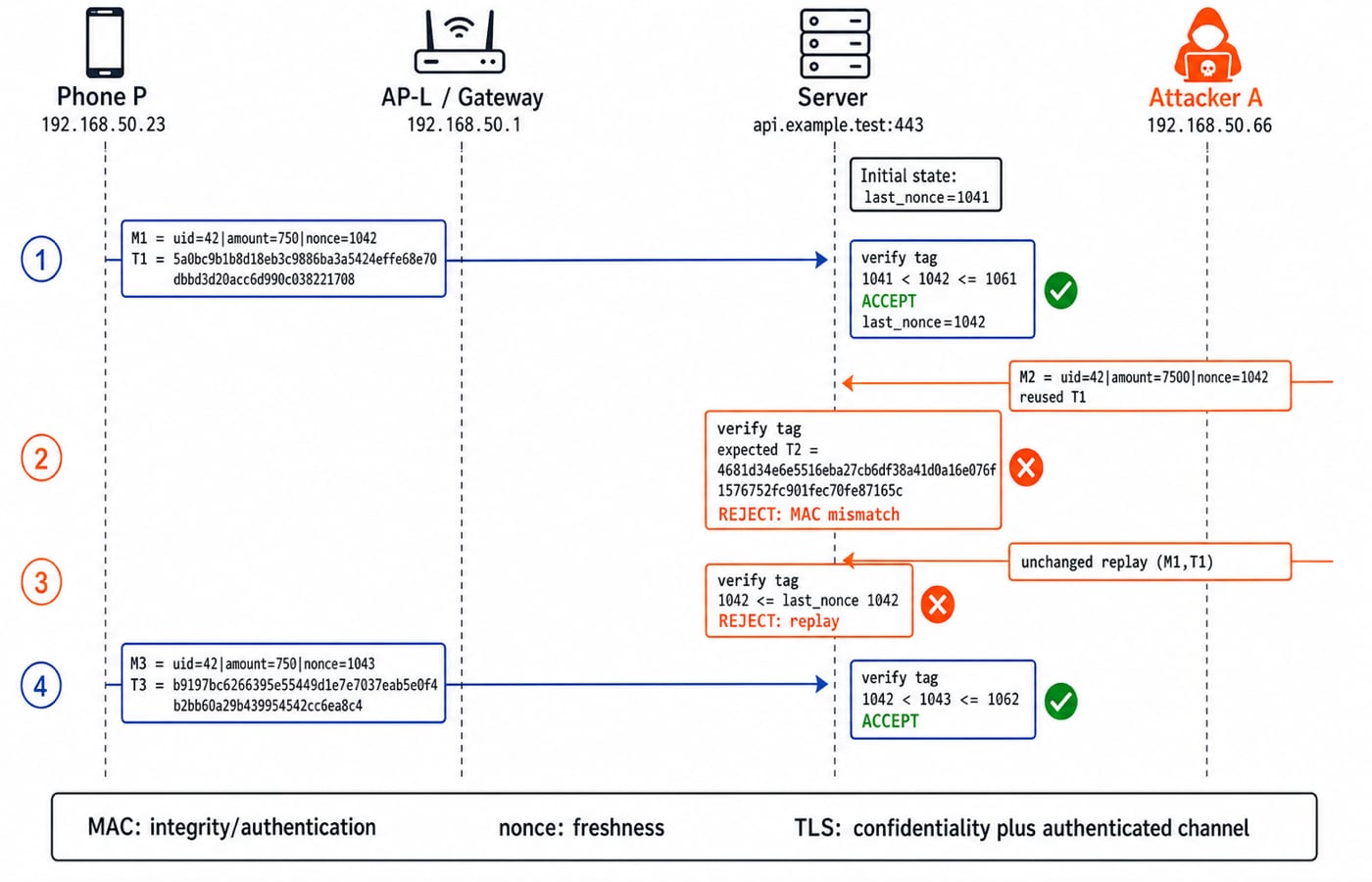
For session 42, the server begins with last_nonce = 1041. The uid field identifies the user. The server accepts only when the Hash-based Message Authentication Code with Secure Hash Algorithm 256 (HMAC-SHA-256) is valid and last_nonce < nonce <= last_nonce + 20.
Phone
PsendsM1 = uid=42|amount=750|nonce=1042withT1 = 5a0bc9b1b8d18eb3c9886ba3a5424effe68e70dbbd3d20acc6d990c038221708. The server recomputesT1. Since1041 < 1042 <= 1041 + 20 = 1061, it accepts once and setslast_nonce = 1042.Attacker
Achanges only the amount, producingM2 = uid=42|amount=7500|nonce=1042, but reusesT1. The correct tag isT2 = 4681d34e6e5516eba27cb6df38a41d0a16e076f1576752fc901fec70fe87165c. SinceT1 != T2, the server rejects the modification.Attacker
Aresends unchanged(M1,T1). Its MAC remains valid, so integrity alone has not stopped replay. Freshness does:1042 <= last_nonce 1042, so the server rejects it.A fresh request
M3 = uid=42|amount=750|nonce=1043hasT3 = b9197bc6266395e55449d1e7e7037eab5e0f4b2bb60a29b439954542cc6ea8c4. Its tag is valid and1042 < 1043 <= 1042 + 20 = 1062, so it passes.
HMAC does not hide the amount. TLS or another authenticated-encryption layer supplies confidentiality.
Build defence in depth and plan incident response
Suppose the phone joins evil twin AP-E, and the user sees a certificate warning. It means the app or browser could not validate the service, so do not bypass it. The user enters no password, disconnects, forgets the network, reports it and reviews account sessions. Credentials should be changed if they were entered, and exposed sessions should be revoked.
Stage | Control stack |
|---|---|
Prevent | Managed Wi-Fi, updates, least privilege, multi-factor authentication |
Detect | Access-point monitoring, device alerts, session anomalies, secret-free audit logs |
Contain | Network isolation, token revocation, account lock, configured remote lock or wipe |
Recover | Clean update or restore, credential rotation, verified reconnect, incident review |
If radio-link protection fails, validated TLS can still protect app data. If the device is compromised, neither Wi-Fi encryption nor TLS guarantees safe handling after decryption.
Recognise exam-style and interview-style questions
Questions may use single-choice threat-to-control matching, multiple-select controls against an evil twin, a last_nonce trace, or an interview design asking where Wi-Fi, TLS, VPN, device encryption and multi-factor authentication apply. Aspirants should confirm coverage and question types in their exam's official syllabus and bulletin.
Common traps and corrections:
An SSID is not access-point identity.
Hiding an SSID is not strong security.
Media Access Control address filtering is weak because addresses can be spoofed. This network-address MAC differs from the cryptographic MAC defined earlier.
A captive portal is not link encryption.
A cryptographic MAC provides no confidentiality and does not stop replay by itself.
Two passwords are not two independent authentication factors.
KnowledgeGate offers over 40 practice questions on this exact topic. For placement and interview preparation, the Computer Science course provides the relevant Network Security, Mobile Technology and Cyber and Information Security path.
Short version and the next study step
Identify the asset, attacker and trust boundary for every scenario you meet. Protect the radio hop, authenticate the intended service, protect app data, secure the device and identity, add freshness, then plan detection and recovery. Explain aloud why tampering failed through T1 != T2, why replay passed the MAC check but failed 1042 <= 1042, and why TLS was still required. Use Zero to Hero for a broader structured Computer Networks and CS study path.
Keep learning
Cyber Safety and Security: Information Security and Cyber Law with Worked Examples
Learn information security as an applied subject. Classify security failures, work Caesar and RSA examples, separate common attacks, and revise India's cyber-law framework.
Updated 22 Oct 20266 min readGATE Strategy & Roadmap
Internet & Web Technology for GATE: Syllabus Boundary, Weightage Method and Prep Order
Treat Internet and Web Technology as an overlap area, not a promised standalone subject. Build scope, paper-audit, URL-tracing and subnetting skills in a 12-session plan.
Updated 18 Oct 20265 min readGATE Strategy & Roadmap
How to Use Practice Exams and Past Papers with Spaced Repetition
Turn practice exams and past papers into a spaced revision system. Learn how to analyse mistakes, schedule reattempts, and fit mocks into a weekly study plan.
15 Oct 20266 min readGATE Strategy & Roadmap
Information Security & Cyber Laws for GATE: Syllabus Scope, Weightage Reality and Prep Order
Check where security concepts overlap with GATE CS, where Cyber Laws sits outside the cited syllabus, and how to protect core preparation while serving a second target.
Updated 14 Oct 20265 min readGATE Strategy & Roadmap