SQL Queries for Placement Interviews: Second Highest Salary, Joins and GROUP BY Step by Step
SQL queries for placement interviews built step by step on one schema: second highest salary three approaches, joins with results shown, GROUP BY and HAVING.
KnowledgeGate Team
Exam prep & CS education
Updated 19 Jul 20267 min read
The SQL questions in service-company placement rounds repeat. Second highest salary, a join between two tables, a GROUP BY with HAVING, and a duplicates question are commonly reported in technical rounds at companies such as TCS, Infosys and Accenture. The reason candidates still fumble them is that they memorise final answers instead of building the query up.
Build it up instead. One schema runs through every query below, each one assembled clause by clause with the intermediate result printed, so you can see why each clause is there.
The shared schema every query below runs on
Two tables. An Employee table with a salary, a department reference, and a manager reference, and a Department table.
Employee
emp_id | name | salary | dept_id | manager_id |
|---|---|---|---|---|
1 | Asha | 90000 | 10 | NULL |
2 | Ravi | 75000 | 10 | 1 |
3 | Meena | 75000 | 20 | 1 |
4 | Karan | 60000 | 20 | 3 |
5 | Divya | 50000 | NULL | 3 |
6 | Farhan | 95000 | 30 | 1 |
Department
dept_id | dept_name |
|---|---|
10 | Engineering |
20 | Analytics |
30 | Sales |
40 | HR |
Notice the deliberate texture: two employees share a salary (75000), one employee has no department (Divya), and one department has no employees (HR). Interviewers plant exactly these cases, because they separate candidates who understand NULLs and duplicates from those who copied a query once. Keep those six rows in front of you: every result below is small enough to check by hand.
Second highest salary in SQL: three approaches, built up
One of the most repeated placement SQL questions. Build it in stages.
Step 1: the highest salary. Trivial, but it is the inner block of what comes next.
SELECT MAX(salary) FROM Employee;
-- result: 95000
Step 2: the second highest, with a subquery. Ask for the maximum among salaries strictly below the maximum.
SELECT MAX(salary) FROM Employee
WHERE salary < (SELECT MAX(salary) FROM Employee);
-- result: 90000
This version works on every SQL engine and needs no window functions, so it is the safest interview answer.
Step 3: ORDER BY with LIMIT and OFFSET. Sort descending and skip one row.
SELECT salary FROM Employee
ORDER BY salary DESC
LIMIT 1 OFFSET 1;
-- sorted salaries: 95000, 90000, 75000, 75000, 60000, 50000
-- result: 90000
Here is the trap: extend this to the third highest with OFFSET 2 and you get 75000, but OFFSET 3 also gives 75000, because the duplicate occupies two rows. The fix is DISTINCT:
SELECT DISTINCT salary FROM Employee
ORDER BY salary DESC
LIMIT 1 OFFSET 2;
-- distinct sorted salaries: 95000, 90000, 75000, 60000, 50000
-- result: 75000 (the true third highest)
Step 4: DENSE_RANK for the general Nth highest. The modern answer, and the one that shows depth.
SELECT salary FROM (
  SELECT salary, DENSE_RANK() OVER (ORDER BY salary DESC) AS rnk
  FROM Employee
) ranked
WHERE rnk = 2;
-- ranks: 95000 -> 1, 90000 -> 2, 75000 -> 3, 60000 -> 4, 50000 -> 5
-- result: 90000
DENSE_RANK gives duplicates the same rank without leaving gaps, which is exactly the "Nth highest" semantics interviewers mean. If asked why not RANK, the answer is that RANK would jump from 3 to 5 after the two 75000 rows.
SQL joins on the same schema: INNER, LEFT and the IS NULL trick
For the relational theory behind joins, the sublanguage families and the full join taxonomy, see SQL Queries and Joins in DBMS. An interviewer asks for less: three joins, written on a schema this size.
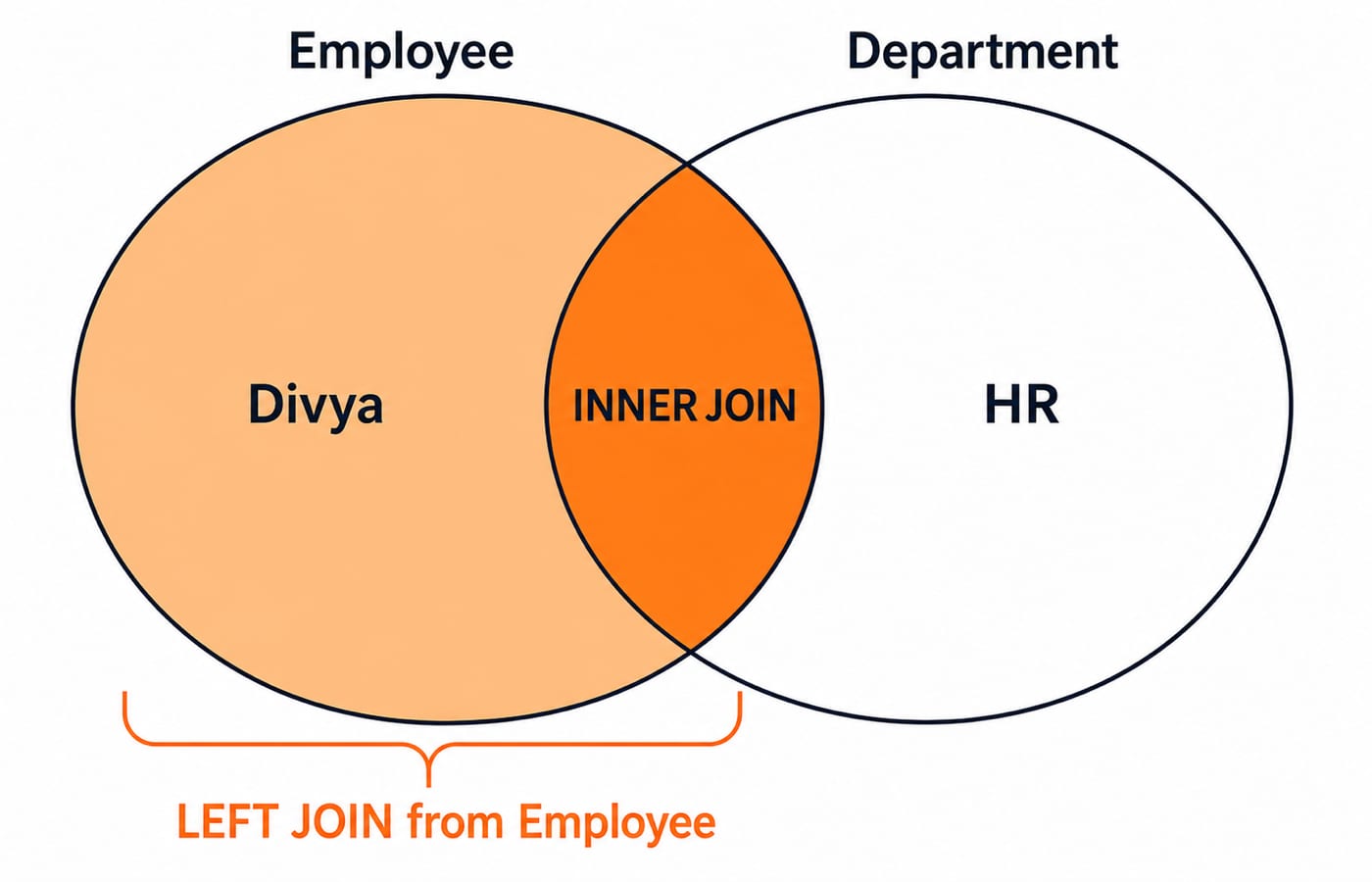
INNER JOIN keeps only matching rows.
SELECT e.name, e.salary, d.dept_name
FROM Employee e
INNER JOIN Department d ON e.dept_id = d.dept_id;
name | salary | dept_name |
|---|---|---|
Asha | 90000 | Engineering |
Ravi | 75000 | Engineering |
Meena | 75000 | Analytics |
Karan | 60000 | Analytics |
Farhan | 95000 | Sales |
Divya vanished (her dept_id is NULL, and NULL matches nothing) and HR never appeared (no employee references it). Five rows, not six.
LEFT JOIN keeps every left-side row. Run the same query with LEFT JOIN and Divya returns, with dept_name as NULL.
That NULL is not a nuisance, it is a query tool. "Find employees not assigned to any department" is a LEFT JOIN plus an IS NULL filter:
SELECT e.name
FROM Employee e
LEFT JOIN Department d ON e.dept_id = d.dept_id
WHERE d.dept_id IS NULL;
-- result: Divya
Flip the table order and the same shape answers "which department has no employees": HR.
Self join: employees who earn more than their manager
A manager is just another row of the same table, so join Employee to itself.
SELECT e.name AS employee, m.name AS manager
FROM Employee e
INNER JOIN Employee m ON e.manager_id = m.emp_id
WHERE e.salary > m.salary;
-- result: Farhan (95000) earns more than Asha (90000)
Trace it: each employee row pairs with its manager's row, then the WHERE compares the two salaries. This one question tests aliases, join logic and comparison in one line, which is why it recurs so reliably.
GROUP BY and HAVING: department-wise questions step by step
Step 1: count employees per department.
SELECT dept_id, COUNT(*) AS headcount, AVG(salary) AS avg_salary
FROM Employee
GROUP BY dept_id;
dept_id | headcount | avg_salary |
|---|---|---|
10 | 2 | 82500 |
20 | 2 | 67500 |
30 | 1 | 95000 |
NULL | 1 | 50000 |
Two things to say out loud in an interview: GROUP BY collects the NULL dept_id rows into their own group, and any selected column that is not aggregated must appear in the GROUP BY clause.
Step 2: filter groups with HAVING. WHERE filters rows before grouping; HAVING filters groups after. "Departments with more than one employee" is:
SELECT dept_id, COUNT(*) AS headcount
FROM Employee
GROUP BY dept_id
HAVING COUNT(*) > 1;
-- result: dept_id 10 and 20
Step 3: combine JOIN, GROUP BY and ORDER BY. "Which department has the highest average salary, by name?"
SELECT d.dept_name, AVG(e.salary) AS avg_salary
FROM Employee e
INNER JOIN Department d ON e.dept_id = d.dept_id
GROUP BY d.dept_name
ORDER BY avg_salary DESC
LIMIT 1;
-- result: Sales, 95000
Read it in execution order: join first, group the joined rows, aggregate, then sort and cut. Saying that order aloud is worth as much as the query itself.
Duplicates, the last recurring pattern. GROUP BY plus HAVING finds them:
SELECT salary, COUNT(*) FROM Employee
GROUP BY salary
HAVING COUNT(*) > 1;
-- result: 75000 appears twice
SQL in placement rounds: the two forms the questions take
SQL reaches you in two shapes, and they reward different practice.
In the online test, SQL is usually multiple choice: predict the output of a short query on a small table, or pick the clause that breaks it. Speed and NULL reflexes decide the mark, which is why the DISTINCT trap and the IS NULL filter above are the two to over-practise.
In the technical interview, you write the query and narrate it. The follow-up is almost always one of the cases this schema plants: what happens to Divya, what the two 75000 rows do to an OFFSET answer, why HAVING and not WHERE.
Round structures differ by company and change from cycle to cycle. For TCS NQT, confirm the current structure on the official TCS All India NQT hiring page; our walkthrough of the TCS NQT exam structure explains how to read it.
What does not change is the content: the queries above, plus DBMS theory (keys, normalisation, transactions) around them.
The 25 SQL queries to have ready
Practise until you can write each of these cold on the schema above.
Select all rows; select specific columns.
Filter with WHERE on one and on multiple conditions.
Filter with BETWEEN, IN and LIKE.
Handle NULL correctly with IS NULL / IS NOT NULL.
Sort with ORDER BY on one and two columns.
Highest salary with MAX.
Second highest with a subquery.
Nth highest with DISTINCT, LIMIT and OFFSET.
Nth highest with DENSE_RANK.
Employees earning above the company average.
INNER JOIN of Employee and Department.
LEFT JOIN and explain the extra rows.
Employees with no department (LEFT JOIN + IS NULL).
Departments with no employees.
Self join: employee alongside manager name.
Employees earning more than their manager.
Headcount per department.
Average, minimum and maximum salary per department.
HAVING to keep departments with more than N employees.
Highest-average-salary department by name (join + group + order).
Top earner within each department (window function or correlated subquery).
Find duplicate values with GROUP BY and HAVING.
Delete duplicates keeping one row (by lowest id).
WHERE versus HAVING, shown on one query.
UNION versus UNION ALL on two selects.
Numbers 1 to 5 are warm-ups you should never lose marks on. Most of 6 to 25 you have just written on this schema. Four go further: the above-average filter, the top earner within each department, deleting duplicates while keeping one row, and UNION versus UNION ALL. They follow from the same pieces, so write those four yourself tonight.
The short version, and your next step
Learn one schema deeply instead of fifty queries shallowly. Build second highest from MAX upwards, know why Divya disappears in an INNER JOIN, and narrate the join, group, aggregate, sort order out loud.
SQL is one leg of the placement stack. For DBMS depth with company-tagged MCQs, Computer Science Fundamentals for Placements by Sanchit Sir covers DBMS and Operating Systems in the same recruiter-focused flow. For the coding rounds that sit beside the SQL questions, Coding for Placements runs C, C++, Java, Python and DSA from basics to competitive level with practice tests. And the wider Placement Preparation category collects everything else, aptitude included.
Write all 25 queries by hand this week, against this schema, checking each intermediate result. That is a placement SQL round prepared, not gambled on.
Keep learning
INNER JOIN in SQL: Syntax, Worked Examples, and Common Errors
Build INNER JOIN intuition with a customer-order dataset. Trace exact row matches, handle one-to-many results, extend to payments, and practise common interview patterns.
Updated 25 Oct 20266 min readDBMS
Types of Indexing in DBMS: Primary, Clustering, Secondary and Multilevel Examples
Learn how file order, uniqueness and entry coverage determine an index type. Two worked examples build index levels and count simplified block reads.
Updated 24 Oct 20266 min readDBMS
SQL Joins Explained: INNER, LEFT, RIGHT, FULL, CROSS and SELF with Runnable Examples
Trace all six SQL join types on one support-agent dataset, with runnable queries, exact outputs, NULL behaviour, row counts and filter-placement traps.
Updated 21 Oct 20265 min readDBMS
GROUP BY and HAVING in SQL: Syntax and Worked Examples
Trace eight sales rows through WHERE, GROUP BY, aggregates, and HAVING, then tackle multiple columns, NULLs, COUNT variants, and common query traps.
Updated 17 Oct 20265 min readDBMS