Computer Architecture Evolution and History: From Stored Programs to Multicore Systems
Follow the causal path from physical reconfiguration to stored programs, integrated processors, memory hierarchy and multicore, with checked numerical examples.
KnowledgeGate Team
Exam prep & CS education
Updated 4 Sep 20265 min read
Computer-history notes often become a list of generations, dates and device names, but exam-style questions ask what architectural problem each change solved. Computer architecture evolved from hard-wired operation through stored programs, integrated processors, memory hierarchies and multicore execution. The crucial distinction in GATE CS Exam Preparation is causal: each architectural change answers a pressure. Address capacity remains separate from data-transfer width, as the 16-bit and 24-bit designs show.
1. Computer architecture evolution: a causal timeline, not four memorised generations
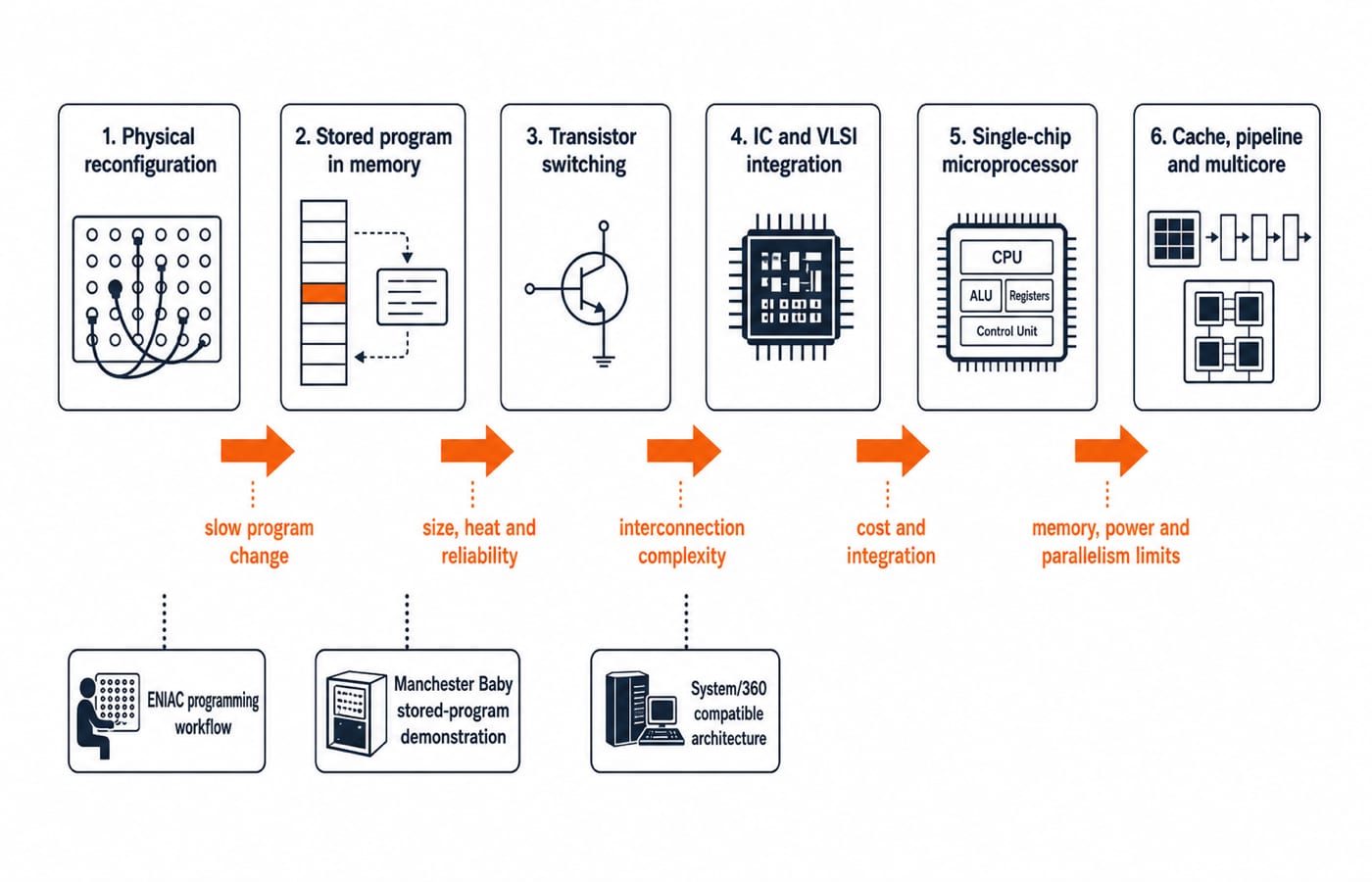
Early machines calculated quickly, but switches and plugboards slowed task changes. Stored instructions moved changes into memory. Transistors improved size, heat and reliability; ICs and VLSI reduced interconnections; microprocessors put CPU functions on one chip. Caches, pipelines and parallelism attacked later limits.
These stages overlap. Textbook generations are retrospective labels, not universal cut-offs.
Pressure | Technical change | Architectural consequence | What not to infer |
|---|---|---|---|
Slow reconfiguration | Stored instructions | Programs change in memory | Memory must be unified |
Size, heat, reliability | Transistors | Denser switching | Exact generation boundary |
Board complexity | IC and VLSI | Integrated logic | Architecture equals implementation |
CPU-memory gap | Cache hierarchy | Useful blocks stay closer | Every access is fast |
Single-stream limits | Multicore, heterogeneous processing | Parallel resources | Every program scales |
ENIAC illustrates switch-and-plugboard programming; the Manchester Baby, electronic stored-program operation; System/360, one architecture across differently organised machines. These are capability milestones, not sole-inventor or universal-first claims.
2. The stored-program idea changed both the machine and the program
The stored-program principle keeps coded instructions in addressable memory. Using the program counter (PC), the control unit fetches one into the instruction register (IR), decodes, executes and continues. The classical von Neumann arrangement connects processor, memory and I/O, but the principle does not require one undivided physical memory.
Consider a byte-addressed teaching machine with 4-byte instructions.
Initially,
PC = 0x100. Memory there holdsLOAD R1,[0x240]; location0x240contains decimal37.Fetch fills the IR and advances the PC by 4 bytes:
0x100 + 0x4 = 0x104. Execution loadsR1 = 37.Location
0x104holdsADD R1,#5. Fetch advances the PC to0x108; execution givesR1 = 37 + 5 = 42.
Changing instruction words changes computation without rewiring. The PC holds the next address, the IR the instruction, registers data, the ALU transforms values, and control directs transfers.
3. Architecture versus organisation across computer history
Architecture is the programmer-visible contract: instruction set, registers, data types, address space and addressing modes. Organisation, or microarchitecture, implements it through control, pipelines, caches, buses and execution units. Organisation may change while compatibility keeps architecture stable, as System/360 illustrates.
A 24-bit address field exposed by the ISA is architectural because software sees it. A 32-bit internal data bus at 10 MHz is organisational. LOAD R1,[R2+12] exposes an addressing mode; its pipeline stages are organisational. Addressing Modes and Instruction Formats develops the distinction.
Address width controls named locations; data-path width and transfer rate control data movement.
4. Architecture evolution worked example: address space and bus bandwidth
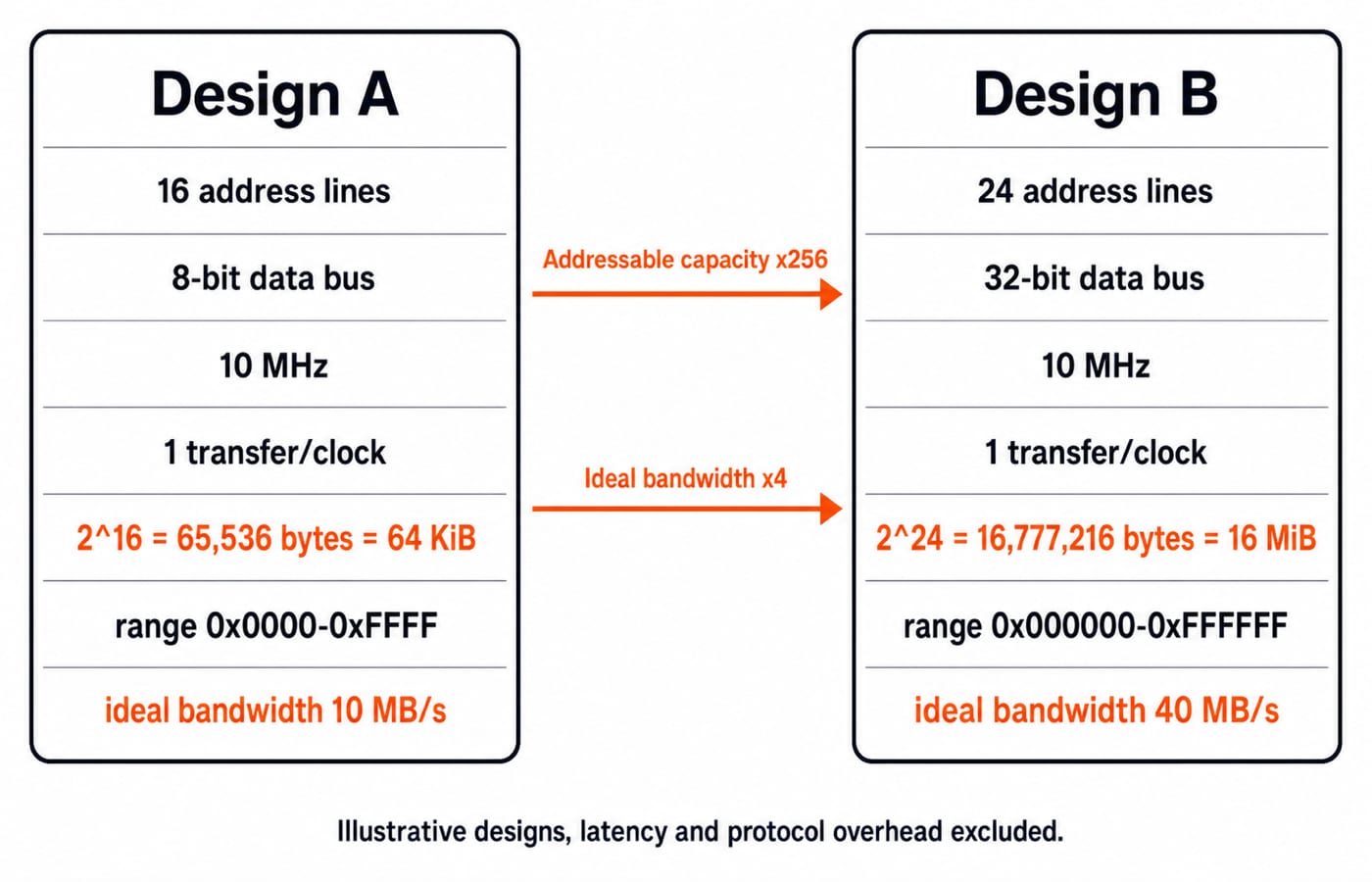
Both illustrative byte-addressed designs use 10 MHz and one transfer per clock.
Design A has 16 address lines and an 8-bit data bus.
Addressable capacity:
2^16 = 65,536 bytes = 64 KiB.Address range:
0x0000through0xFFFF.Ideal bandwidth:
8 bits x 10,000,000 transfers/s = 80,000,000 bit/s.Converting bits to bytes:
80,000,000 / 8 = 10,000,000 byte/s = 10 MB/s.
Design B has 24 address lines and a 32-bit data bus.
Addressable capacity:
2^24 = 16,777,216 bytes = 16 MiB.Address range:
0x000000through0xFFFFFF.Capacity ratio:
2^(24-16) = 2^8 = 256.Ideal bandwidth:
32 x 10,000,000 = 320,000,000 bit/s = 40,000,000 byte/s = 40 MB/s.
Checks: 64 KiB x 256 = 16 MiB; 10 MB/s x 4 = 40 MB/s. Eight extra address lines give 256 times the capacity; a fourfold-wider data bus gives four times the ideal bandwidth. Latency, wait states, arbitration and protocol overhead reduce real bandwidth.
5. Why evolution moved towards hierarchy, pipelining and multicore systems
Memory hierarchy balances capacity and latency. Registers sit closest to execution, cache keeps recent or nearby blocks closer than main memory, and secondary storage supplies capacity. Locality makes hierarchy work, but not every access fast. Cache Memory: Mapping and Hit Ratio adds the numerical view.
Pipelining overlaps instruction stages, as in IF -> ID -> EX -> MEM -> WB; Pipelining in Computer Architecture explains its limits. Superscalar hardware may issue several independent operations from one stream. Multicore systems can run multiple streams.
If 80% of a program is perfectly parallel, 20% remains serial and four identical cores add no overhead, Amdahl's law gives:
Speedup = 1 / (0.20 + 0.80/4) = 1 / (0.20 + 0.20) = 1 / 0.40 = 2.5
Four cores therefore give only 2.5 speedup. Evolution must balance parallel work, memory, energy and compatibility.
6. Computer architecture history traps
Tempting statement | Why it fails | Correct version |
|---|---|---|
Every generation starts on one date | Changes overlap | Generations are retrospective labels |
Stored program means one physical memory | Principle and implementation are mixed | Coded instructions are fetched from memory |
Microprocessor means microcomputer | Integration and system class differ | CPU-on-chip and system class are separate |
Architecture equals organisation | Contract and implementation differ | Visible ISA versus internal realisation |
Address bits proportionally raise bandwidth | Address and data paths differ | This example gives |
Classify the capability: stored programs concern fetching, transistors and ICs technology, microprocessors integration, caches and pipelines organisation, and multicore parallel resources. One system can combine them.
Before using 2^n, identify the addressable unit. Convert bits to bytes: 32/8 x 10,000,000 = 40,000,000 byte/s, not 320 MB/s.
7. How exams test computer architecture evolution and history
Exam-style questions usually ask you to order changes, match technology with consequence, separate principle from implementation, classify architecture versus organisation, calculate address space or bandwidth, and explain limited speedup.
Use this rapid check:
Instructions in memory: stored-program operation, because they are fetched.
Transistor replaces vacuum tube: technology change, because the switch changed.
Software-visible 24-bit address space: architecture, because programs see it.
32-bit internal bus: organisation, because it is internal.
Design B:
16 MiBand40 MB/sunder the stated assumptions.80% parallel work on four cores: ideal speedup
2.5, because 20% remains serial.
When you practise, mix chronology and classification questions with address-space, bandwidth and limited-speedup calculations. A single question type misses the chapter’s range.
8. Computer architecture evolution in the short version
Stored programs enabled reprogramming through memory, integration increased density, and hierarchy plus parallelism addressed remaining limits. Remember: 16 to 24 address lines gives x256 capacity; 8 to 32 data bits gives x4 ideal bandwidth at the same transfer rate.
Redraw the timeline, reproduce 64 KiB to 16 MiB, then classify each change as architecture, organisation or implementation technology. GATE Guidance by Sanchit Sir places this foundation inside wider COA and GATE CS study.
Keep learning

Memory Chip Configuration: Chip Count, Address Lines and Two Worked Designs
Learn to separate depth expansion from width expansion, wire chip banks, derive address pins and check hexadecimal ranges with two complete examples.
Updated 25 Oct 20265 min readComputer Organization & Architecture

Pipelining Basics in Computer Architecture: Clock Cycle, Speedup and Hazard Worked Examples
Learn how to calculate a pipeline clock, fill and drain time, finite-batch speedup, latency, throughput, and the cost of a load-use stall.
Updated 23 Oct 20266 min readComputer Organization & Architecture

Data Manipulation Micro-Operations in COA: Arithmetic, Logic and Shift Operations Worked Step by Step
Learn a fixed-width method for tracing arithmetic, logic, and shift micro-operations. Every example tracks register values, result bits, carry, and overflow.
Updated 19 Oct 20265 min readComputer Organization & Architecture
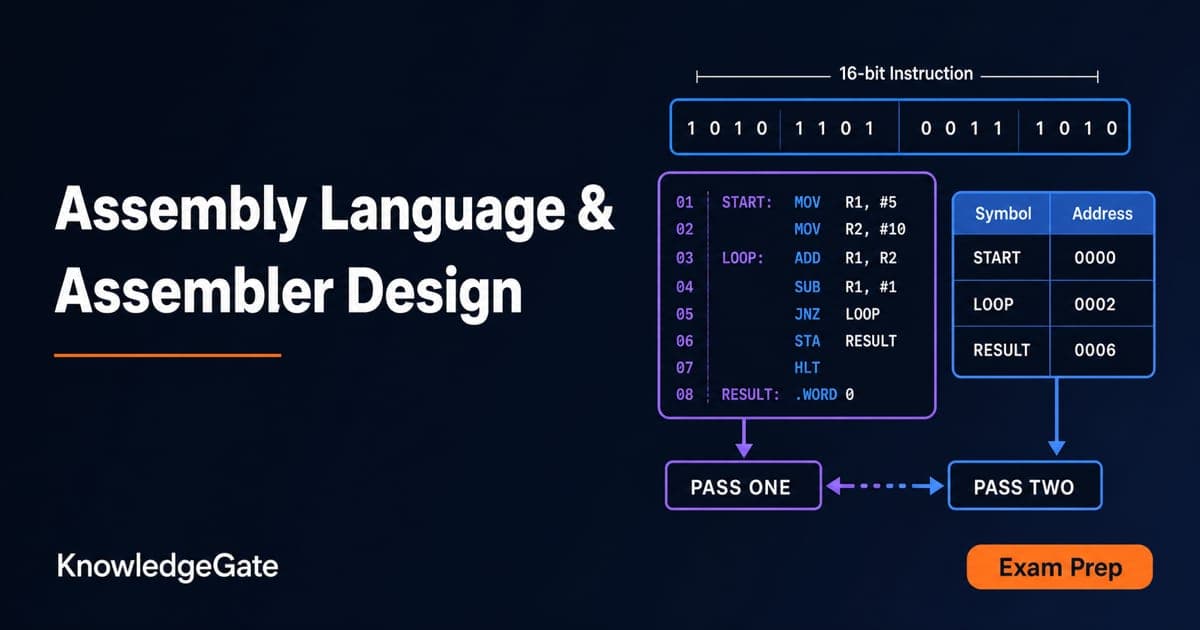
Assembly Language and Assembler Design: Two-Pass Translation with a Complete Worked Example
Follow a 16-bit Basic Computer program through pass one, pass two, hexadecimal encoding and execution, with every symbol, address and result shown.
Updated 15 Oct 20266 min readComputer Organization & Architecture