MongoDB Queries for Interviews: CRUD, Operators and Aggregation Pipeline Walkthroughs
Translate familiar SQL ideas into MongoDB filters and aggregation stages. Then trace one complete pipeline from five input documents to the sorted result.
KnowledgeGate Team
Exam prep & CS education
Updated 30 Jul 20266 min read

If you already know SQL, MongoDB interview queries are less unfamiliar than they first appear. WHERE becomes a filter, GROUP BY becomes $group, and a join becomes $lookup. The syntax changes, but the job of the query does not.
The useful mental model is translation, and it holds all the way down. A document is the record, the filter object handed to find() is the WHERE clause, and an aggregation pipeline is an ordered list of stages where each stage sees only the documents the stage before it produced.
Documents and collections vs rows and tables
A MongoDB collection is roughly comparable to a relational table. A document is comparable to a row, and a field is comparable to a column. Every document also has a unique _id field, whether you supply it or let MongoDB generate it.
The important difference is structure. A table normally has a fixed set of columns. Documents in one collection can have different fields, and a field can hold an array or a nested document.
For example, a student document could contain:
{
  _id: 101,
  name: "Asha",
  marks: 90,
  city: "Delhi",
  skills: ["Python", "MongoDB"]
}
That flexibility is useful, but it does not mean structure is irrelevant. A production application still benefits from consistent document shapes, validation, and indexes. The mental switch is from fixed columns to self-describing documents.
MongoDB CRUD in one screen
CRUD means create, read, update, and delete. These four operations cover the first layer of most MongoDB interview tasks.
// Create
db.students.insertOne({ name: "Asha", marks: 90, city: "Delhi" })

// Read
db.students.find({ city: "Delhi" })

// Read with projection
db.students.find(
  { city: "Delhi" },
  { name: 1, _id: 0 }
)

// Update one field
db.students.updateOne(
  { name: "Asha" },
  { $set: { marks: 95 } }
)

// Delete
db.students.deleteOne({ name: "Asha" })
Use insertMany() when adding several documents. In find(filter, projection), the first object selects documents and the second selects fields to return.
The update trap matters. Changing selected fields requires an update operator such as $set: handing { marks: 95 } on its own to updateOne() is rejected, because that update document carries no atomic operator. The same plain document is accepted by replaceOne(), but it then replaces the whole stored document apart from the immutable _id, so name and city are gone.
Query operators and the implicit AND
Translate this SQL query:
SELECT *
FROM students
WHERE marks > 80 AND city = 'Delhi';
The MongoDB query is:
db.students.find({
  marks: { $gt: 80 },
  city: "Delhi"
})
Two keys in the same filter object are combined with an implicit AND. In this example, the comma between the conditions is doing the work of SQL's AND.
The operators worth knowing first are:
$gt,$gte,$lt, and$ltefor numeric or ordered comparisons$inwhen a field may equal any value in a list$nefor not equal$or: [{...}, {...}]when either of several filter objects may match
For example, { city: { $in: ["Delhi", "Pune"] } } matches either city. A real OR looks like { $or: [{ marks: { $gte: 90 } }, { city: "Pune" }] }.
The SQL-to-MongoDB query bridge
Keep this mapping visible while practising translations:
SQL idea | MongoDB equivalent |
|---|---|
|
|
| implicit equality, |
|
|
|
|
|
|
|
|
selected columns | projection or |
|
|
The SQL queries and joins guide is a useful relational baseline. Once the SQL intention is clear, translating it into MongoDB becomes a controlled syntax exercise.
Aggregation pipeline worked document by document
Suppose the SQL goal is:
SELECT city, AVG(marks) AS avgMarks
FROM students
WHERE marks >= 40
GROUP BY city
ORDER BY avgMarks DESC;
The corresponding MongoDB pipeline is:
db.students.aggregate([
  { $match: { marks: { $gte: 40 } } },
  { $group: { _id: "$city", avgMarks: { $avg: "$marks" } } },
  { $sort: { avgMarks: -1 } }
])
Now trace five input documents, shown as {city, marks}:
{Delhi, 90} {Delhi, 70} {Pune, 50} {Pune, 30} {Delhi, 80}First, $match keeps documents with marks >= 40. Pune with 30 is removed, leaving four documents.
Second, $group uses "$city" as its grouping key. Delhi contributes 90, 70, and 80. Their sum is 90 + 70 + 80 = 240, and 240 / 3 = 80. Pune contributes only 50, so its average is 50 / 1 = 50.
Third, $sort: { avgMarks: -1 } orders the averages from high to low. The final result is:
[
  { _id: "Delhi", avgMarks: 80 },
  { _id: "Pune", avgMarks: 50 }
]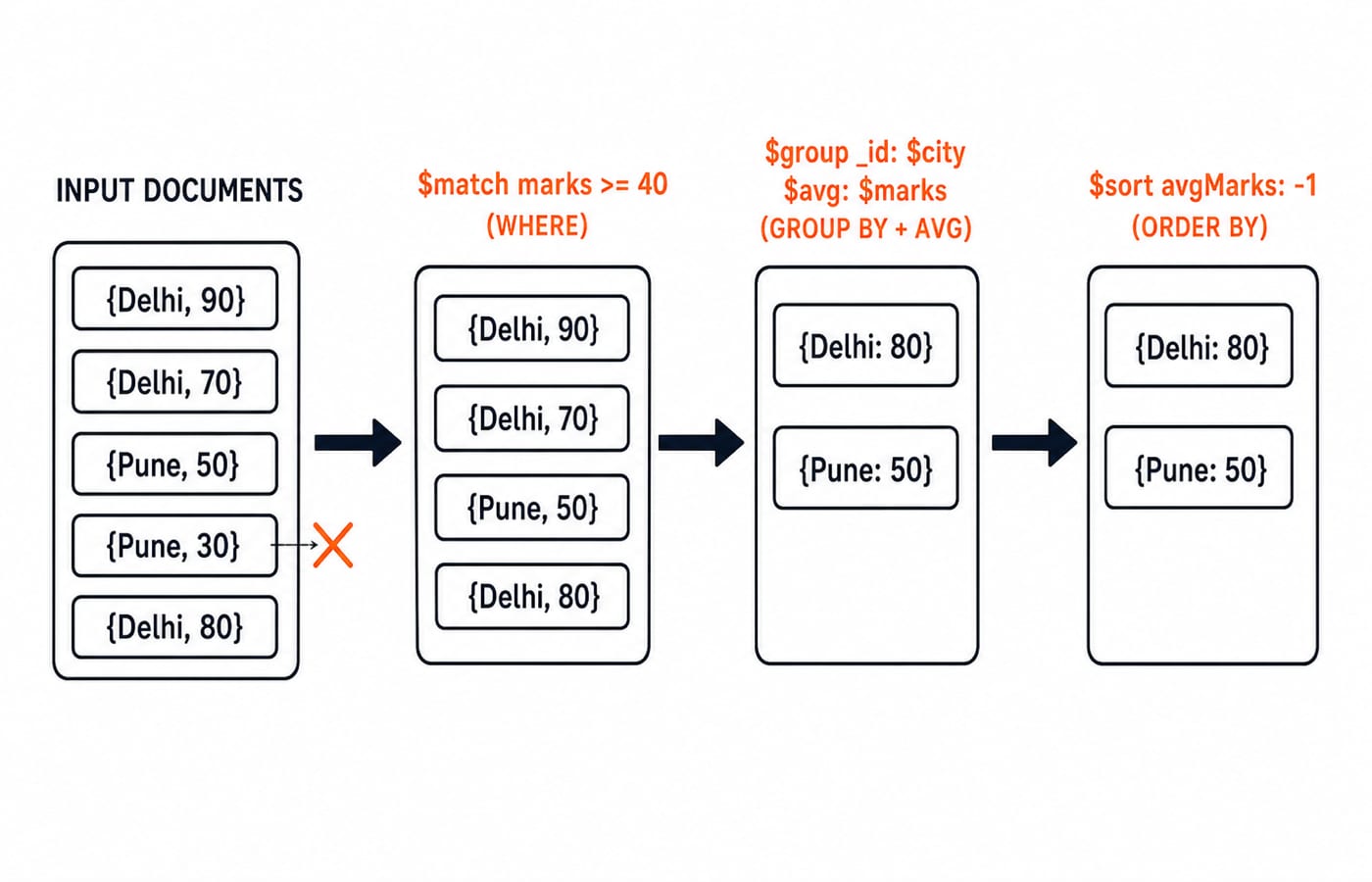
Every surviving document is accounted for in that output. Delhi's three values total 240, so its average is 80, and Pune's single surviving value of 50 is its own average. Delhi therefore sits above Pune once $sort runs on avgMarks in descending order.
MongoDB $lookup: the join stage traced across two collections
SQL's JOIN maps onto $lookup, but the stage does not behave the way a SQL join does, and interviewers aim straight at that gap. Add a second collection, cities, holding one document per city:
// cities
{ _id: "Delhi", zone: "North" }
{ _id: "Pune", zone: "West" }
Attaching each student's zone takes three stages:
db.students.aggregate([
  { $lookup: {
      from: "cities",
      localField: "city",
      foreignField: "_id",
      as: "cityInfo"
  } },
  { $unwind: "$cityInfo" },
  { $project: { _id: 0, name: 1, marks: 1, zone: "$cityInfo.zone" } }
])
Trace Asha, in Delhi with 90 marks, through it. $lookup looks for cities documents whose _id equals her city value of "Delhi", and attaches what it finds as an array: cityInfo: [{ _id: "Delhi", zone: "North" }]. $unwind turns that one-element array into a plain field, and $project keeps three fields while lifting cityInfo.zone up to zone. For Asha in Delhi and Ravi in Pune with 70, the output is:
[
  { name: "Asha", marks: 90, zone: "North" },
  { name: "Ravi", marks: 70, zone: "West" }
]
Two details decide the answer. First, $lookup always produces an array, even when exactly one document matches, so the joined fields cannot be read as ordinary fields until $unwind or an array index gets them out. Second, $lookup is a left outer join: a student whose city has no matching cities document still comes through, with cityInfo set to []. A bare $unwind then drops that student without a word, which is what preserveNullAndEmptyArrays: true is for.
MongoDB traps interviewers test
Several short rules explain most wrong answers:
Put
$matchbefore$groupwhen possible, so fewer documents reach later stages.The
_idinside$groupis the grouping key, not necessarily the original document ID.A field reference inside a stage needs the
$prefix. Use"$marks", not"marks".Use
$setfor a partial field update. Do not confuse a replacement with an update.String equality is case-sensitive unless you deliberately configure different matching behaviour.
Large
$matchand$sortworkloads need suitable indexes.
That last point connects MongoDB query performance to the same data-structure ideas explained in B+ trees and database indexing. Interviewers may ask you to translate a SQL query, build a "top cities by average" pipeline, contrast find() with aggregate(), or explain $lookup as MongoDB's join stage.
Our question bank carries over 600 practice questions in the full-stack MERN track, covering MongoDB CRUD and aggregation, and more than 500 SQL questions under DBMS, which is the relational baseline these translations rest on.
The short version and next step
A collection maps roughly to a table, find() with a filter object performs the job of WHERE, and multiple keys in one filter are ANDed. For grouped work, read a pipeline as a sequence: $match, then $group, then $sort, with $ marking field references. A join is $lookup followed by $unwind, and it hands you an array before it hands you a field.
Build the complete backend context with the Node.js, Express.js and MongoDB course. If you want this database work alongside coding-round preparation, use the MERN Stack and DSA bundle. If your interview list also covers DBMS, operating systems and networks, the CS Fundamentals catalogue groups those subjects into one route.
Keep learning

Which Skill Sets Are in Demand for Tech Jobs?
Explore the technical and human skill combinations showing up across software, AI, data, cloud, and security roles—and how students can prove them with focused projects.
21 Oct 20265 min readPlacement Preparation
AI Is Changing Campus Hiring: How Students Can Show Their Skills
Make your technical skills visible in AI-assisted campus hiring with clear resume evidence, one explainable project, and a practical interview routine.
15 Oct 20265 min readPlacement Preparation

Resume Checklist: What Must Be Included and What Must Be Left Out
3 Oct 20264 min readPlacement Preparation

LDAP Explained: DNs, Bind, Search Filters, and a Developer Login Flow
Build one LDAP mental model from directory tree to login. Trace a service bind, escaped user search, password-verifying user bind, and group-based role check.
Updated 13 Aug 20265 min readPlacement Preparation