Attention-to-Detail Questions: Tips for TCS-Style Placement Tests
Learn a controlled method for exact matches, record comparisons and visual anomalies, with worked examples and a practical accuracy-first routine.
KnowledgeGate Team
Exam prep & CS education
Updated 3 Sep 20266 min read
An otherwise easy mark can disappear because C09438 looked like C09483, or 18,450.75 looked like 18,405.75. The problem is usually not poor eyesight. Attention-to-detail questions reward a repeatable comparison process that works for strings, records and simple visual grids.
What attention-to-detail questions actually test
Every version of this question type sits on one axis: judging whether two things are the same, or finding the one place where they stop being the same. You may need to decide whether two items are identical, locate one anomaly, count mismatched fields, or apply a substitution instruction exactly. The content changes, but the underlying task stays the same: preserve the printed information and compare it without adding assumptions.
Accuracy comes before speed. A fast whole-line glance has no value if two characters blend together. A fixed scan order may feel slower at first, but repetition makes it both reliable and quick. The same control pays off across the quant, reasoning and verbal drills in the Aptitude for Placements guide.
Recognise the question family before you scan
First identify what kind of answer the question expects.
Question family | Typical task | Answer unit |
|---|---|---|
Exact string match | Find the option identical to a reference | One option |
Multi-field record comparison | Compare IDs, dates, amounts or codes | Number of fields |
Instruction or symbol substitution | Apply a rule, then evaluate | Final computed value |
Picture or grid anomaly | Find the cell that changes | Grid position |
Consider the reference Q7B-19M-4K2P and these options:
A:
Q7B-19M-4K2PB:
Q7B-19N-4K2PC:
Q7B-I9M-4K2PD:
Q7B-19M-4K2R
Chunk the reference as Q7B | 19M | 4K2P. Option A matches all three chunks. B changes M to N, C changes 1 to I, and D changes P to R. Therefore A is the only exact match. The dangerous pairs here are M/N, 1/I and P/R, not the long string as a whole.
Use the anchor, chunk, compare, verify loop
Use the same five-step loop on every format:
Read the instruction and identify the answer unit.
Anchor on separators, spaces, row labels or column headings.
Split a long string into groups of three or four characters.
Compare one group at a time in the same direction, marking any mismatch.
Verify once in the reverse direction before submitting.
Stop early only when the question asks whether a pair is similar or dissimilar and the first mismatch settles the answer. If it asks how many fields differ, scan every field once. Count fields, not individual characters.
A useful practice rhythm is 10 seconds: spend the first 2 seconds reading the instruction, about 6 seconds on a controlled scan, and the final 2 seconds checking the marked location. This is a training discipline, not an official test limit. Start untimed if the method is new.
Worked example: compare a five-field inspection record
Question: "How many fields in the candidate record differ from the reference record?"
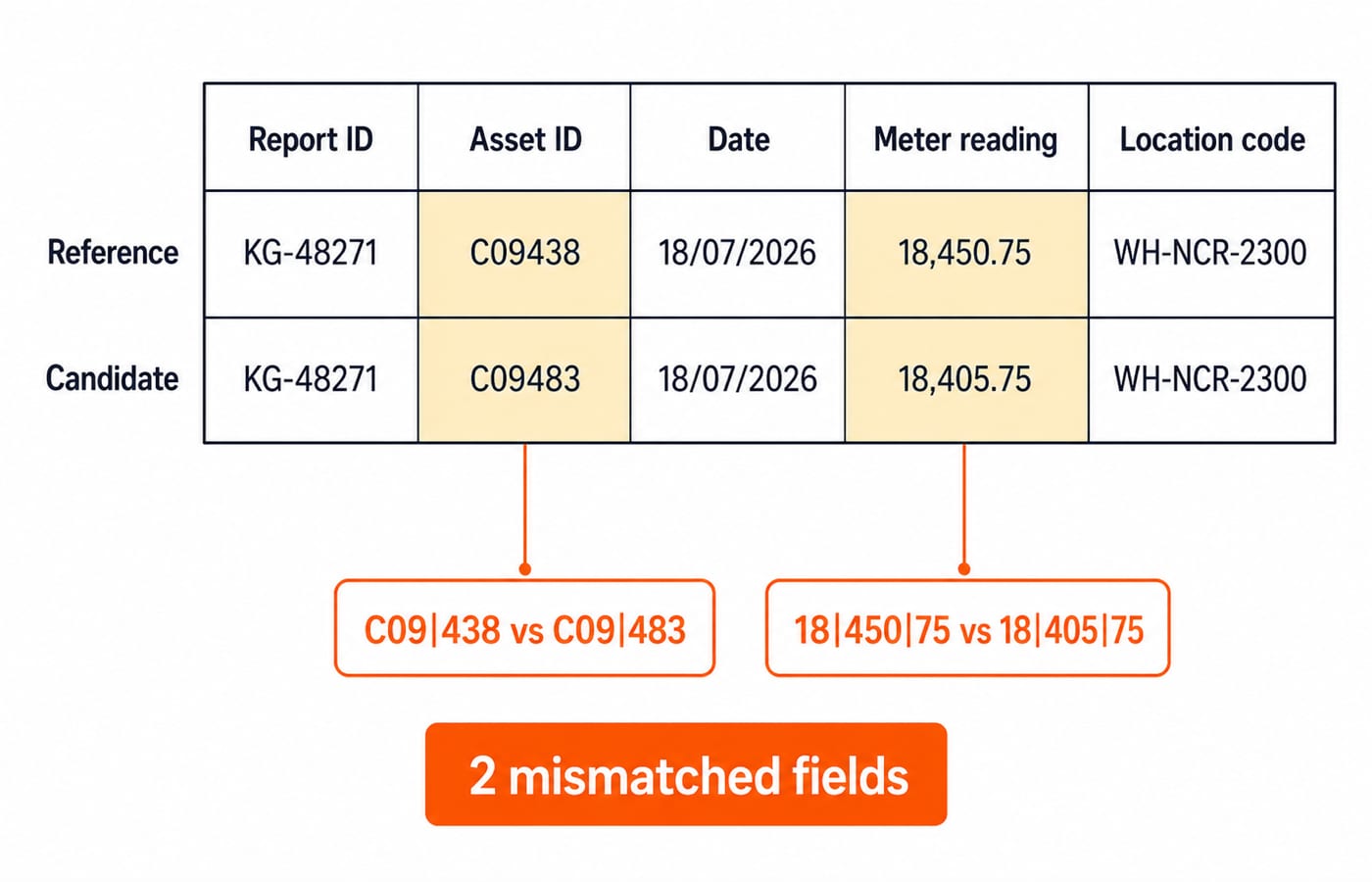
Reference: KG-48271 | C09438 | 18/07/2026 | 18,450.75 | WH-NCR-2300
Candidate: KG-48271 | C09483 | 18/07/2026 | 18,405.75 | WH-NCR-2300
Now compare field by field:
Report ID:
KG-48271matchesKG-48271.Asset ID:
C09|438differs fromC09|483. Mark one mismatched field.Date:
18/07/2026matches18/07/2026.Meter reading:
18|450|75differs from18|405|75. Mark a second mismatched field.Location code:
WH-NCR-2300matchesWH-NCR-2300.
The answer is 2 fields. Across those fields, four character positions change, but the question asks for fields, not characters. Reverse-check the two marked chunks: 438 against 483, then 450 against 405. Both still differ, so the count remains 2.
This example combines two common traps. The asset ID contains a transposition, while the comma-grouped meter reading encourages the eye to treat the middle group as a familiar number instead of checking its order.
Apply the right shortcut to strings, tables, symbol rules and pictures
For strings and numbers, begin at stable separators and preserve leading zeroes. When characters are visually ambiguous, name them in pairs: zero/O, one/I, five/S and eight/B. Saying the contrast mentally stops the second symbol from being absorbed into the first.
For tables, lock onto one row label and move column by column. Do not jump toward the values that look most distinctive, because that makes skipped fields and double-counted fields more likely.
For instruction and symbol rules, read the rule twice, then apply it strictly left to right and evaluate only after every substitution is in place. If P @ Q means P minus Q and P # Q means P plus Q, then 12 @ 5 # 3 is (12 - 5) + 3, which is 10. Reading @ as addition gives 20, and evaluating # first gives 4. Both wrong answers come from the rule, not the arithmetic, which is why the rule earns the second read.
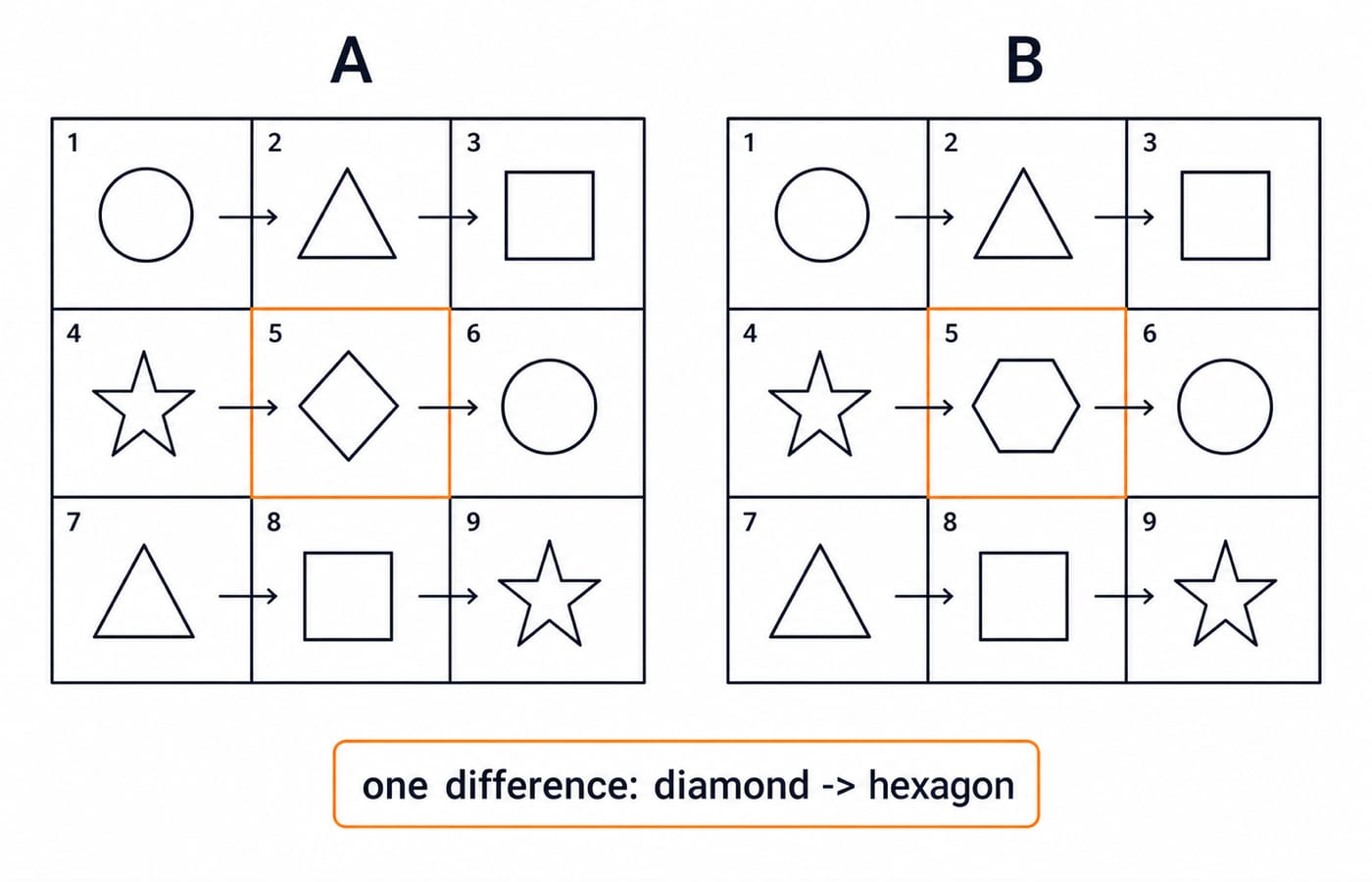
For pictures, impose a grid and scan left to right, top to bottom. Suppose Grid A contains these rows:
circle, triangle, squarestar, diamond, circletriangle, square, star
Grid B has the same rows except that row 2, column 2 contains a hexagon. The sole difference is R2C2: diamond -> hexagon. The shortcut is not a guess. It reduces the search space by giving every cell one fixed place in the scan.
Traps that create avoidable errors
Learn the trap shapes so that you know where to slow down:
Transposition:
438versus483Substitution:
1versusIOmission:
AB-7094versusAB-794Duplicated token:
north northSign or decimal shift:
-0.75versus0.75, or18.50versus185.0Date-order confusion:
08/11versus11/08
Three habits cause most avoidable errors. Whole-line staring produces visual blending, so chunk the data. Random jumping skips fields, so fix one direction. Repeated full rescans waste time, so mark the mismatch and verify only the relevant chunk.
Most importantly, do not correct the data mentally. Report what is printed, even when capitalisation, punctuation or a leading zero looks unusual. An odd value is still the value you must compare.
TCS-style placement tests: where exact comparison actually bites
Side-by-side IDs, invoice or application records, code strings, rule-following items and picture anomalies can all test controlled comparison under time pressure. A TCS NQT-shaped test names its parts as Numerical Ability, Verbal Ability and Reasoning Ability, with Programming Logic and a hands-on Coding section for technical roles, so exact comparison never arrives as a section of its own. It shows up inside those parts: error spotting and para-jumbles in the verbal items, coding-decoding and series work in reasoning, and reading a coding problem's constraints exactly as printed. Each part also runs on its own clock, so a careless rescan is paid for out of that section's time and cannot be borrowed back from an easier one.
Section names, question counts, timings and cutoffs move between cycles. Confirm them on your own invitation and on the official TCS iON National Qualifier Test page, and never carry a remembered pattern into a test. KnowledgeGate's TCS NQT exam structure guide walks through those parts one by one.
Build accuracy with a small practice ladder:
Solve five untimed exact-match pairs.
Solve five record comparisons, capped at 15 seconds each.
Finish with one mixed set of ten items.
Record each miss by cause: transposition, look-alike, skipped field or instruction error. The label tells you what to repair in the next set. If the misses are mostly instruction errors, spending another hour scanning strings will not solve the actual problem.
Short version and next step
Remember the five-part line: read the answer unit, anchor, chunk, compare in one direction, verify once. Shortcuts remove disorder from the scan. They never replace checking.
For a complete reasoning practice path, use the Aptitude for Placement course and the Aptitude category. If you want a company-focused next step, continue with the TCS test series. Start with accuracy, record the cause of every miss, and let speed grow from a method you can repeat.
Keep learning
Number System Concepts and Shortcuts: Solved Examples for Competitive Exams
Learn how to classify numbers, choose the right divisibility or prime-factor method, and verify remainders, factors, HCF, LCM, and unit digits.
Updated 22 Oct 20266 min readAptitude & Reasoning
Age Ratio-Based Problems: 12 Questions with Step-by-Step Solutions
Solve 12 age ratio-based questions from the KnowledgeGate practice bank. Each fresh solution shows how to form the equation, shift every age correctly, and verify the answer.
18 Oct 20267 min readAptitude & Reasoning
Mixture and Alligation: Rules, Shortcuts and Solved Examples for Exams
Learn how concentration, alligation and the retention factor solve the main mixture question types, with step-by-step examples and arithmetic checks.
Updated 14 Oct 20265 min readAptitude & Reasoning
Mental Ability Concepts and Shortcuts: Solved Examples for Competitive Exams
Learn a four-step reasoning process, then apply it to number patterns, mirror coding, directions, syllogisms, blood relations and ranking problems.
Updated 10 Oct 20267 min readAptitude & Reasoning